

Test management for manual, automated, and AI testing
TestCollab is where a team keeps its test cases, runs them, and reports the results. Testers, your CI pipeline, and AI agents add their results to one test plan, with the evidence.
14-day free trial. No credit card needed.
QA teams in finance, government, publishing, and software chose TestCollab













- SOC 2 Type 2
- Data in the US or the EU
- Used by QA teams for 14 years
Four ways to run a test. One place for the results.
Most teams test in more than one way. TestCollab puts each result into the same test plan, so the team reads one report and not four.
A tester runs it
The tester does the steps, sets a status, and attaches screenshots. Use it for the checks that need a person.
Test management Test automationYour pipeline runs it
Playwright, Cypress, Selenium, or any test runner that writes JUnit XML. One command sends the results.
Automated results AI testingQA Copilot writes and runs it
QA Copilot drafts test cases from your requirements. Assign a case to it, and it does the steps in a real browser.
QA Copilot Agentic QAYour coding agent runs it
Claude Code, Codex, or Cursor runs a test plan and reports each result with its evidence.
Coding agentsAutomated tests are not acceptance tests. A pass shows that the code does what the test says. It does not show that the product is right for the user. That is why manual testing keeps its place here.
Everything a QA team needs to run a test cycle
Write the test cases, plan the work, run it, and report. This is the core of TestCollab. It works with AI or without it.
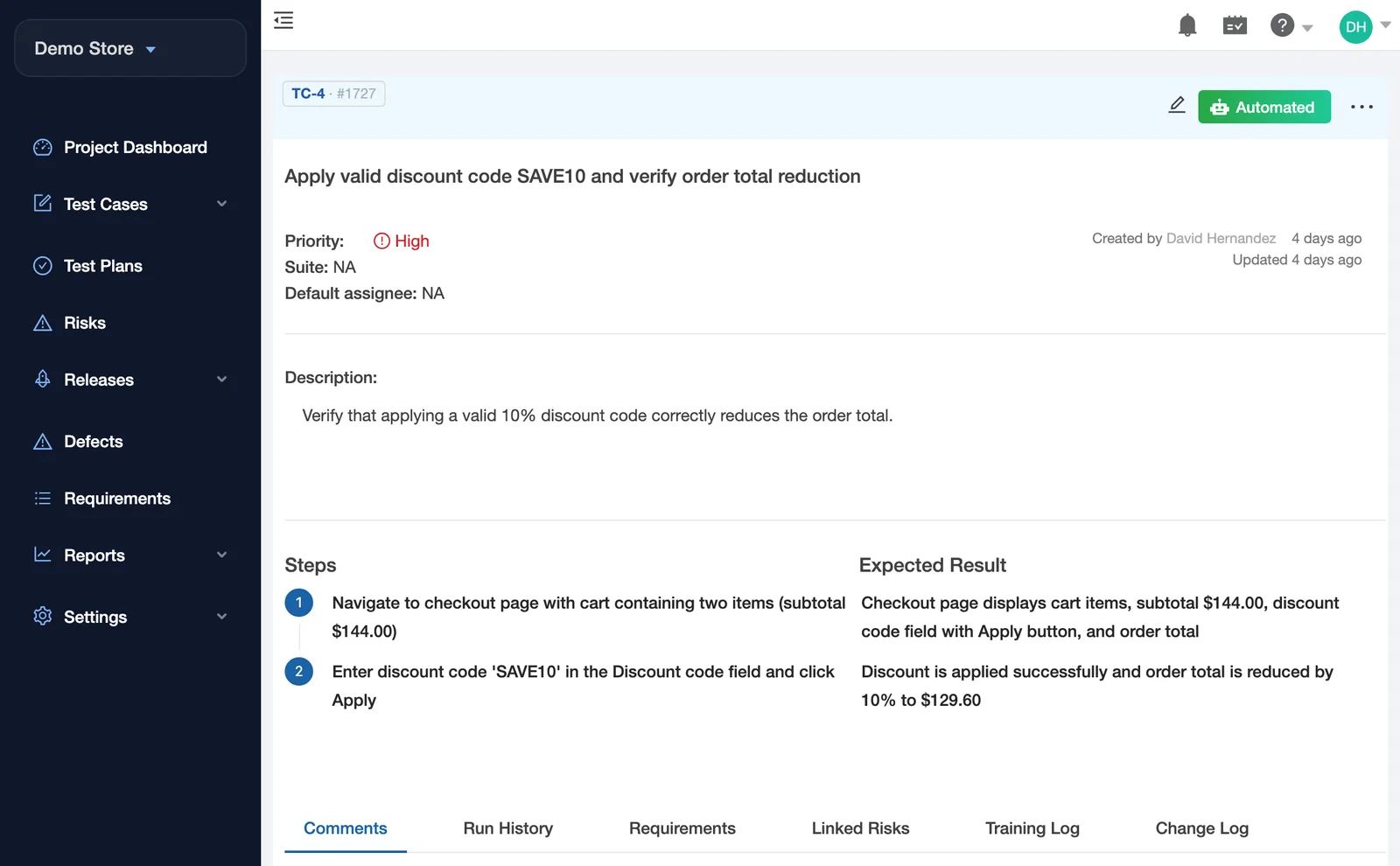
Keep every test case in one place
A test case is a list of steps with the result you expect. TestCollab keeps them in suites that the whole team can search and review.
- Steps and expected results, in suites and sub-suites
- Shared steps, custom fields, and tags
- A version history for each test case
- Import from a CSV file
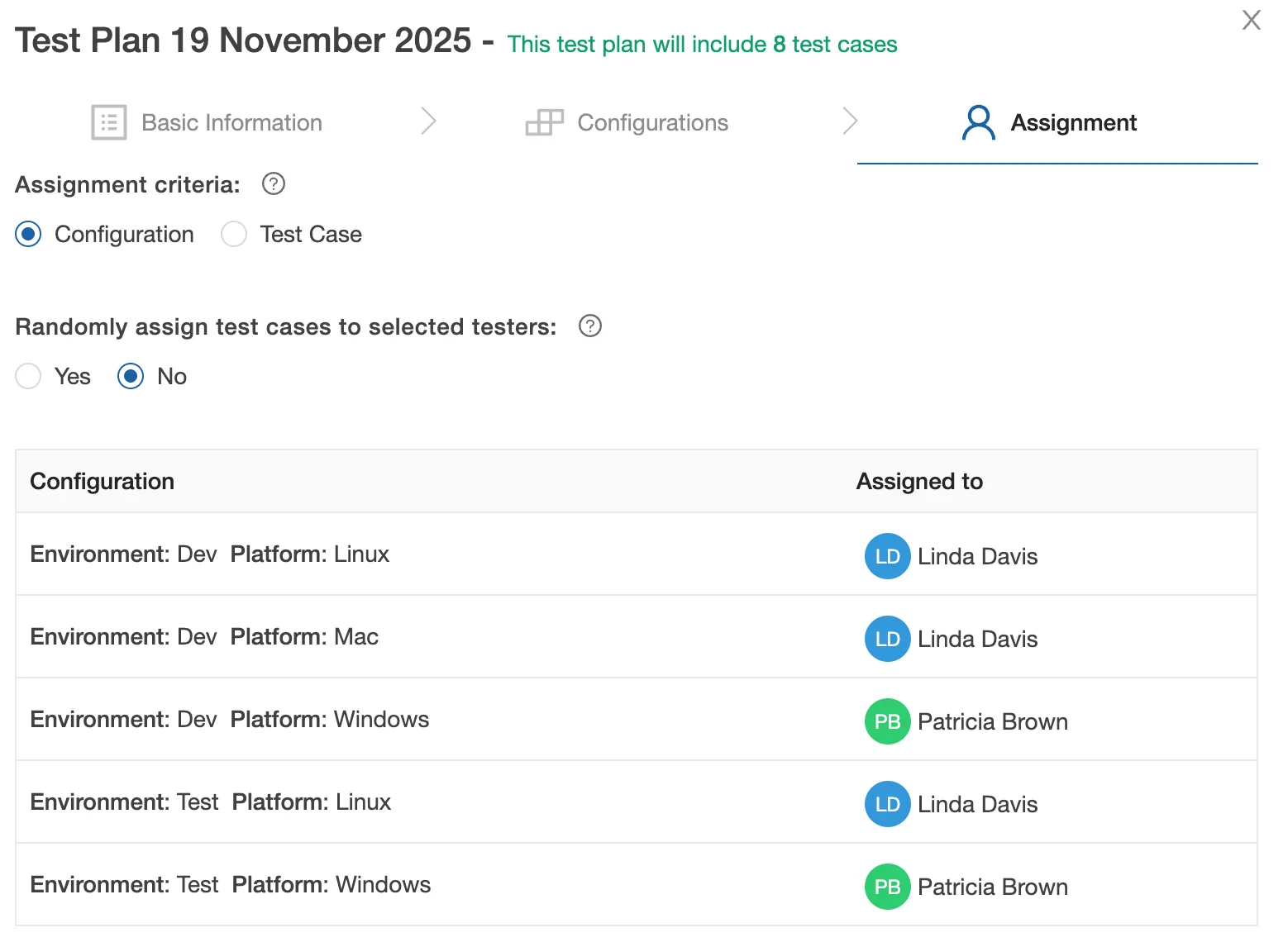
Plan a test cycle and assign the work
A test plan is the set of test cases for one release or one sprint. A lead picks the cases and assigns them to the people who run them.
- Assign all cases to one tester, divide them automatically, or pick one by one
- Run one plan on more than one browser or environment
- See how long a plan will take, from the time of past runs
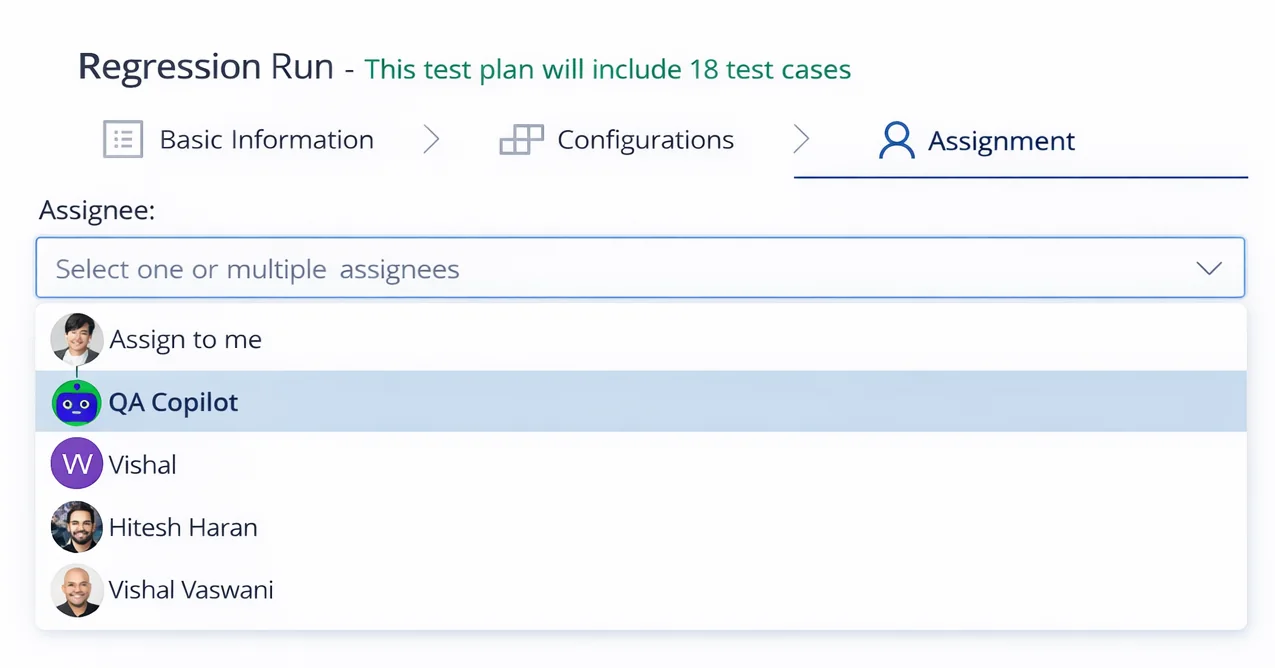
- Assign cases to QA Copilot in the same list as your testers
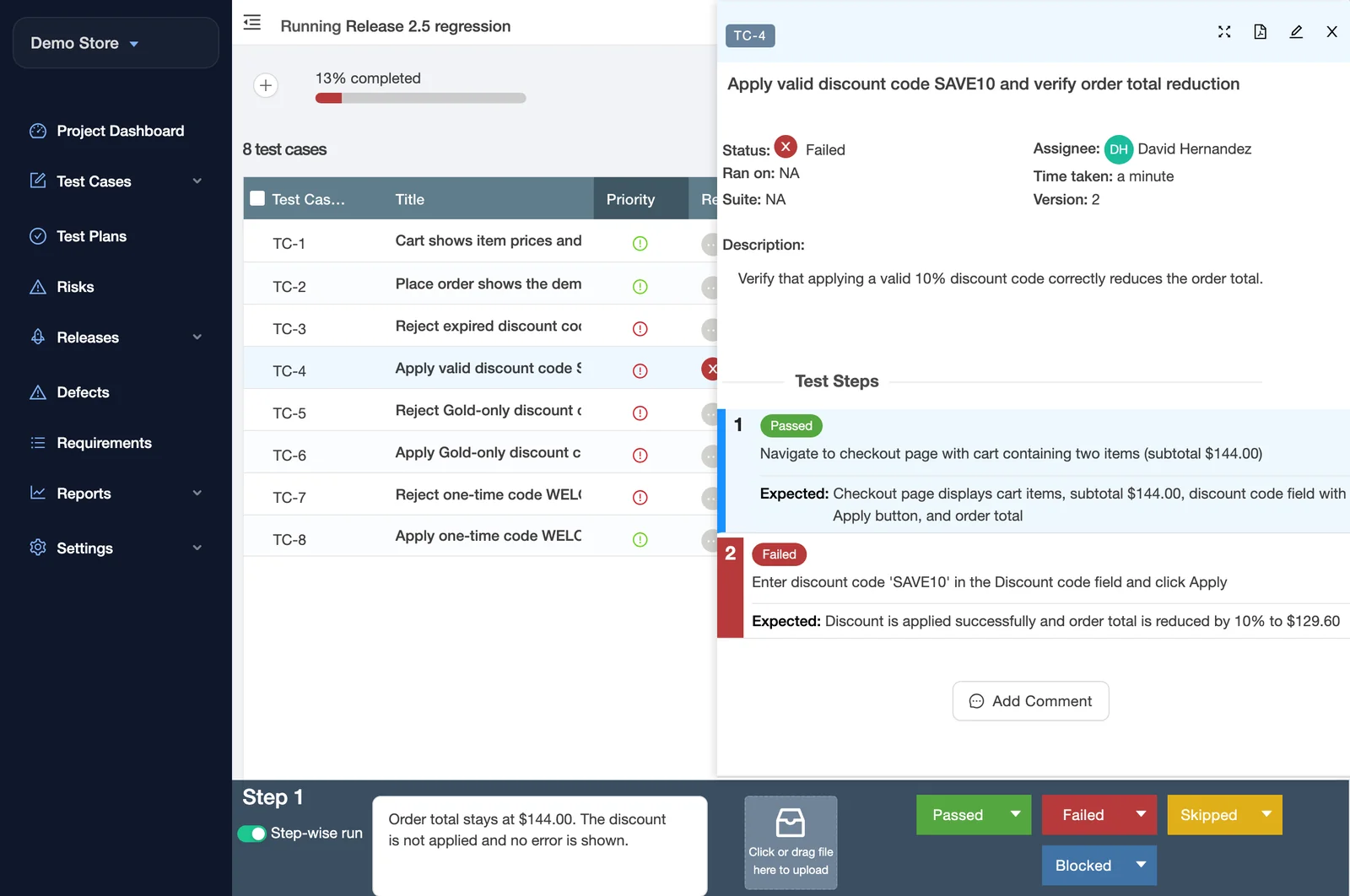
Run the tests and report the bugs
Each tester sees the cases assigned to them. They do the steps, record what they see, and report a bug without leaving the test.
- A status for each step or for the whole case, with a comment and files
- The time of each test is recorded
- Create an issue from a failed test in Jira, GitHub, GitLab, Azure DevOps, Linear, Asana, ClickUp, or ServiceNow
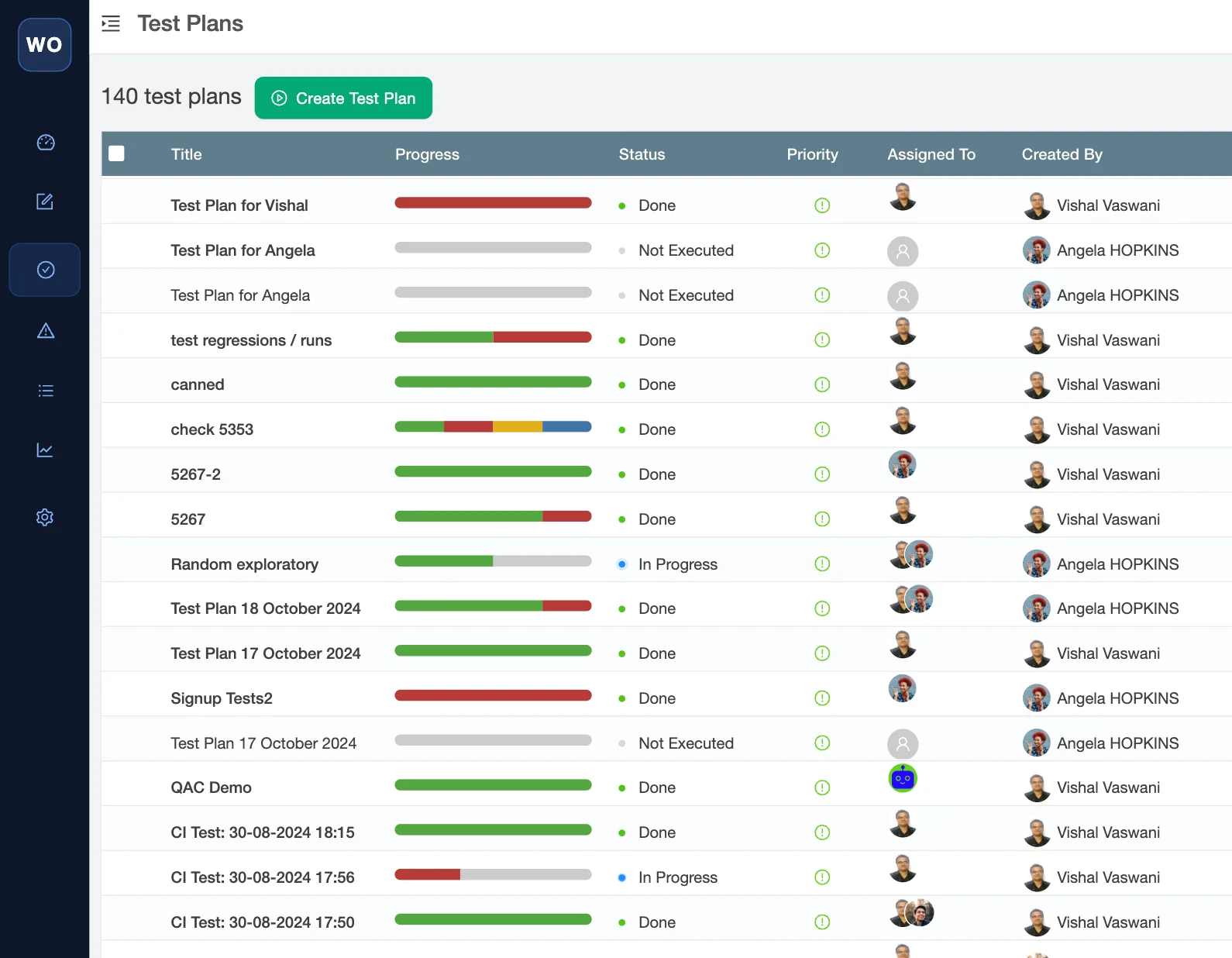
Know what is on track and what is late
Each test plan shows its progress as the team works. You do not have to ask for a status update.
- Passed, failed, and not run for each plan
- The workload of each person, and a burndown chart against the plan dates
- Emails when a plan finishes or is late
- A read-only link for clients and stakeholders. They need no account.
Show what was tested, and decide if you can release
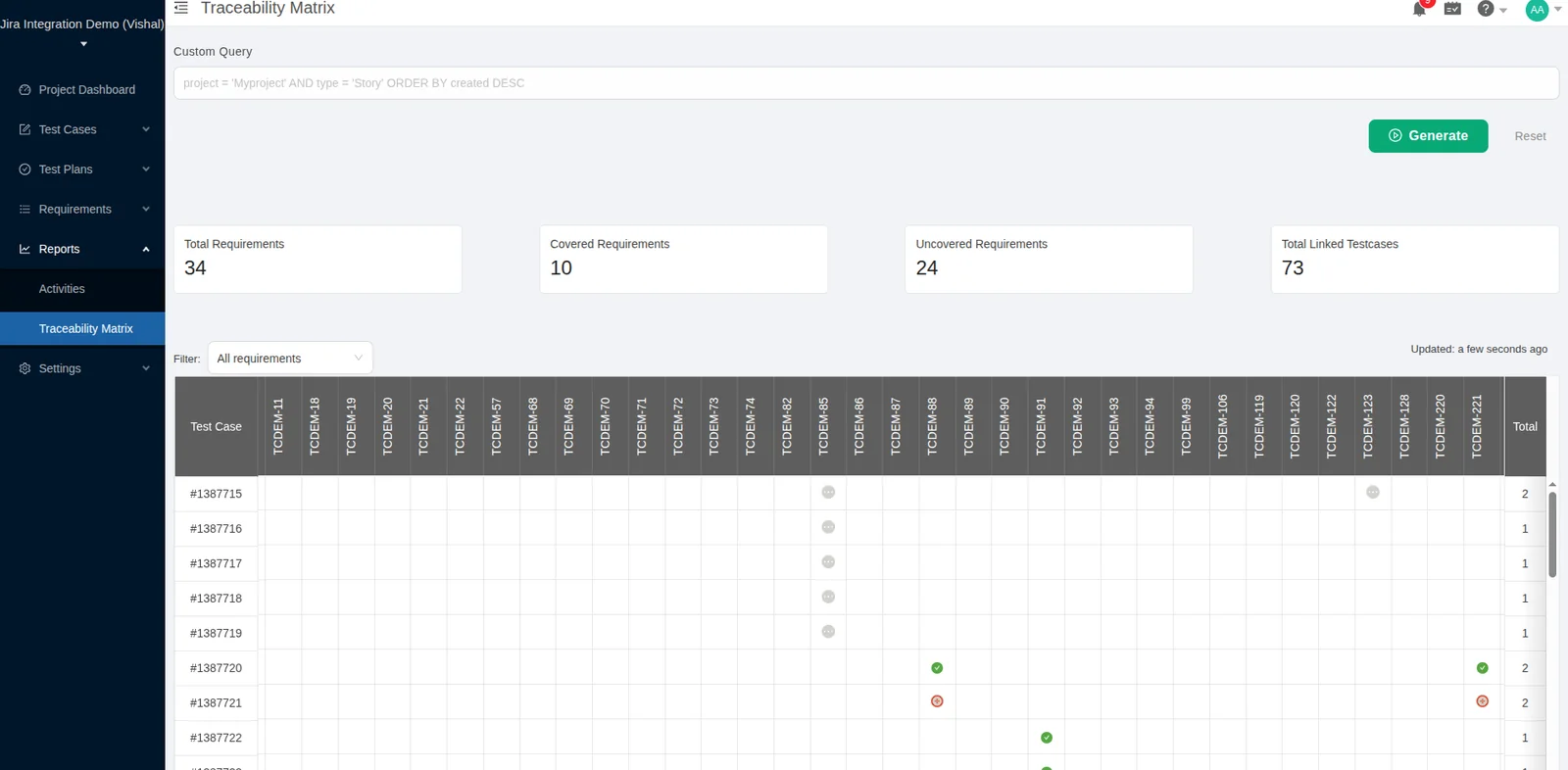
Link test cases to the requirements in your issue tracker. Then you can see which requirements have no test, and the last result of each test that has one.
- Requirements from Jira, GitLab, or Azure DevOps
- A traceability matrix that shows each requirement with no test
- A release dashboard with a GO or NO-GO verdict from the pass rate, open defects, and progress Elite and Enterprise
Test the riskiest parts first
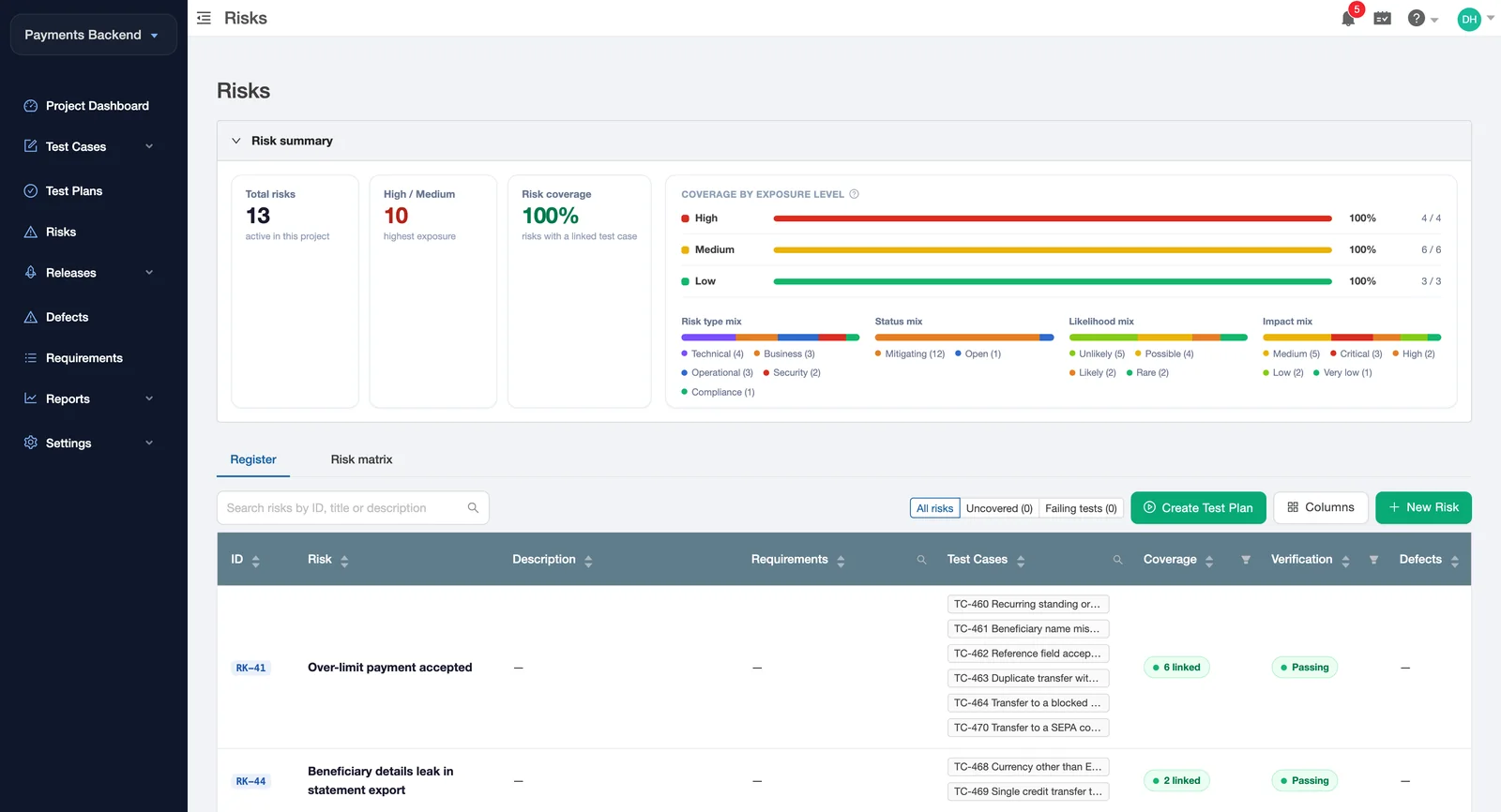
A risk register is the list of things that can go wrong in your product. TestCollab scores each risk and links it to the test cases that check it. Elite and Enterprise include the risk register.
- Score each risk by likelihood and impact
- Link risks to test cases, requirements, and defects
- See the risks that have no test, or whose tests fail
- Make a test plan for those risks from the register
AI test case generation from a Jira story, a spec, a screenshot, or a URL
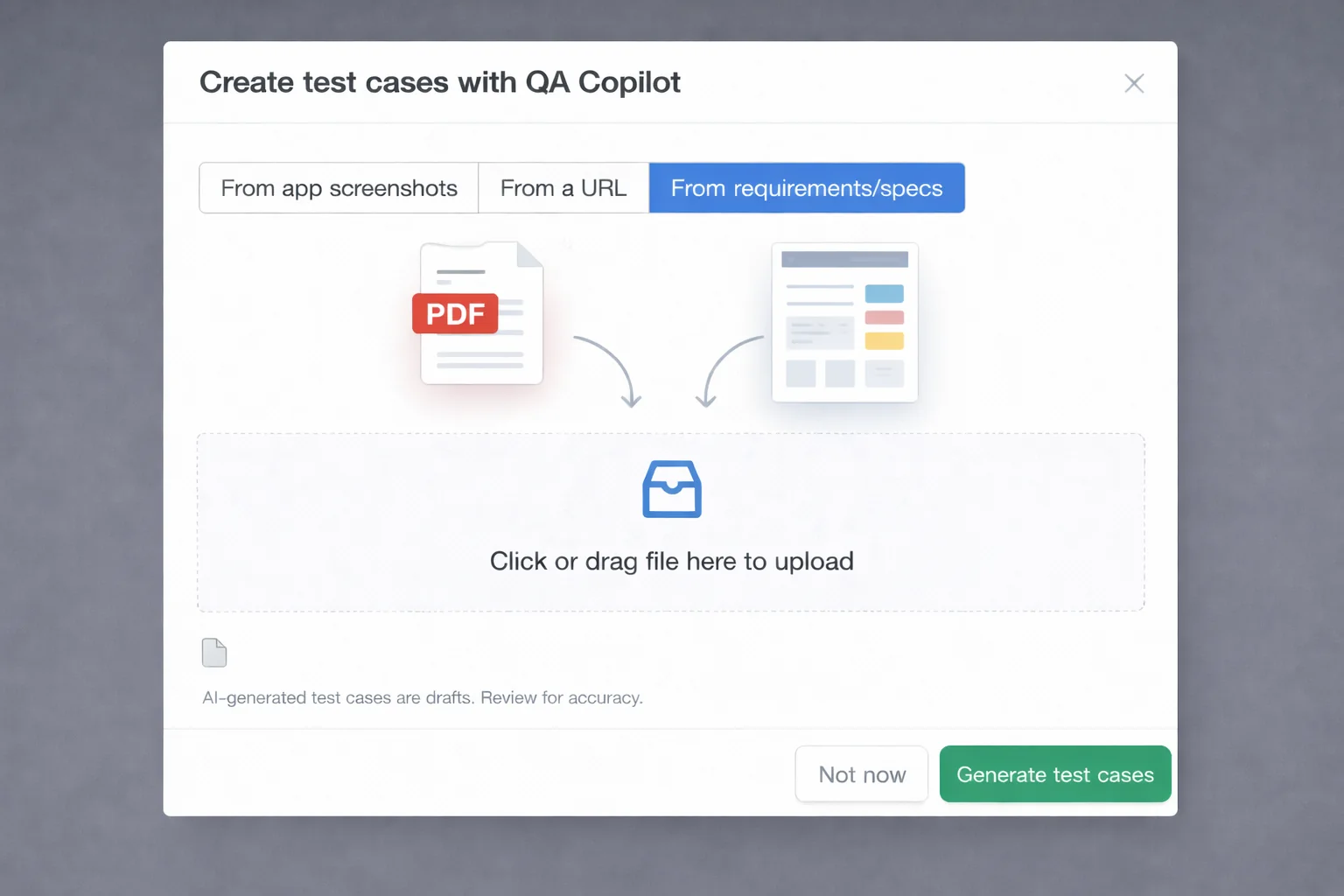
QA Copilot is the AI assistant in TestCollab. Give it a source, and it proposes test cases with steps and expected results. No draft goes into your suite until a person accepts it.
- Jira user story
- Requirements document
- App screenshot
- Page URL
- Choose a source. Pick a story, upload a file, or paste a link.
- QA Copilot drafts the test cases, usually in less than 90 seconds.
- You review each draft. Edit it, then accept or reject it.
AI test automation: assign a test to QA Copilot, like to a tester
QA Copilot reads the steps of a test case and does them in a real browser. It records screenshots and video, so a person can check each result. When the page changes, it repairs the steps that broke. Nobody writes a script.
Already have automated tests?
Keep them. The tc command line tool sends the results of any test runner that writes JUnit XML or Mochawesome JSON. It creates a test case for each new test.
$ tc report --format junit --result-file results.xml --auto-create
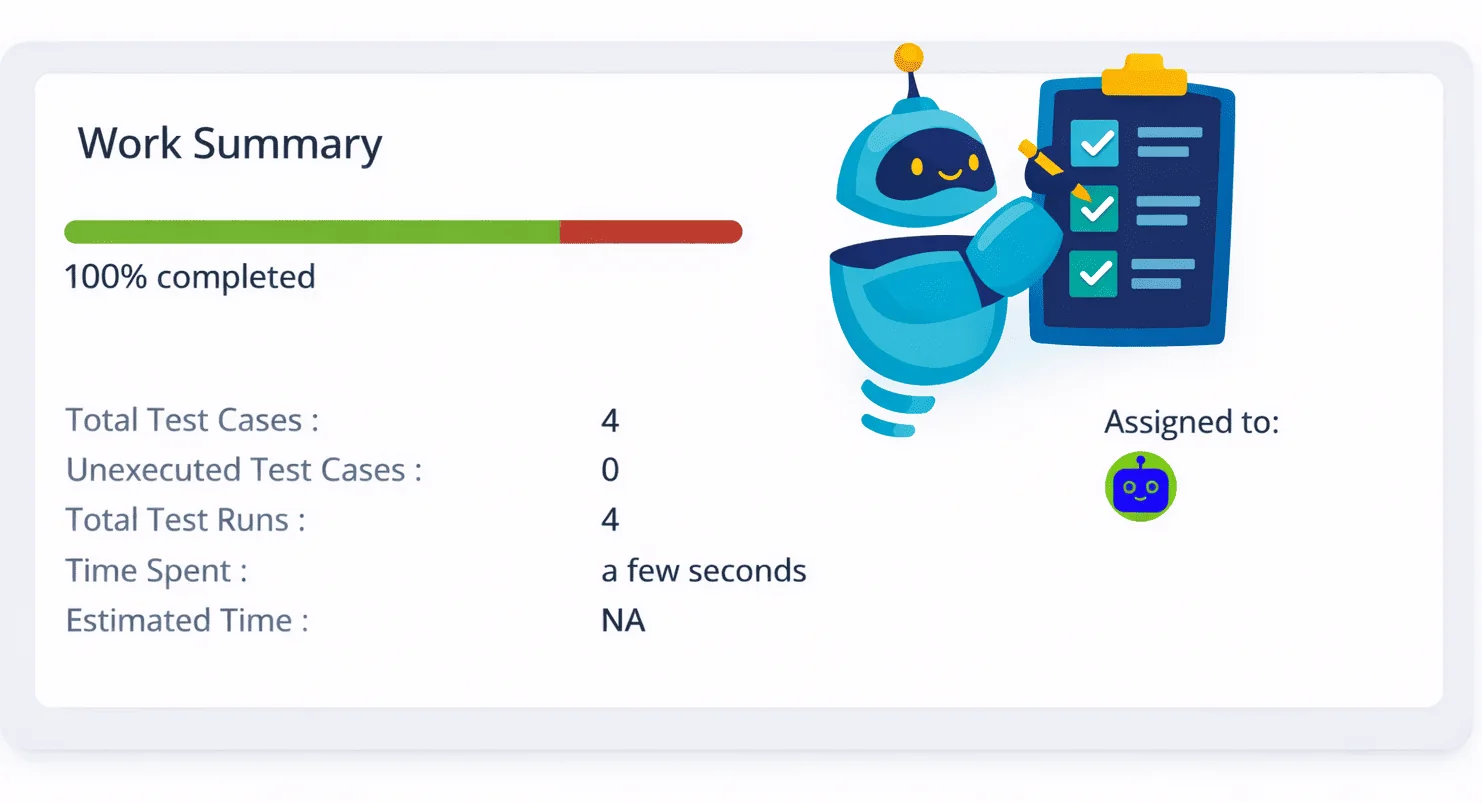
Agentic testing: let your coding agent test the app. A person stays in charge.
Claude Code, Codex, Cursor, and other coding agents connect to TestCollab with the tc command line tool. The agent can write new automated tests, or run a test plan that your team wrote. It reports each result with screenshots and logs.
Download https://testcollab.com/agents.md with curl and read the whole file, not a summary. Then look at this project and tell me in a few lines what TestCollab adds for it. Ask me one short question at a time, with a few answers to choose from. Do not start with setup. Take my API token from the TESTCOLLAB_TOKEN environment variable and never ask me to paste it here.
 Claude Code
 Codex
Codex
 Cursor
Any agent with a shell
Cursor
Any agent with a shell
A person picks the test cases
When the agent runs a test plan, it runs the cases that a person assigned to it. It does not decide what matters.
A person reviews each failure
Every result keeps its evidence, so a tester can see what the agent saw.
A gate can stop the release
tc gate fails the pipeline when the results of a plan do not meet your rule.
One tool for each person who has a say in quality
Testing is a team job. Each person comes to TestCollab for a different reason.
Works with the tools you use now
Connect your issue tracker, your test runners, and your AI tools.
Bugs and requirements
- Jira
- GitHub
- GitLab
- Azure DevOps
- Linear
- Asana
- ClickUp
- ServiceNow
Automation and CI
- Playwright
- Cypress
- Selenium
- JUnit XML
- Mochawesome
- Gherkin feature files
- Any CI that runs Node.js
AI
- Claude Code
- Codex
- Cursor
- Windsurf
- MCP server
Security and data residency
SOC 2 Type 2 certified. TestCollab runs on AWS.
- Data in the US, or in the EU on AWS Frankfurt
- Roles and permissions for each project
- Review and approval of test case changes Elite and Enterprise
- SSO, SCIM, and an audit log Enterprise
I’ve been getting encouraging comments from my QA team on how it doesn’t really force you to put a lot of information. Also, my PM and Dev Lead sides, they’re loving the ability to review and comment on the test cases. Previously, everyone in different teams had different standards of writing or documenting test cases and test executions. I would recommend TestCollab because it is a simple test management tool that can ease adoption by your QA team.
 Sallehin SallehuddinQA Lead, Carsome
Frequently asked questions
What is TestCollab?
TestCollab is a test management tool. A team keeps its test cases there, plans each test cycle, runs the tests, and reports the results. It records manual results, automated results from CI, and results from AI in the same test plans.
Does AI replace my testers?
No. QA Copilot drafts test cases and runs checks that repeat, and a person accepts each test case that it drafts. Automated checks show that the code does what a test says. They do not show that the product is right for the user. Manual testing and user acceptance testing keep their place in TestCollab.
Which AI coding agents work with TestCollab?
Any agent that can run shell commands, for example Claude Code, Codex, Cursor, or Windsurf. The agent uses the tc command line tool. An agent that supports MCP can also create and update test cases with the TestCollab MCP server.
Can I keep my automated tests?
Yes. The tc report command sends the results of any test runner that writes JUnit XML or Mochawesome JSON, with the evidence. The results go into the same test plans as the manual results.
Who does not need TestCollab?
A solo project where a pass or a fail in CI is enough. TestCollab is for teams that plan the testing, share the results, or must prove what was tested.
Where is my data stored?
On AWS, in the US or in the EU (Frankfurt). TestCollab is SOC 2 Type 2 certified.
Start with one test plan
Import your test cases, or let QA Copilot draft the first ones from a Jira story. Then run them by hand, in CI, or with AI.
14-day free trial. No credit card needed.



