

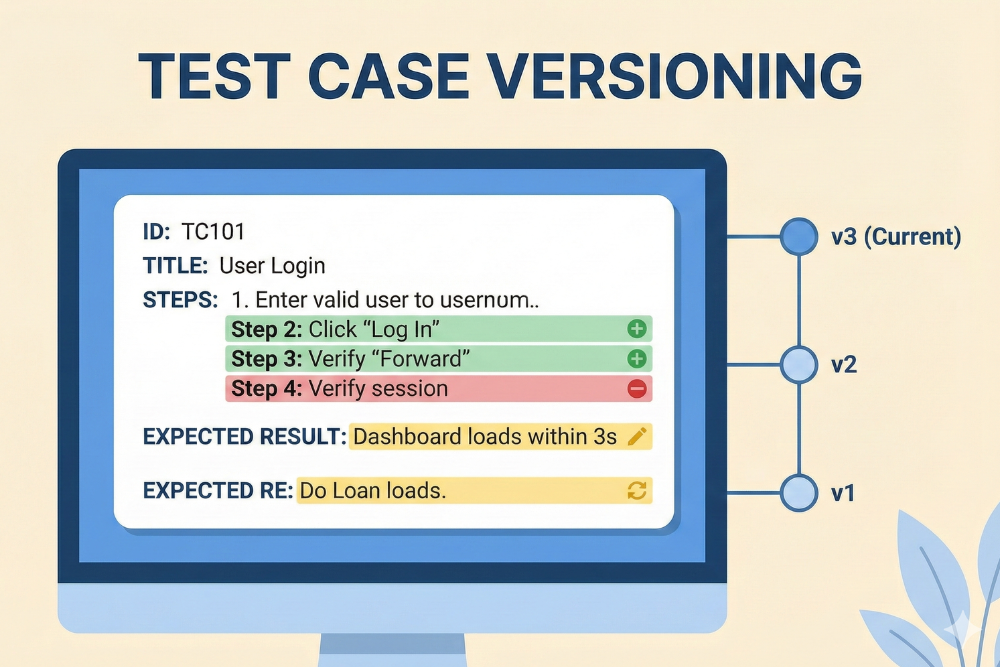
During your application lifecycle a lot of new changes are made to existing features, and when these features change, so does your test cases. Shipping code without test case versioning is like editing a contract and throwing away every previous draft. You might get away with it for a while. Then something breaks in production and no one can answer the simple question: what exactly did we test at that time?
What is test case versioning?
Test case versioning is the practice of keeping a history of every change made to a test case over time.
At minimum that means:
- Each edit creates a new version
- You can see who changed what and when
- You can diff versions
- You can roll back to a previous version
Think of it as Git, but for the instructions that say how to verify your product works, not just for the code itself.
Why bother at all?
Because reality changes, and your tests need a paper trail.
1. You need to answer “what did we test for release X?”
When a regression appears in production, the crucial question is not only what changed in the code, but what changed in the tests.
Versioned tests let you say:
- At release 3.2 we executed version 7 of this test
- That version did not cover edge case Y
- We added that edge case in version 9
Tools like TestCollab actually store the exact revision of a test case that was executed in a run, so you can open that old version instead of guessing from memory.
2. You avoid silent test decay
Tests rot.
- Requirements evolve, tests get patched “just enough”
- People tweak wording and steps without tracking why
- A flaky step gets removed to “unblock the run”
Without versioning, you lose the rationale and you normalize hacks. With versioning you see the history and can ask “why did we remove this step last quarter” before repeating the same mistake.
3. You stay sane in regulated or high risk environments
If you are in fintech, health, or anything with auditors, you already know the drill:
- “Show me evidence that this requirement was tested in that release”
- “Show who approved the change to this test before go live”
Versioning plus change logs plus approvals give you that trail. Many modern tools highlight version history and audit logs exactly for that reason.
4. You can experiment without fear
Good test design is iterative.
You want to:
- Refactor bloated test cases into smaller ones
- Try new test datasets or flows
- Consolidate duplicate coverage
With versioning you can do that aggressively, because rollback is cheap. Without it, people hedge and stop improving tests since any change might erase something important.
5. You align tests with branches and environments
Your product might have:
- A hotfix branch
- A long lived LTS version
- A trunk with breaking changes
In that world, tests are not “one true version”. Versioning lets you:
- Keep a stable version that matches the LTS
- Evolve tests along with mainline
- Tag or branch versions per release where your tooling supports it
Even if your tool does not do “branches”, simple version history plus tags already gets you most of the way there.
How test case versioning looks in practice
In a typical workflow:
- A tester edits a test case
- The tool automatically creates a new version with a timestamp, author, and a summary
- You can open the history tab for that test and see all revisions
- You can click “view diff” to compare any two versions field by field
- If needed, you hit “revert” which creates a new version that restores the old content
That is exactly how TestCollab’s test case versioning works: change log with version numbers, diff view, and one click revert to a previous revision.
Tools that help with test case versioning
1. Git plus plain text tests
If your tests live as files in a repo, you already have a versioning engine.
Examples:
- API tests written in YAML or JSON
- BDD scenarios in Gherkin .feature files
- Robot Framework, Cypress, Playwright tests in code
Pros:
- First class diff, blame, branching, code review
- Same workflow as your application code
- Works great with PR approvals
Cons:
- Harder to manage for large non technical QA teams
- No built in notion of “test run executed version 12 of this file” unless you wire it up yourself
2. Gherkin and .feature files
Gherkin itself is just a language and file format:
- .feature file holds a feature description plus one or more scenarios
- Each Scenario (or Scenario Outline) is effectively a test case
- Steps are executable through step definitions
How versioning works here:
- The .feature file is stored in Git
- Each commit gives you a versioned snapshot
- You can see when a scenario was added, changed, or removed
- Branches map naturally to product branches
This is simple and powerful: your executable specs evolve with your code and you always know which version of the spec was shipped with which build.
3. TestCollab
TestCollab gives you a full test management UI plus built in versioning. Highlights:
- Every update to a test case becomes a new version in the change log
- You see who changed what and when, with ability to diff the versions
- You can revert a test case to any previous revision
- Test runs retain references to the revision number that was executed, so you can reopen the exact version later
On top of that, it layers test planning, runs, dashboards, and modern things like AI assisted test authoring and BDD support, all inside one system.
4. Other test management tools
Most serious test management tools will give you some mix of:
- Version history per test case
- Baselines or snapshots tied to releases
- Audit logs, approvals, and permissions
If you already use one, check:
- Can I see previous versions of this test case and diff them
- Can I roll back quickly
- Does a test run remember which version was executed
If any of these are missing, you are one incident away from a painful forensic exercise.
When should you invest in test case versioning?
You should make it non negotiable if:
- You have more than a handful of testers
- You support more than one active version of your product
- You are in any regulated or high risk domain
- You rely on manual or semi manual testing for critical flows
The moment tests start living longer than the people who wrote them, versioning stops being “nice to have” and becomes simple operational hygiene.