If your team keeps Gherkin feature files in Git, tc sync runs in your pipeline on every push and turns them into suites and test cases in TestCollab, and Git stays the source of truth. We have just shipped the largest update to BDD test management in TestCollab since the sync launched. Scenario Outlines now run once per example row, Cucumber results report straight back into the synced test cases with no IDs in your feature files, and a scenario you remove is archived with its history instead of deleted.
This post walks through what changed, using our new demo repository and the job logs of its pipeline, and ends with how to get it.
Watch the 110-second walkthrough to see the sync run in GitHub Actions, pull requests that add, edit and move scenarios, and Cucumber results on the synced test cases:
Watch the BDD sync walkthrough on YouTube. The video uses the same demo repository with one more feature file, so its counts are higher than in the screenshots below.
One CI job, and Git stays in charge
Nothing about the basic workflow changed. The sync is a step in your pipeline: on a push to your main branch, every committed .feature file becomes a suite with one test case per scenario, and the next push syncs only the files that changed. The same job then runs Cucumber and reports the results. This is the core of the demo repository's GitHub Actions workflow; GitLab CI and the others look the same.
name: BDD sync and report
on:
  push:
    branches: [main]

jobs:
  bdd:
    runs-on: ubuntu-latest
    env:
      TC_PROJECT_ID: ${{ vars.TC_PROJECT_ID }}
      TESTCOLLAB_TOKEN: ${{ secrets.TESTCOLLAB_TOKEN }}
    steps:
      - uses: actions/checkout@v4
        with:
          fetch-depth: 0   # the sync compares with the last synced commit
      - uses: actions/setup-node@v4
        with:
          node-version: 20
      - run: npm ci
      - run: npm install -g @testcollab/cli

      - name: Sync committed feature files
        run: tc sync --project $TC_PROJECT_ID

      - name: Run Cucumber tests
        run: npx cucumber-js --format junit:reports/cucumber-junit.xml

      - name: Report results to the synced cases
        run: >
          tc report --project $TC_PROJECT_ID --auto-create
          --format junit --result-file reports/cucumber-junit.xml
The demo has two feature files with four scenarios between them. The first run of the sync step creates a suite for each feature and a test case for each scenario:
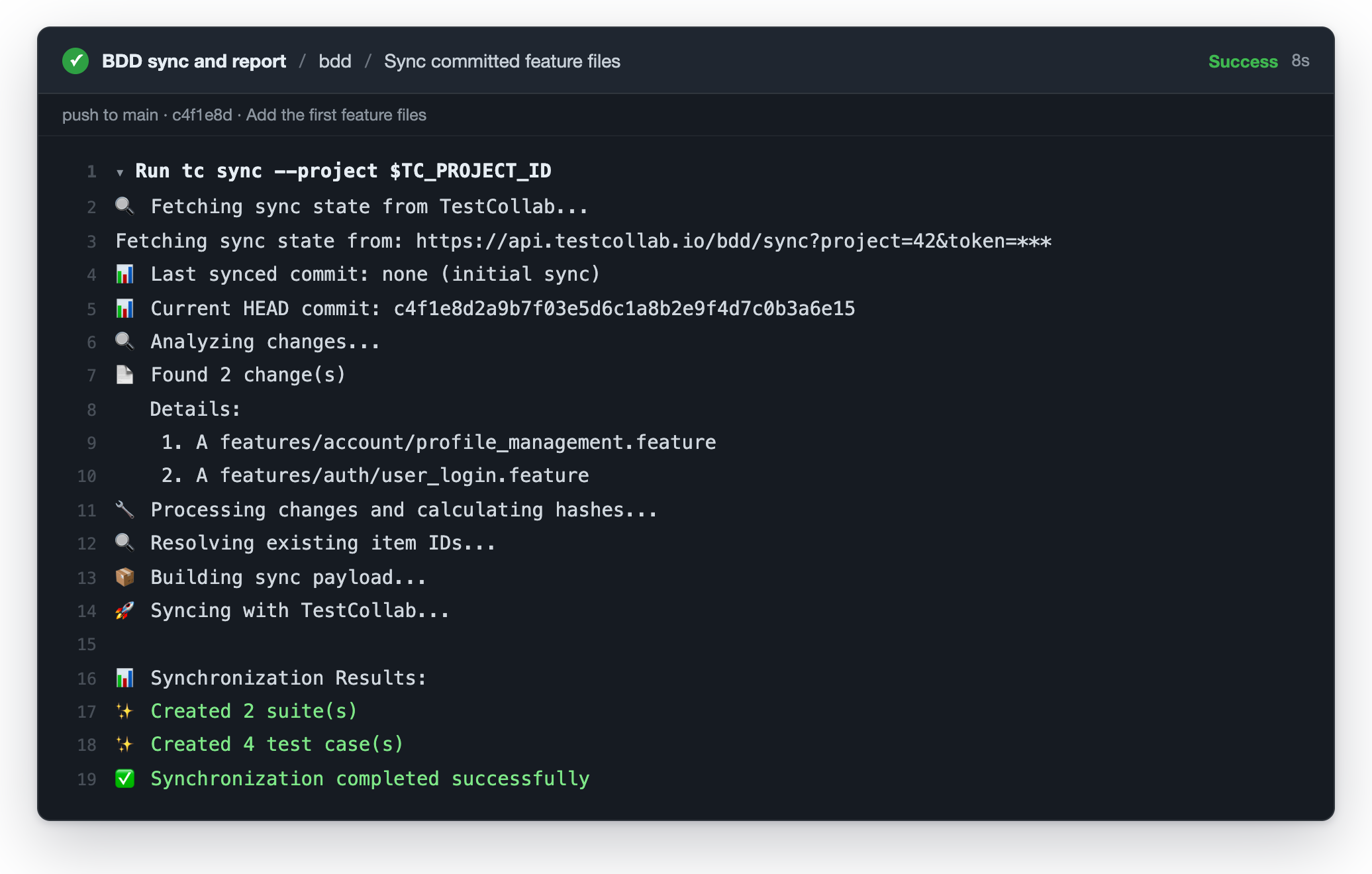
Synced suites and test cases stay read-only in TestCollab. If you want a scenario changed, you change the feature file and push. That rule is what makes the rest of this post possible: because the repository owns the cases, the sync can archive, restore and match them without ever guessing.
Scenario Outline Examples become test datasets
A Scenario Outline is one scenario that runs once per row of its Examples: table. Until now the sync dropped the table and kept the literal <placeholders> in the steps, so the synced case ran once and testers had to look up the data elsewhere. This outline is from the demo's login feature:
Rule: Registered users can sign in

  @smoke @dataset
  Scenario Outline: Sign in as <email>
    When I sign in with "<email>" and "<password>"
    Then I should see the welcome message "<welcome>"

    Examples: Active accounts
      | email             | password        | welcome                   |
      | valid@example.com | correctpassword | Welcome back, John Doe!   |
      | jane@example.com  | mypassword123   | Welcome back, Jane Smith! |
The outline now syncs as one test case with a linked test dataset. Each <column> in the title and the steps becomes {{column}}, which is the placeholder TestCollab fills from a dataset row, and the Examples: table becomes the dataset. A test plan runs the case once per row, with a result for every row, exactly like a dataset-driven case you built by hand. Several Examples: blocks go into one dataset.
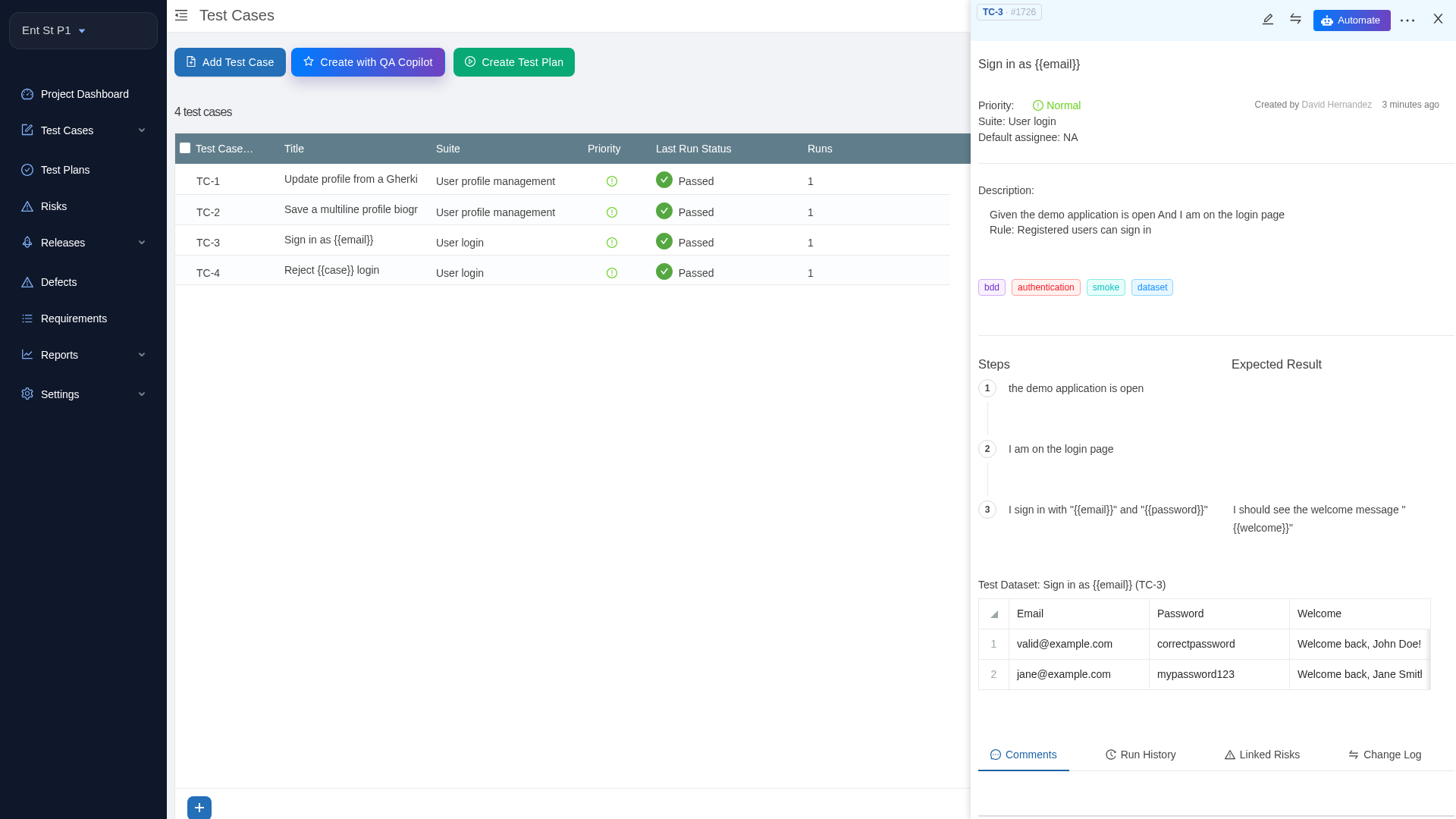
The dataset belongs to the file. Change the table in Git and the next sync of that scenario rewrites the dataset; edits made to the dataset in TestCollab are overwritten. Test datasets are available on the Elite and Enterprise plans. On other plans the outline still syncs, without the dataset, and the sync summary tells you so.
Cucumber test results land on the synced BDD test cases
This is the change we are most pleased with. Before, a Cucumber run could not report into synced cases at all. tc report only matched results that carried a TestCollab ID in the test name, and a synced feature file has none. The results were counted as "missing TestCollab ID", the step still exited 0, and the pipeline stayed green while every result was dropped.
A Cucumber JUnit report already names the feature and the scenario it ran, and that is the pair the sync stored: the feature as a suite, the scenario as a test case under it.
<testcase classname="User profile management"
          name="Update profile from a Gherkin data table" />
tc report now resolves every result without an ID by that pair. Only cases created by the sync can match, so a hand-written case that happens to share a title is never written to. In the job above, the report step runs after the sync step on the same commit, and --auto-create builds a test plan for the run:
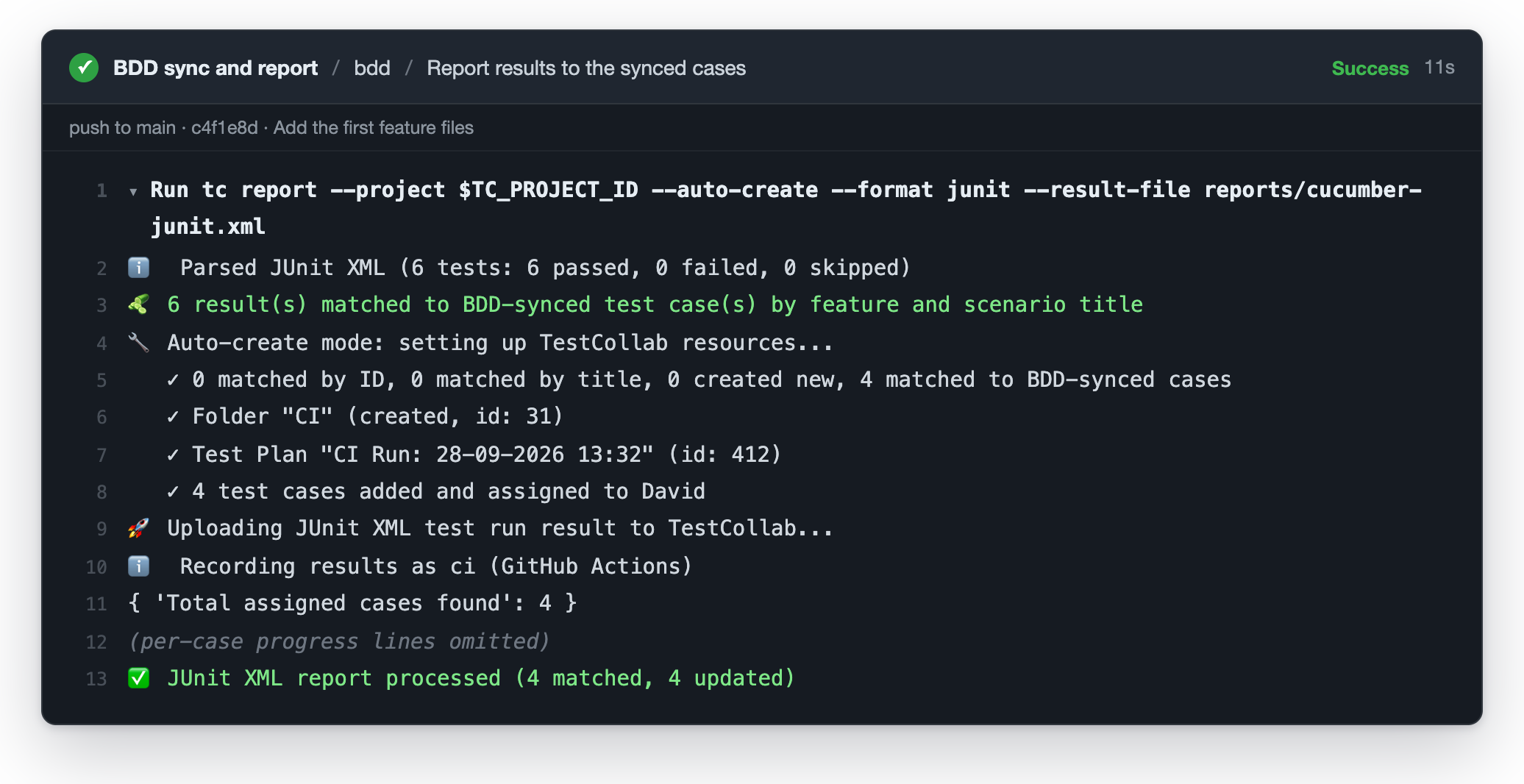
Two details worth knowing. Scenario Outline rows roll up into one result per case: the demo's two outlines produce four of the six Cucumber results, and those roll back into their two cases. Any failed row makes the case failed, and the durations are summed. Since CLI 1.23.0, each row also keeps its own result in the run, so the test plan shows which example failed. We use this to give each prompt its own result in how to test AI agent guardrails. And --auto-create stops making copies. It used to create a second, stepless case for every synced scenario it could not tag; a synced case is now added to the generated plan as it is.
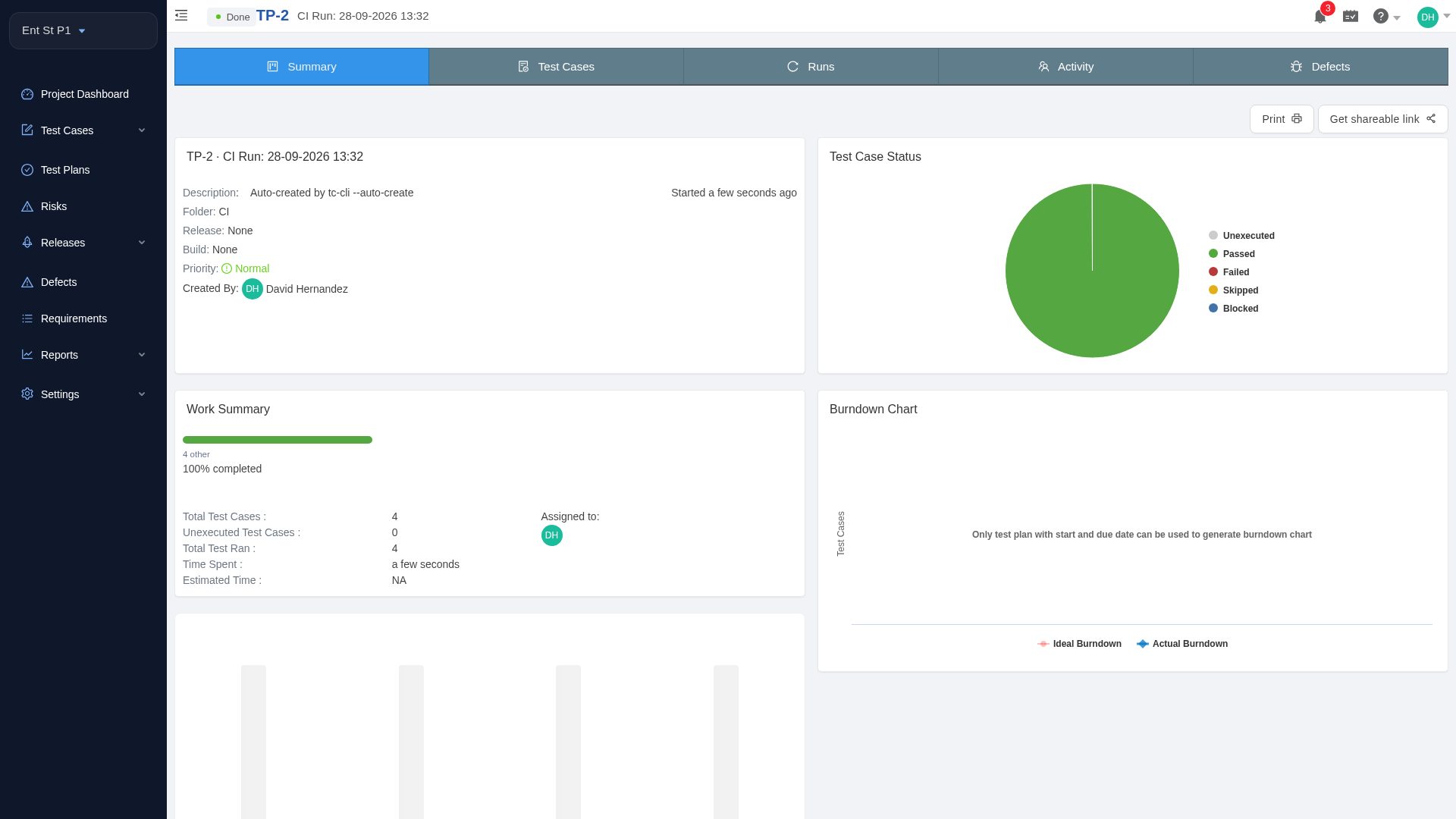
If you are new to result uploads, our guide to automating test reporting from CI/CD covers the plan and report steps.
A removed scenario is archived, not deleted
Deleting a scenario from a feature file used to delete its test case at the next sync, together with every run, result and comment it ever had. Reports that counted it changed retroactively. A prospect put it plainly: a deleted scenario should be marked as removed, not thrown away.
The sync now archives the case instead. When the push that drops the scenario lands on main, the sync step archives its case. The case leaves the test case list and cannot be added to a new test plan, but its revisions, runs and results stay, so past runs and reports keep their meaning. In TestCollab the case carries two tags, Archived and Removed from repository, and the job log says what happened.
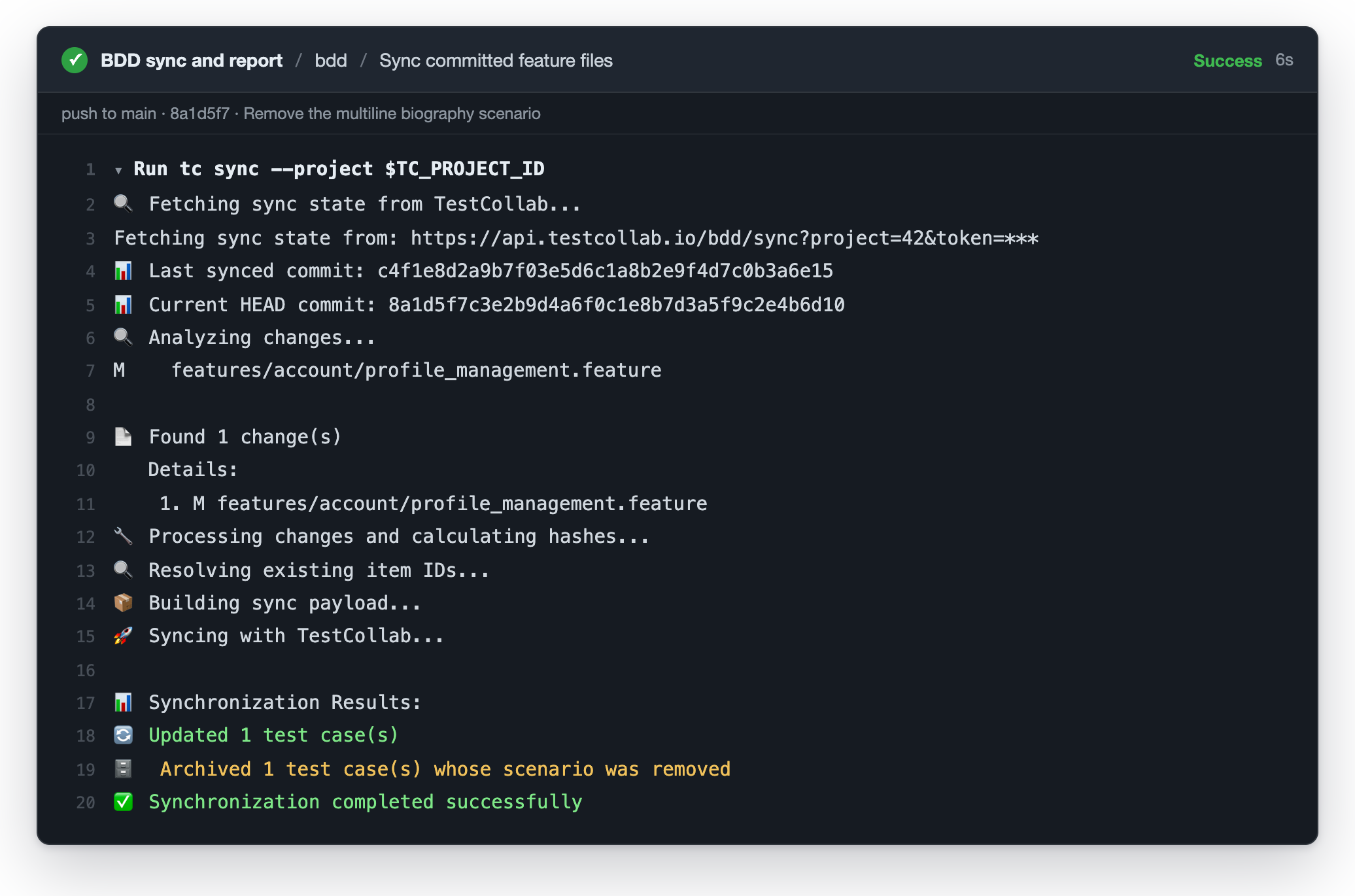
If the scenario comes back with the same steps in the same file, the next sync restores the same test case, number, history and all. A deleted feature file archives the cases of every scenario in it and keeps the suite, and adding the file back restores them. A scenario that returns with different steps is a new scenario and gets a new case; the old one stays archived.
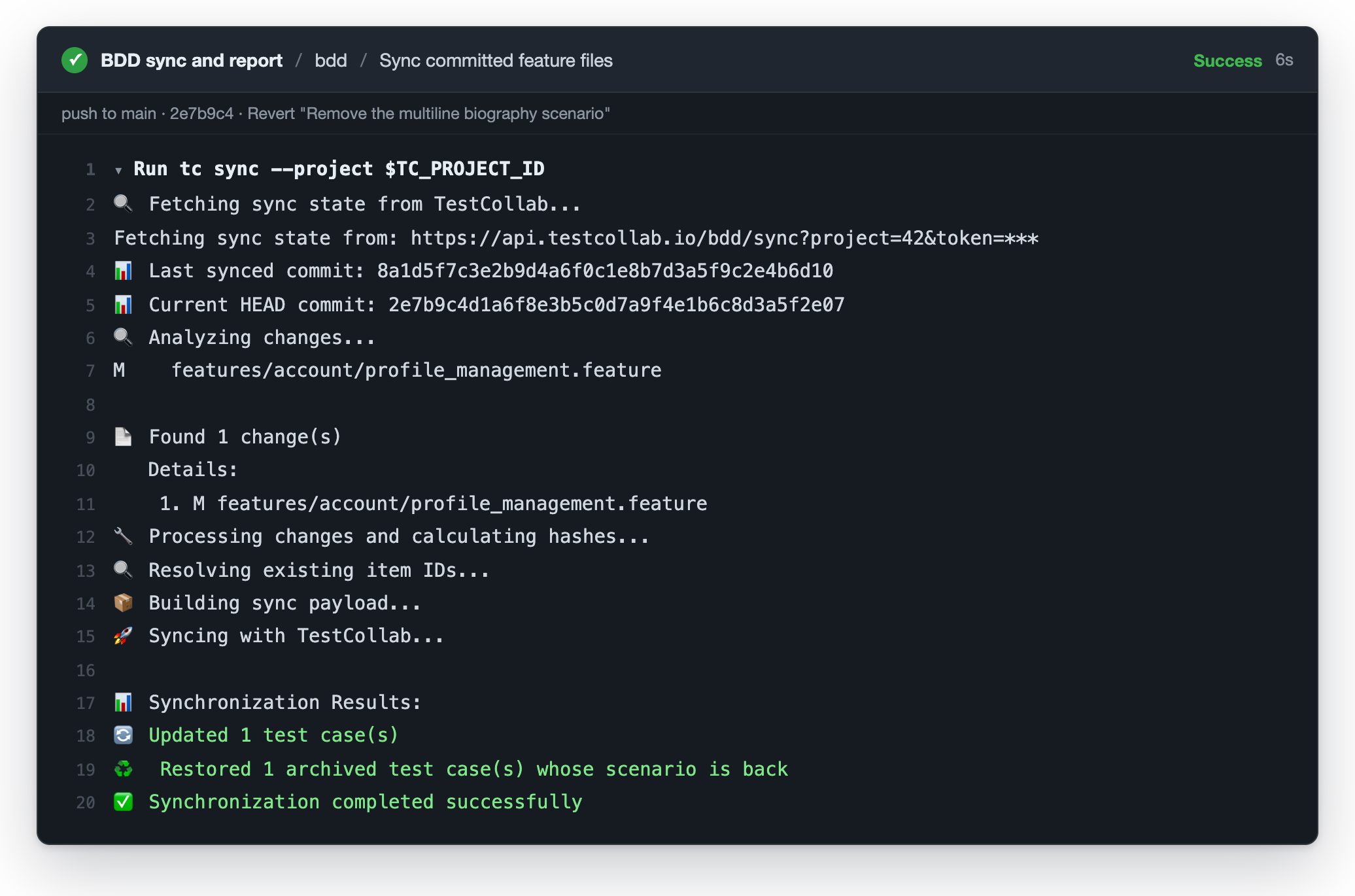
Archiving is also available for regular test cases now. Every case has an Archive option next to delete, and a Show Archived toggle on the test cases grid brings archived cases back into view. Synced cases are the exception: the repository owns them, so only the sync archives and restores them.
Closer to the feature file: tables, doc strings, rules and tags
Several things a feature file can say were lost in translation. They are now carried over, and the demo repository has an example of each:
- Step data tables and doc strings travel with their step. A table shows as a table on the step, a doc string as a preformatted block, and a
Background:table appears on every case of the feature. - Scenarios under a
Rule:heading sync into the feature's suite like any other scenario. They get the rule'sBackground:steps ahead of their own, inherit the rule's tags, and name the rule in their description. Before this change, a feature organised in rules synced as an empty suite. - Tags on the
Feature:line apply to every case in the file, together with the rule and scenario tags. A tag removed from the file is removed from the cases at the next sync. Tags also no longer leak into case and suite descriptions.
Optional: keep Given, When and Then in the steps
Testers who read a synced case wanted to see it the way it is written in the file. A new project setting, Show Gherkin Keywords in BDD Steps under Settings > General, keeps the keyword at the start of every synced step and expected result. It is off by default, so nothing changes until you turn it on, and the way keywords split into steps and expected results stays the same: Given and When lines become steps, Then lines become the expected result of the step before them.
The small fixes
A release this size collects fixes along the way:
- Two scenarios in one file with the same steps but different titles are now two test cases that stay apart across renames, edits and removals.
- A mandatory custom field no longer blocks the sync. Synced cases get the field's default value, and the summary warns you.
- The sync summary prints the real counts and warnings. It used to end with "No changes were required" even after creating suites and cases.
- The change log of a synced case shows the right user and the actual change after a sync, with no empty entries.
How to get it
The server side is live for every plan. Update the CLI in your pipeline to the latest @testcollab/cli to get the new sync and report behaviour:
npm install -g @testcollab/cli@latestCases you synced before the update pick up their tables, datasets and rule scenarios the next time their feature file changes, because the sync only rewrites the files that changed. The full mapping, including how a renamed or edited scenario keeps its test case and the known limitations, is documented in how the sync maps your feature files. The changelog has the itemised list.
The fastest way to try it is to fork the demo repository, set the TC_PROJECT_ID variable and the TESTCOLLAB_TOKEN secret in its Actions settings, and push: the workflow syncs the feature files, runs Cucumber and reports the results. For your own repository, follow setting up a BDD project, and see the BDD testing feature overview for the bigger picture. If you do not have a TestCollab account yet, start a free trial and wire tc sync into your pipeline today.