
Educational guide
Claude Code for QA testing
Six practical use cases where Claude Code helps QA and dev teams work together on quality: from generating test cases to tracking evidence and making risk based testing decisions.
TL;DR
- Claude Code runs in your terminal and can read your codebase, understand context, and call external tools through MCP.
- Best QA use cases: generating test cases from code, exploratory testing with Playwright CLI, risk based test planning from recent changes, and evidence capture for quality governance.
- It is an assistant, not a replacement. You still own the test strategy, the pass or fail decisions, and the release call.
- Pair it with a test management tool through MCP to turn AI output into structured, trackable quality artifacts instead of chat transcripts.
Manual testers, QA leads, SDETs, and developers who contribute to QA. Whether you have full code access or work from specs and requirements, most of these use cases still apply. The guide calls out what needs code access and what does not.
What is Claude Code and why should QA teams care?
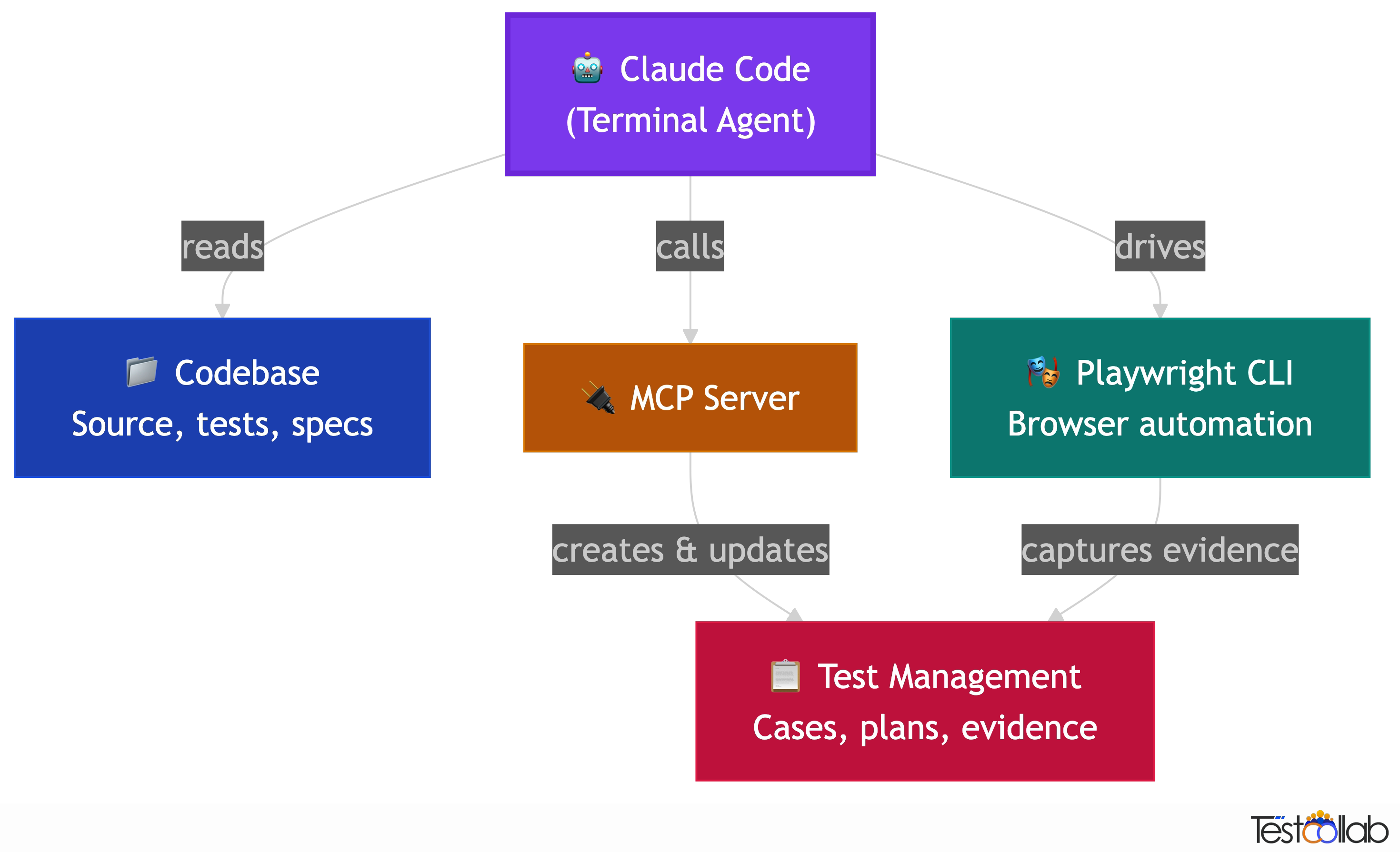
Claude Code is Anthropic's terminal based AI coding agent. Unlike chat based AI tools, it runs inside your development environment, can read your project files, understand your codebase, execute commands, and connect to external services through the Model Context Protocol (MCP). For QA teams this is significant because the AI is no longer working from generic knowledge. It sees your actual code, your test structure, your recent changes, and your test management data. That context gap between what the AI knows and what your project actually looks like is what makes most AI testing advice useless. Claude Code closes that gap.
- Terminal native
- Runs in your terminal alongside your dev tools. No browser tab, no copy paste. It reads files, runs commands, and writes code directly.
- Codebase aware
- It can read your source code, config files, test files, and project structure. It generates tests based on what your app actually does, not generic templates.
- MCP connected
- Through the Model Context Protocol, Claude Code can call external tools: your test management system, browser automation, CI pipelines, and more.
- Agentic
- It can chain multiple actions together. Read code, generate test cases, create them in your test management tool, and set up a test plan, all in one conversation.
Who benefits: QA teams, dev teams, and the space between
Claude Code is a developer tool by origin, but the use cases in this guide apply to anyone involved in software quality. How much value you get depends on your access to the codebase and where you sit in the team.
QA teams with code access
Full power. Claude Code reads your source code, traces dependencies, understands recent changes, and generates tests based on actual implementation. Every use case in this guide applies, from codebase aware test generation to impact based risk analysis.
QA teams without code access
Still valuable. You can use Claude Code with requirements, specs, user stories, and API documentation to generate test cases. Exploratory testing with Playwright CLI works regardless of code access since it drives the browser. Evidence capture and test management through MCP work the same way. You lose the codebase aware features like impact analysis and code change based test maintenance, but the other use cases still apply.
Dev teams contributing to QA
The accelerator. Developers already use Claude Code for building features. Adding test generation to that workflow means tests are created alongside code, not as an afterthought. A developer fixes a bug and creates a regression test in the same session. A feature branch ships with test cases already in the test management tool. The QA team receives structured test artifacts instead of a message saying it works on my machine.
The biggest gains come when dev and QA teams share a test management workspace. Developers generate test cases from code context, QA reviews and refines them, and both sides track execution and evidence in the same place. Claude Code becomes the bridge: it speaks code with developers and speaks test cases with QA, and MCP pipes the artifacts to a shared system.
Use case 1: Test case generation from your codebase
The most immediate win for QA teams. Claude Code reads your source code, understands the feature logic, and generates test cases with detailed steps, expected results, and edge cases. Unlike generic AI chat tools, the test cases reflect your actual implementation because Claude Code is reading the real code, not guessing from a description.
With an MCP connected test management tool, Claude Code does not just suggest test cases in chat. It creates them directly, organized in the right suites, with correct priority levels and tags. You review and refine instead of manually typing everything from scratch.
This works especially well in auto accept mode where you can point Claude Code at an entire module and let it scan the code, create suites matching your module structure, and generate test cases for every feature it finds. On a medium sized codebase of about 50 files, this produces 50 to 100 test cases across 15 to 25 suites in roughly 20 to 30 minutes.
From feature code to test cases
Point Claude Code at a feature you just built. It reads the implementation, identifies happy paths, edge cases, error handling, and boundary conditions, then generates structured test cases.
From user stories to test scenarios
Give Claude Code a user story or requirement. It drafts test cases covering success paths, failure modes, and corner cases that you can review and add to your test suite.
From API specs to API tests
If you have OpenAPI specs or API routes, Claude Code generates test cases covering valid requests, validation errors, auth failures, rate limiting, and edge cases.
Bulk generation in auto accept mode
Scan an entire module or codebase. Claude Code creates a suite hierarchy mirroring your code structure and populates it with test cases. Best for bootstrapping test coverage on untested codebases.
With TestCollab: The TestCollab MCP server lets Claude Code create test cases directly in your workspace, organized in suites with priority and tags, so generated cases go straight into your test management workflow.
For a step by step walkthrough with video, see our blog post on automated test case generation with Claude Code and MCP.
Connect the TestCollab MCP server to a trial project, and Claude Code creates the cases, runs the test plan, and reports each result. The trial runs 14 days and needs no credit card.
Connect Claude Code to a free trialUse case 2: Exploratory testing with Playwright CLI
Exploratory testing has always been a human strength: the intuition to poke at edges, follow hunches, and find bugs that scripted tests miss. Claude Code adds a new dimension to this. Using the Playwright CLI skill, Claude Code can drive a real browser, navigate your application, interact with elements, and observe the results, all while you guide the exploration through natural language.
The key difference from traditional browser automation is the feedback loop. You describe what you want to explore in plain English. Claude Code navigates, clicks, fills forms, and reports back what it sees. You can redirect it on the fly: go deeper into that error state, try submitting with empty fields, check what happens on mobile viewport. It is like pair testing with an assistant that never gets tired and can operate the browser faster than you can click.
Playwright CLI is particularly effective here because it is token efficient compared to MCP based browser tools. It sends structured commands instead of screenshots, which means Claude Code can run longer exploratory sessions without hitting context limits.
- Navigate complex user flows and report what it observes at each step.
- Test form validations by trying boundary values, special characters, empty fields, and oversized inputs.
- Explore error states: network failures, expired sessions, permission denials, and edge cases that are tedious to set up manually.
- Check responsive behavior across viewports without manually resizing.
- Verify accessibility: tab order, ARIA labels, screen reader compatibility.
Exploratory testing with Claude Code is assisted exploration, not autonomous bug hunting. You direct the session, the AI operates the browser and reports findings. Treat AI observations as leads that need human verification, not as definitive bug reports.
With TestCollab: Findings from exploratory sessions can be logged as test cases or bug reports in TestCollab through MCP, so discoveries do not stay trapped in terminal output.
Learn how the Playwright CLI skill works and why it is more efficient than Playwright MCP for AI agents in our Playwright CLI guide.
Use case 3: Evidence tracking and quality governance
Running tests is only half the job. The other half is proving that you ran them, capturing what happened, and making that evidence available for audits, compliance, and release decisions. This is where combining Claude Code with Playwright CLI and a test management tool creates a workflow that most teams do not have today.
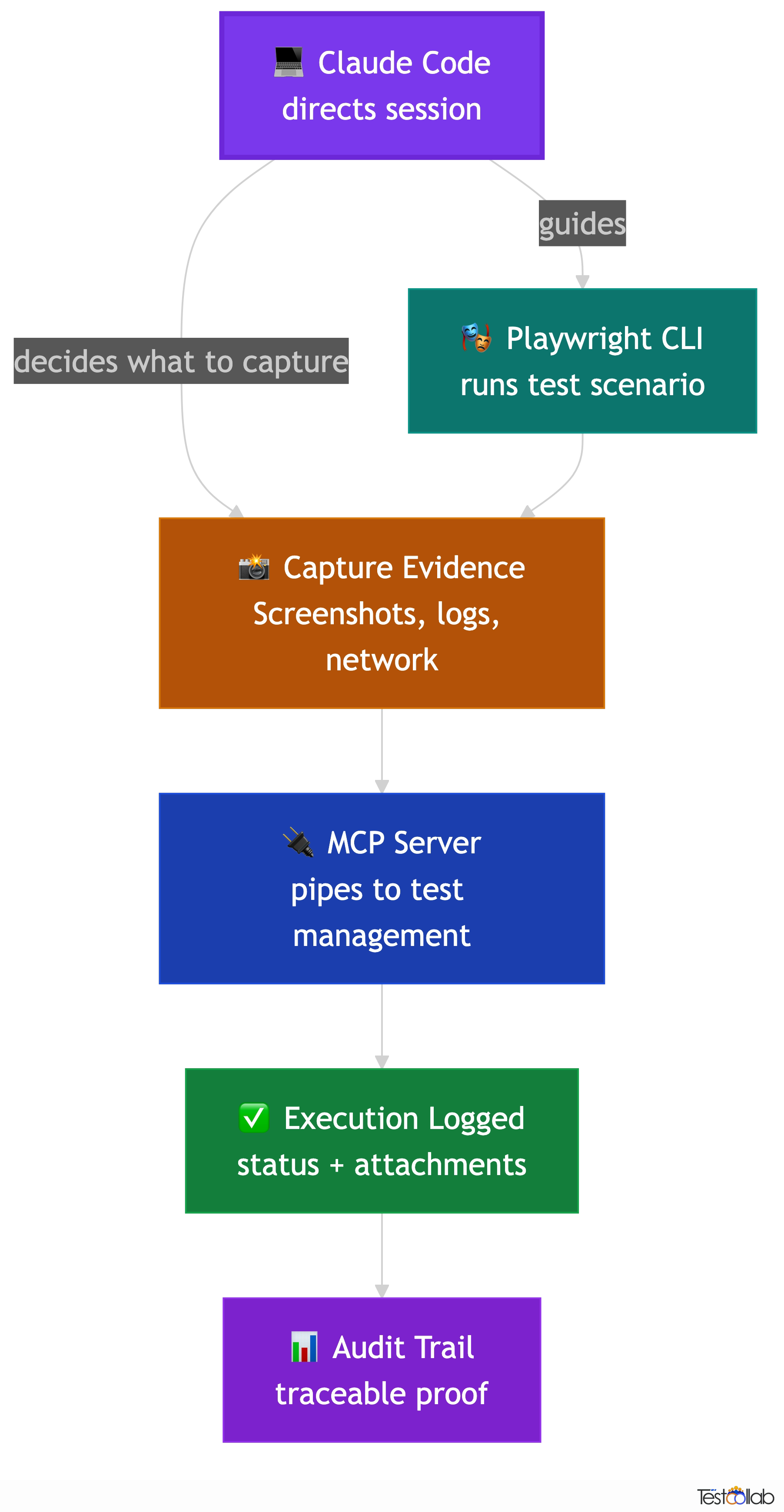
When Claude Code runs exploratory or scripted tests through Playwright CLI, it can capture screenshots, record network responses, and log the steps it took. Connected to a test management tool through MCP, it can attach that evidence directly to test executions: screenshots linked to specific test steps, browser logs attached to failure reports, and execution timestamps that create an audit trail.
This matters for teams that need to demonstrate test coverage to stakeholders, comply with regulatory requirements like ISO 27001 or SOC 2, or simply answer the question: what exactly did we test before this release went out? Instead of scattered screenshots in Slack threads and verbal assurances, you get structured evidence tied to specific test cases and test plans.
Evidence capture workflow
- Claude Code runs a test scenario using Playwright CLI, interacting with your application in a real browser.
- At each significant step, it captures screenshots, network responses, and console output as evidence artifacts.
- Through MCP, it logs the execution result against the corresponding test case in your test management tool with status, notes, and attachments.
- Test plan dashboards show execution progress with evidence. Stakeholders and auditors can trace every result back to captured proof.
Release sign off with proof
Before a release, run critical test plans and capture evidence for every execution. Test plan reports show what was tested, what passed, and the screenshots to prove it. The release dashboard turns those results into a GO or NO-GO verdict.
Compliance and audit readiness
For teams that need to demonstrate testing rigor, the evidence trail from Claude Code plus test management creates documentation that satisfies auditors without extra manual work.
Async QA handoffs
When QA and development work across time zones, evidence attached to test executions means the next person can see exactly what was tested and what happened, without a sync call.
With TestCollab: Screenshots and logs from Playwright CLI sessions can be attached directly to test case executions via the MCP server, creating an audit trail tied to your test plans.
Use case 4: Risk analysis and impact based testing
Every release ships with a question: what could this change break? Traditionally, answering that question requires someone who knows the codebase well enough to trace dependencies, identify affected features, and decide which tests to prioritize. Claude Code can do most of that tracing work for you.
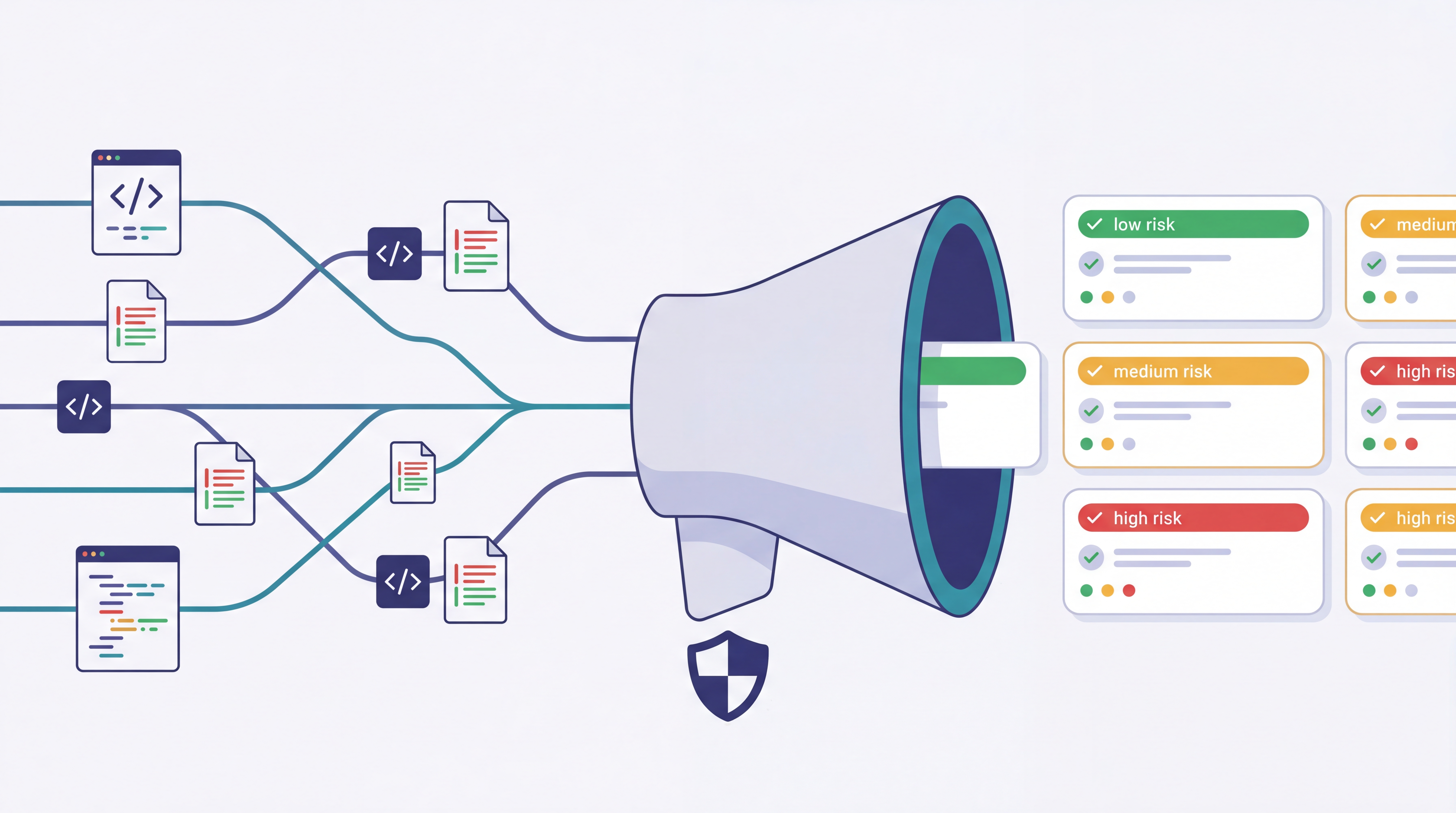
Because Claude Code reads your actual source code, it can analyze a recent merge, a set of commits, or a release diff and identify which modules, features, and user flows are affected. It can then cross reference those affected areas against your existing test cases to find coverage gaps and recommend which tests to run.
This ties directly into creating a targeted test plan. Instead of running the full regression suite every time, you get a risk based test plan that focuses on the areas most likely to be affected by the changes. Through MCP, Claude Code can create this plan in your test management tool, populated with the right test cases, prioritized by risk, and assigned to your team.
Risk based test planning workflow
- Point Claude Code at a recent merge, PR, or release branch diff. It reads the changed files and traces the impact across your codebase.
- Claude Code identifies affected features, modules, and user flows based on the actual code changes, not just file names.
- It queries your existing test cases to find which ones cover the affected areas, and flags any coverage gaps.
- It creates a focused test plan with the recommended test cases, prioritized by risk, and assigned to your team.
Merge risk assessment
Before merging a large PR, ask Claude Code to analyze the diff and identify which test suites need to pass. Catch gaps before they reach the main branch.
Release scoping
When preparing a release, Claude Code reviews all commits since the last release tag and creates a test plan covering the affected areas. No more guessing what to test.
Hotfix impact analysis
For urgent fixes, quickly understand the blast radius: what else could break? Claude Code traces dependencies and recommends a minimal but sufficient test set.
With TestCollab: Both the MCP server's create_test_plan tool and the TestCollab CLI's create test plan command let Claude Code build a risk based test plan, assign it to your team, and link it to a release.
Use case 5: Test maintenance after code changes
Test cases decay. Code changes, UI evolves, error messages get reworded, APIs add new fields, and slowly your test cases drift out of sync with reality. Keeping them updated is one of the most tedious parts of QA work, and it is exactly the kind of repetitive, context heavy task that Claude Code handles well.
When you make a code change, Claude Code can identify which test cases reference the affected behavior, then update the relevant steps, expected results, and descriptions to match the new implementation. It does this by reading both your code changes and your existing test cases, understanding what changed, and proposing specific updates.
This is not self healing in the black box sense. Claude Code shows you what it wants to change and why. You review the updates before they are applied. The goal is to eliminate the hours spent manually hunting through test cases to find which ones need updating after a refactor.
- Renamed a function or changed an API response? Claude Code finds every test case that references the old behavior and updates the steps.
- Changed an error message or validation rule? It updates the expected results across all affected test cases.
- Refactored a module? It reviews the test suite for that module and flags tests that no longer match the implementation.
- Deprecated a feature? It identifies test cases to archive and any dependent tests that need restructuring.
Always review AI proposed updates before accepting. Claude Code can misunderstand intent, especially with nuanced business logic changes. Use it to draft updates, not to auto apply them.
With TestCollab: Claude Code can search, read, and update test cases in your TestCollab workspace through MCP, so maintenance happens in your test management tool, not in a separate document.
Use case 6: Bug report to regression test pipeline
Every bug fix should leave behind a regression test. In practice, this often falls through the cracks because writing the test case is a separate task from fixing the bug, and by the time the fix is merged, everyone has moved on.
Claude Code can close that loop. When a developer fixes a bug, Claude Code understands the context: what was broken, what the fix changed, and what conditions triggered the issue. From that context, it can generate a regression test case that covers the specific failure scenario, including the setup conditions, the steps to reproduce, and the expected correct behavior after the fix.
With an MCP connected test management tool, the regression test case goes directly into your system, tagged appropriately and added to the relevant test suite. The next time someone runs regression tests for that area, the scenario is covered.
Bug to regression workflow
- Developer fixes a bug and describes the fix context to Claude Code, or Claude Code reads the bug report and the code diff directly.
- Claude Code generates a regression test case covering the exact failure scenario: preconditions, reproduction steps, and the correct expected behavior.
- Through MCP, it creates the test case in your test management tool with high priority, tags it as a regression test, and links it to the bug ticket or PR.
- The test case is automatically included in future regression runs for that module.
Bug: users could bypass email verification by navigating directly to the dashboard URL. After fixing, Claude Code creates a regression test covering: register without verifying, attempt direct dashboard access, verify redirect to verification page, complete verification, confirm access granted.
With TestCollab: Regression test cases are created via MCP with priority, tags, and suite placement, so they are automatically included in future regression runs.
Getting started
You do not need to set up everything at once. Pick one use case that matches your biggest pain point and start there. Most teams begin with test case generation because the value is immediate and the risk is low: the AI suggests, you review.
Setup steps
- Install Claude Code from Anthropic. It runs in your terminal on macOS, Linux, or Windows via WSL.
- Open your project directory in Claude Code. It will automatically read your codebase for context.
- Optionally, connect a test management MCP server so Claude Code can create test cases and plans directly in your workflow.
- Optionally, add the Playwright CLI skill for browser based exploratory testing and evidence capture.
- Start with a focused prompt: generate test cases for this module, or analyze the last merge and suggest what to test.
TestCollab offers an open source MCP server that works with Claude Code, Cursor, Windsurf, and other AI coding agents.
Glossary
- Claude Code
- Anthropic's terminal based AI coding agent that can read files, run commands, and connect to external services through MCP.
- MCP (Model Context Protocol)
- An open protocol that lets AI agents connect to external tools and services. Claude Code uses MCP to interact with test management tools, browsers, and other systems.
- Playwright CLI
- A Claude Code skill that drives a real browser using structured commands. More token efficient than screenshot based browser MCP tools.
- Impact based testing
- Selecting which tests to run based on what code changed, rather than running the full suite every time.
- Regression test
- A test that verifies a previously fixed bug has not been reintroduced by subsequent code changes.
- Evidence artifact
- Screenshots, logs, network traces, and other proof captured during test execution to support audit and compliance needs.
Further Reading
FAQ
What is Claude Code for QA engineers?
Claude Code is a terminal based AI agent from Anthropic that can read your codebase, understand your project structure, and connect to external tools through MCP. For QA engineers, this means an assistant that generates test cases from actual code, helps with exploratory testing through browser automation, analyzes code changes for risk based test planning, and maintains test cases when code evolves. It runs in your terminal alongside your existing dev tools.
Can Claude Code replace manual testers?
No. Claude Code is an assistant that handles repetitive and context heavy tasks: drafting test cases, updating steps after code changes, tracing impact from a merge, and operating a browser during exploratory sessions. But the test strategy, the judgment calls, the understanding of user behavior, and the release decisions remain human responsibilities. The best results come from treating Claude Code as a pair testing partner, not a replacement.
How does Claude Code differ from ChatGPT or other AI chat tools for testing?
The key difference is context. Chat tools work from your description of the code. Claude Code reads the actual code. It can see your project files, understand your test structure, trace function calls, and interact with your tools through MCP. This means test cases are based on real implementation details, not generic assumptions. It also acts on your behalf: creating test cases in your test management tool, running browser sessions, and building test plans, rather than just suggesting text you have to copy paste.
Do I need to know how to code to use Claude Code for QA?
No. Claude Code accepts natural language instructions. You can say things like generate test cases for the password reset feature or explore the checkout flow and check what happens with an empty cart. That said, understanding your application's architecture helps you give better instructions and evaluate the output. QA engineers who know their product well get the best results, regardless of coding skill.
What is the TestCollab MCP server?
It is an open source integration that connects AI agents like Claude Code to your TestCollab workspace. Through MCP, Claude Code can create test cases, build test plans, organize suites, log execution results, and query existing tests, all through natural language commands in the terminal. This turns Claude Code from a suggestion tool into a workflow tool that directly manages your test artifacts.
Is Playwright CLI the same as Playwright MCP?
No. Playwright MCP sends screenshots to the AI for visual understanding, which uses a lot of tokens and slows down long sessions. Playwright CLI sends structured text commands and responses, which is far more token efficient. For QA workflows where you need to run extended exploratory sessions or capture evidence across many test scenarios, Playwright CLI is the better choice. Our Playwright CLI blog post covers the differences in detail.
Can developers use Claude Code for QA even without a dedicated QA team?
Yes. Developers already use Claude Code for building features, and adding test generation to that workflow is a natural extension. A developer can generate test cases while implementing a feature, create regression tests alongside bug fixes, and push all of it into a test management tool through MCP. When a dedicated QA team does exist, this creates a faster feedback loop: developers produce structured test artifacts from code context, QA reviews and refines them, and both sides share the same execution evidence and results.
What if our QA team does not have access to the source code?
You can still use most of these workflows. Exploratory testing with Playwright CLI works entirely from the browser, no code access needed. Test case generation works from requirements documents, user stories, API specs, or even just a description of the feature. Evidence capture and test management through MCP are code independent. The use cases that require code access are impact based risk analysis and code change based test maintenance. For those, you would need either direct repo access or a developer who runs the analysis and shares the output.
Try these workflows on your own test cases
Start a free TestCollab trial, then point Claude Code at it with the open source MCP server. The six use cases on this page run against your own suites, plans, and runs.