

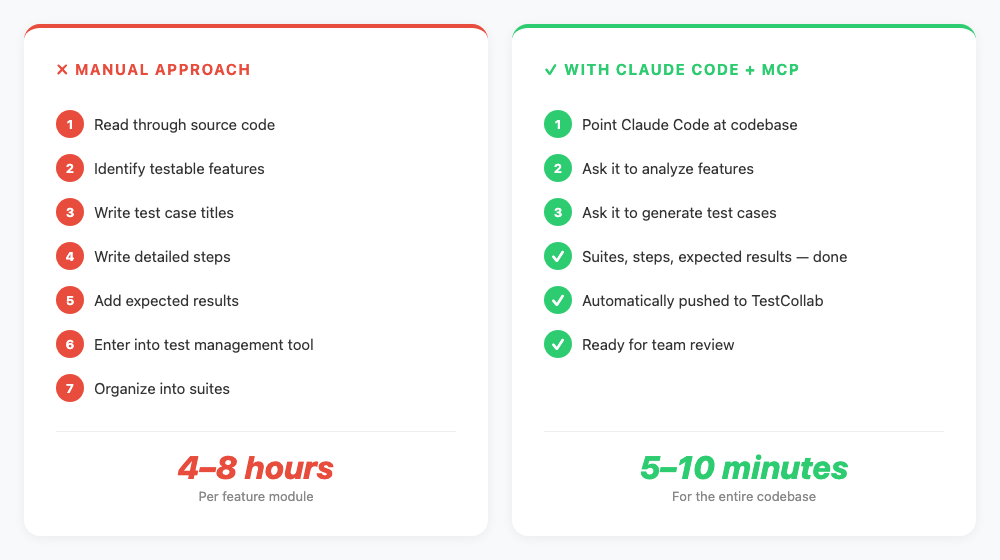
Writing test cases by hand is one of those tasks every QA team knows too well. You read through the code, identify features, write steps, add expected results, enter them into your test management tool, and organize them into suites. For a single feature module, this can take anywhere from 4 to 8 hours.
What if an AI agent could read your codebase, understand what the application does, and generate detailed test cases - complete with steps, expected results, and organized suites - directly in your test management tool? That is exactly what this tutorial covers.
In this guide, you will use Claude Code (Anthropic's AI coding agent) together with the TestCollab MCP Server to go from a raw codebase to a fully populated test suite in minutes.
Prefer watching over reading? Here is the full walkthrough in under 4 minutes:
What You Will Need
Before we start, make sure you have the following ready:
- Claude Code installed on your machine (the CLI agent from Anthropic)
- A TestCollab account with at least one project created (sign up free if you don't have one)
- A codebase you want to generate test cases for (we will use Koel, an open-source music streaming app, as our example)
- Node.js 18+ installed (for the MCP server)
How It Works - The Architecture
The setup involves three components talking to each other through a protocol called MCP (Model Context Protocol).

Claude Code is the AI agent that runs in your terminal. It can read files, understand code, and execute tools. MCP is the protocol that lets Claude Code communicate with external services. Think of it as a standardized way for AI agents to call APIs. The TestCollab MCP Server is the bridge - it exposes 17 tools that let Claude Code create test suites, write test cases, manage test plans, and more inside TestCollab. We covered the MCP server capabilities in detail in our earlier post on AI test case generation with the MCP Server - this tutorial builds on that by showing the full hands-on workflow.
The result is that you can have a conversation with Claude Code in plain English, and it will take actions in TestCollab on your behalf.
Step 1 - Install and Configure the MCP Server
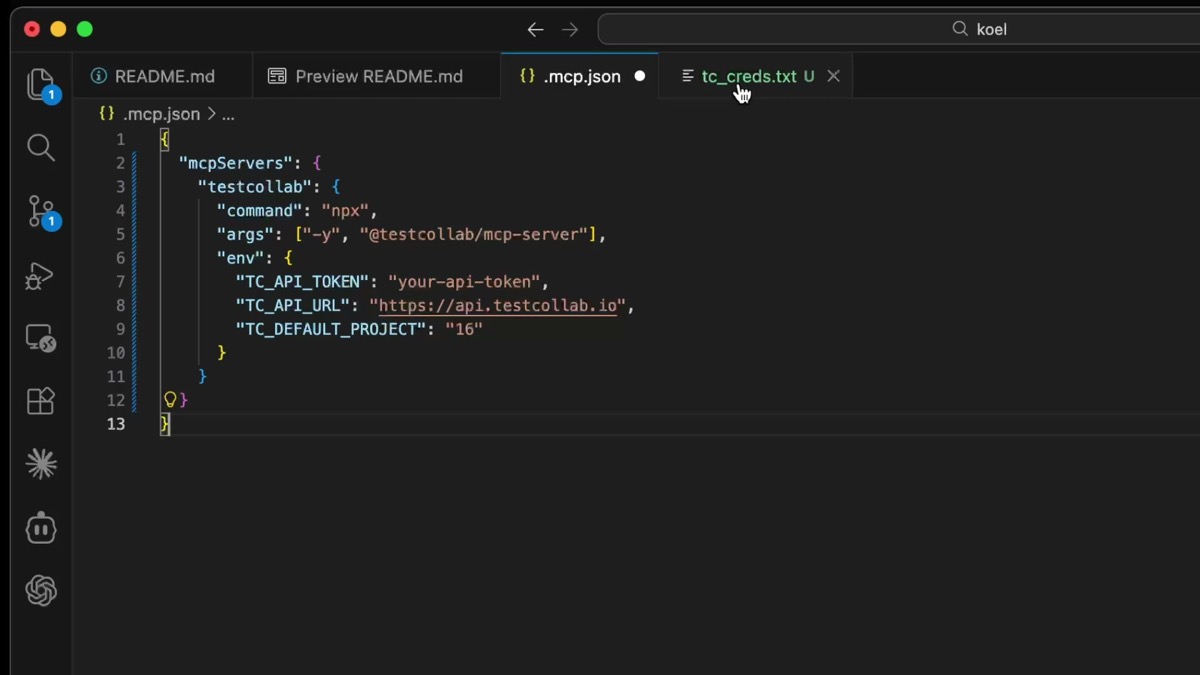
First, you need to tell Claude Code about the TestCollab MCP server. Open your Claude Code configuration and add the server entry.
In your project directory, create a .mcp.json file (or add to your existing Claude Code MCP settings) with the TestCollab server configuration:
{
  "mcpServers": {
    "testcollab": {
      "command": "npx",
      "args": ["-y", "@testcollab/mcp-server"],
      "env": {
        "TC_API_TOKEN": "your-api-token",
        "TC_API_URL": "https://api.testcollab.io",
        "TC_DEFAULT_PROJECT": "16"
      }
    }
  }
}
You will need three values from your TestCollab account:
- API Token - Generate this from your TestCollab profile settings under the API section
- API URL - Your TestCollab API endpoint (typically
https://api.testcollab.io) - Default Project ID - Find this in your project's URL or settings page
The npx -y @testcollab/mcp-server command automatically downloads and runs the latest version of the server. No global install needed.
Step 2 - Verify the Connection
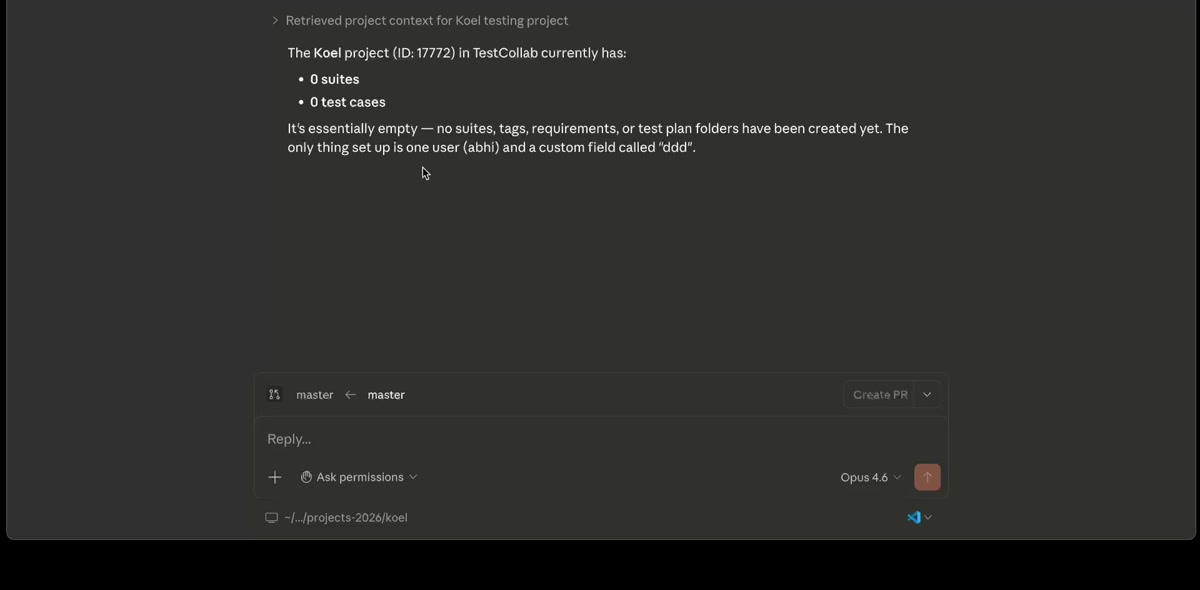
Once configured, launch Claude Code in your project directory and verify that the MCP connection is working. A simple way to test this is to ask a question that requires talking to TestCollab.
How many test cases do I have in this project?If everything is set up correctly, Claude Code will use the MCP server to query TestCollab and return the count. For a fresh project, you will see zero test cases - which is exactly what we expect. The important thing is that the connection works.
Step 3 - Point Claude Code at Your Codebase
Now comes the interesting part. Navigate to your project directory (or clone one if you are following along with Koel) and ask Claude Code to analyze it.
Analyze this codebase and tell me what it does - what are the key features?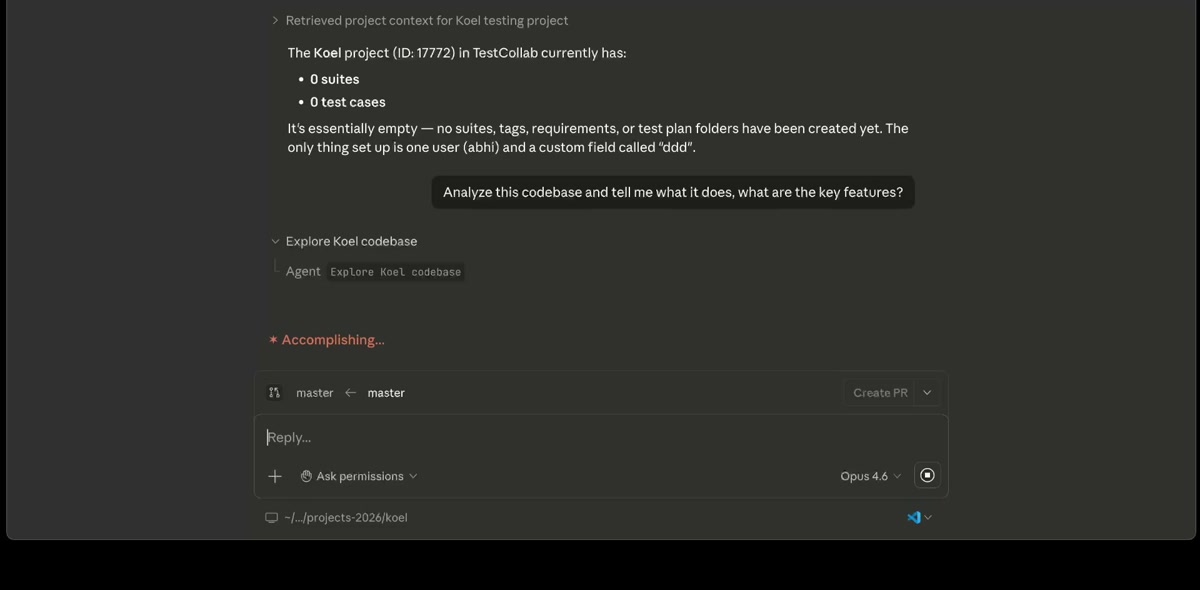
Claude Code will read through the source files - routes, controllers, components, models - and build an understanding of what the application does. For Koel, it identified key features organized by area: core playback, content organization, playlists, podcasts and radio, search, integrations, and user management.
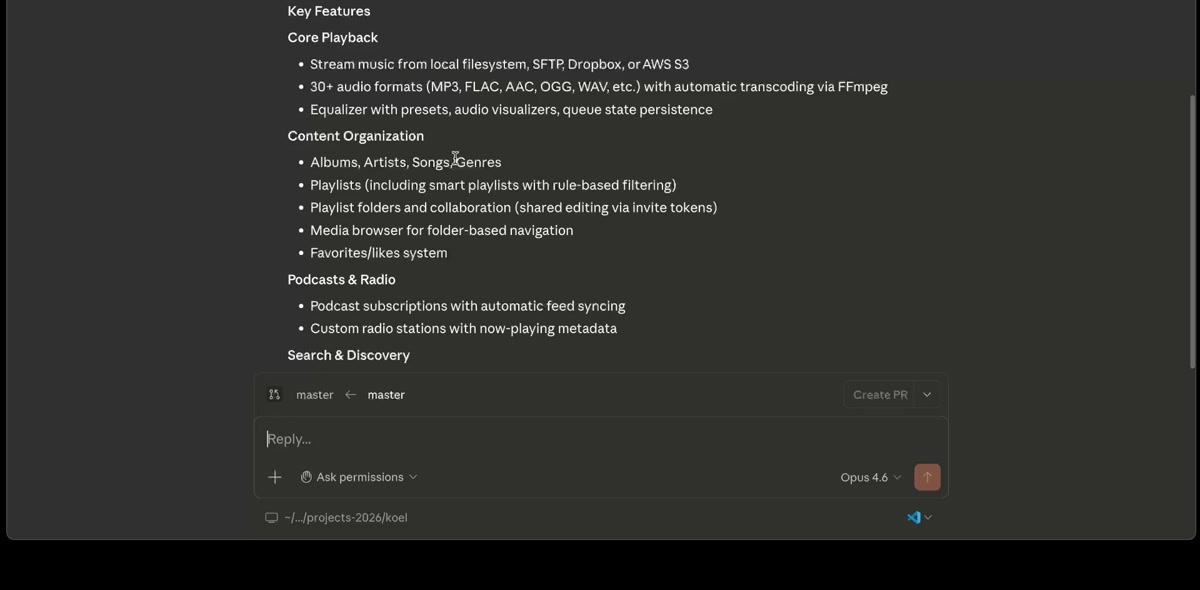
The key insight here is that Claude Code is analyzing the actual implementation, not just reading the README. It understands the routes that exist, the database models, the API endpoints, and the frontend components. This means the test cases it generates later will be grounded in what the code actually does.
Step 4 - Generate Test Suites and Test Cases
Here is where it all comes together. Ask Claude Code to create a test suite hierarchy and generate test cases based on its analysis.
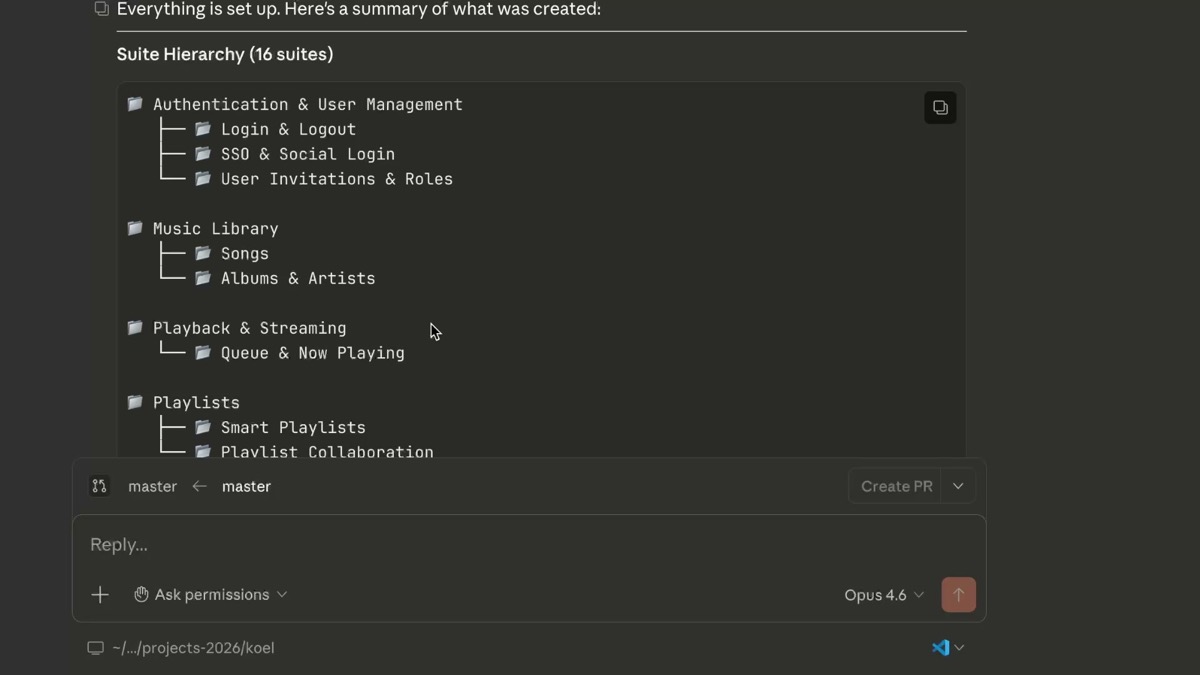
Create a test suite hierarchy based on the features you found, and generate the first 5 test cases.Starting with a small number (like 5) is a smart approach. You want to review the quality of the generated test cases before scaling up. Check that the steps are clear, the expected results make sense, and the coverage aligns with what you would expect.
Claude Code will use the MCP server tools to:
- Create test suites in TestCollab organized by feature area
- Generate detailed test cases with titles, descriptions, steps, and expected results
- Assign the test cases to the appropriate suites
All of this happens directly in TestCollab. There is no copy-pasting, no CSV imports, no manual data entry. The test cases are immediately available for your entire team.
Following along without an account? Step 5 happens in a real TestCollab project. Start a 14-day trial and Claude Code writes the suites and test cases straight into it. No credit card needed.
Create your trial projectStep 5 - Review and Scale Up
Open TestCollab and review the generated test cases. Here is what the 5 generated test cases look like in the TestCollab UI - each one assigned to the correct suite with proper priority levels:
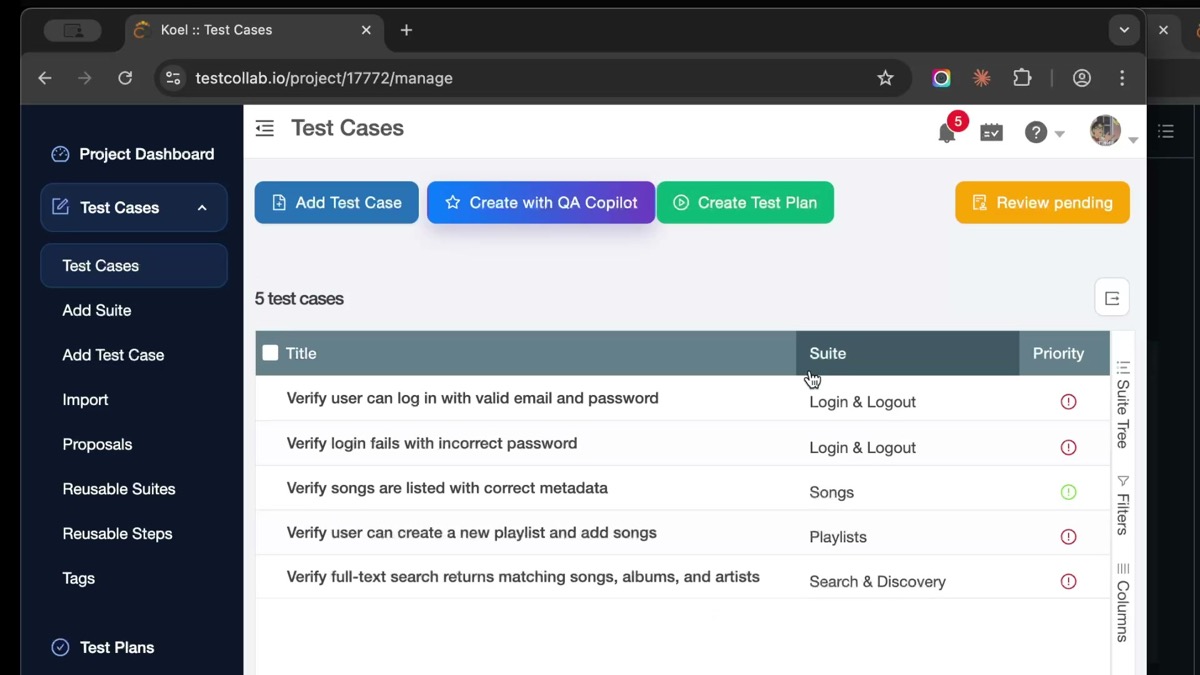
Clicking into any test case reveals the full detail - steps with numbered actions and corresponding expected results:
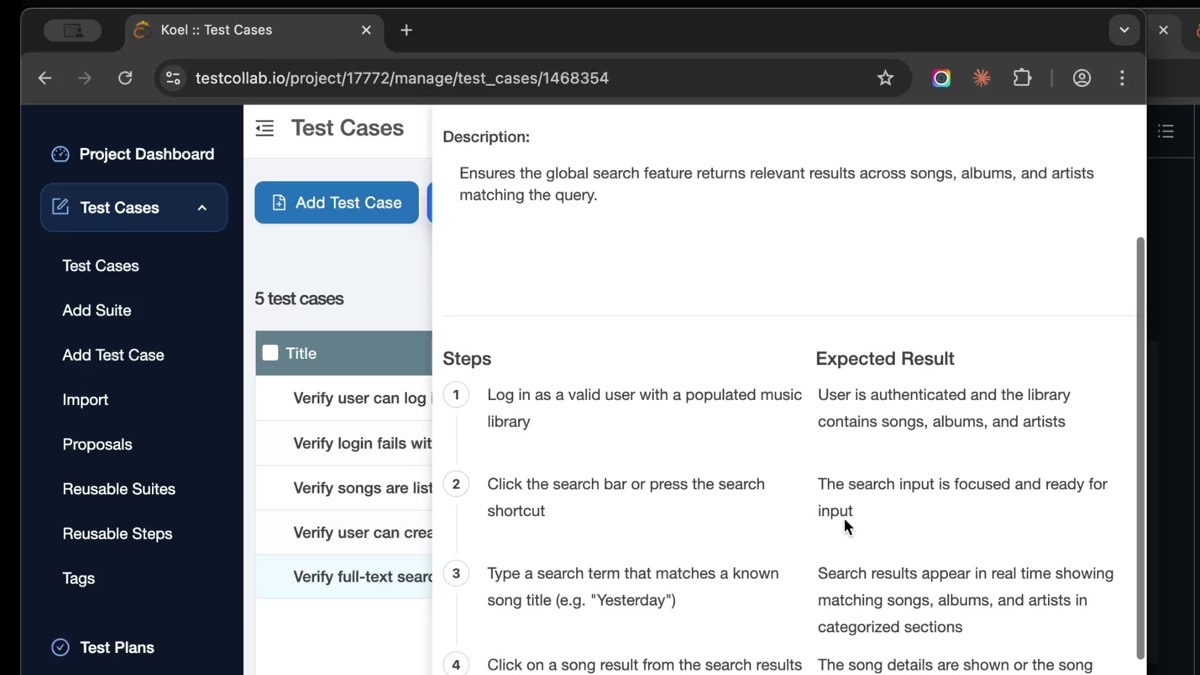
Check that:
- The suite hierarchy makes sense for your project structure
- Test case titles are clear and descriptive
- Steps are specific and actionable
- Expected results are verifiable
- Edge cases and negative scenarios are covered
Once you are satisfied with the quality, you can ask Claude Code to cover the entire codebase:
Generate test cases for all remaining features. Cover positive flows, negative scenarios, and edge cases.Claude Code will work through each feature area systematically, creating comprehensive test coverage across your entire application.
Tips for Getting Better Results
Getting the most out of AI-generated test cases takes some practice. Here are a few tips from our experience:
Be specific about what you want. Instead of "generate tests," try "generate test cases for the authentication module, including login, logout, password reset, and session management. Cover both happy paths and error scenarios."
Review in batches. Generate 5-10 test cases at a time, review them, provide feedback, and then continue. This helps Claude Code calibrate to your expectations.
Use your existing test cases as examples. If you already have well-written test cases in TestCollab, point Claude Code at them and say "follow this style and level of detail."
Combine with manual expertise. AI-generated test cases are a strong starting point, but your team's domain knowledge is irreplaceable. Use the generated cases as a foundation and refine them based on your understanding of the product.
What the MCP Server Can Do
The TestCollab MCP Server exposes 17 tools that cover the core test management workflow:
- Test Suites - Create, list, and organize test suite hierarchies
- Test Cases - Create detailed test cases with steps, expected results, and metadata
- Test Plans - Build test plans and assign test cases to them
- Test Execution - Log execution results and track pass/fail status
- Project Context - Query project structure, tags, priorities, and custom fields
This means Claude Code is not limited to just generating test cases. You can use it for test planning, execution tracking, and even reporting - all through natural language conversation.
When to Use This Approach
Automated test case generation works particularly well for:
- New projects where you are starting from scratch and need to build test coverage quickly
- Legacy codebases where documentation is sparse and the code itself is the best source of truth
- Sprint-based teams that need to keep test cases in sync with rapid feature development
- Code migrations where you need to validate that existing functionality still works
It is less suited for highly specialized domain testing (like financial calculations or compliance scenarios) where deep business context is required. In those cases, use it as a starting point and layer in domain expertise.
Try It Yourself
The TestCollab MCP Server is available as an npm package and works with Claude Code out of the box. Here is how to get started:
- Sign up for TestCollab (free trial available)
- Install Claude Code from Anthropic
- Install the MCP server:
npx @testcollab/mcp-server - Configure your API key and project ID
- Start generating test cases
If you want to see this workflow in action before trying it, watch our video walkthrough on YouTube that demonstrates the entire process from setup to generated test cases.
The days of spending hours manually writing test cases are numbered. With AI agents that understand your code and tools that connect directly to your test management platform, you can shift your QA team's focus from writing tests to designing better testing strategies. This shift is at the heart of harness engineering - building the environments and feedback loops that let AI agents do reliable QA work at scale.
Generation is one half of the loop. The other half is execution - and the same MCP-style pattern now lets a QA agent open a real browser and run the test cases this tutorial creates. See AI in software testing: how QA agents run your test plans for the hands-on walkthrough with Hermes, Claude Code, and Codex.
Test case generation is just one of six ways Claude Code fits into QA workflows. For the full picture - including exploratory testing, evidence tracking, risk analysis, and more - see our guide on Claude Code for QA testing.