Product Updates

What's New

New features and improvements shipped to TestCollab.

Feature

Requirements CSV Export

Export project requirements to CSV from the Requirements page. Choose between visible columns or all columns, and toggle whether to include HTML tags in descriptions.

Project requirements can now be exported to CSV. A new export button on the Requirements page opens an Export CSV dialog where you can pick between exporting only the columns currently visible in the grid or all columns, and whether to keep HTML tags in description text.
Feature

Comments on Inbuilt Issues

Issues now support a full comment thread with rich text, @mentions, email notifications, and a 5-minute author edit/delete window.

Inbuilt issues now have their own conversation thread, matching the comment system already on test cases, test plans, and executions.

- Comments section - A new section appears below the issue details on both the issue view and the Edit Defect page, with each comment showing the author's avatar, name, timestamp, and a count badge in the header.
- Rich text and @mentions - Comments support formatted text and @mentions of project members. Mentioned users, the issue assignee, and the issue creator all receive an email notification when a comment is posted.
- Edit / delete window - Authors can edit or delete their own comments within 5 minutes; after that, the controls disappear. Edited comments show an (edited) label. Company admins can edit or delete any comment at any time for moderation.
- Included in exports - Issue exports now include the comment thread, formatted as timestamp - User Name: comment text.
Feature

tc-cli v1.10.0: New `getTestPlan` Command for Agent-Driven QA

Fetch a curated test plan as agent-friendly JSON, designed to be consumed by AI coding agents (Claude Code, Cursor, Codex) that execute the cases via browser automation.

Hand-written E2E suites are expensive to maintain and manual QA is slow, but coding agents can now drive a real browser reliably. What they were missing is a structured plan of what to test. The new tc getTestPlan command provides exactly that.
tc getTestPlan --project 16 --test-plan-id 555 --output /tmp/plan.json
The command returns the plan and its test cases as clean JSON — HTML stripped from steps and descriptions, statuses mapped, per-configuration results included where the plan has a Browser × OS matrix. Progress messages go to stderr so stdout stays clean for piping to jq or directly into an agent.

Humans curate plans in TestCollab; the agent reads them via getTestPlan, executes via Playwright MCP / computer use, and uploads results back via tc report. The full pattern is documented in the new Agentic QA Guide.
Improvement

User Avatar Display Format Setting

A new global setting controls how user avatars are labeled across the app — Initials, Full name, F. Lastname, or Firstname L. — so you no longer have to hover to see who's assigned.

Hovering over a circle of initials to learn who's assigned has always been a small but constant friction. Settings > General now has a User Avatar Display Format dropdown that controls labeling globally.

- Four options - Initials only (the previous default), Full name, F. Lastname, and Firstname L.
- Applied across the app - Issues, Test Cases, Test Plans, and Requirements grids; user-type custom field columns; the Test Case Review Information and Changelog tabs; the Test Plan index 'Assigned To' column and Summary tab; the project Activities timeline; and assignment events in the activity log all respect the chosen format.
- Compact lists unchanged - Multi-user avatar stacks (e.g., the Projects page Team column) continue to show initials so layout doesn't break. Surfaces that already showed full names are unchanged.
Feature

Never-Assigned Test Cases: Coverage-Gap Tracking

A new 'Never Assigned' flag identifies test cases that have never had anyone assigned to run them. Surfaced as a dashboard metric, a grid column, and a filter.

Test cases that have never been assigned to anyone — through any test plan, configuration, or execution — are a strong signal of coverage gaps. Project owners can now find them at a glance.

- 'Never Assigned' flag - Computed for every test case from the full assignment history. The flag is set when the case is created and flips to 'No' the first time anyone is assigned. It also recomputes when assignments are removed (clearing an assignee, deleting a test plan or test case row), so it accurately reflects current state.
- Dashboard metric - The project dashboard surfaces a new Never Assigned Test Cases count.
- Grid column and filter - The Test Cases manage page (/project/:id/manage) gets a hidden-by-default 'Never Assigned' column with Yes/No values, plus a multi-select Yes/No option in the filter pane.
Fix

Consistent Status Colours Across Custom Reports

Execution status colours and legend ordering are now identical across the report builder and pinned dashboard widgets.

Previously the same execution status (Passed, Failed, Blocked, etc.) could render in a different colour or legend order depending on whether you were viewing the custom report builder, a preview, or a pinned widget on the project dashboard. The fix moves status colour, status order, and dimension behaviour into a single shared utility so every chart pulls from the same source. No setting changes required — every existing report becomes visually consistent on its own.
Feature

Issue Reporter Label and Activity Timeline

Issues now show who reported them and a chronological timeline of every change — creation, status, priority, description, and all custom-field updates including assignee.

Two improvements to the inbuilt issue manager that together answer the most common 'who did this?' questions without leaving the issue.

- 'Reported by:' label - The Edit Issue page now shows a read-only 'Reported by:' label at the top (above the Title field) with the author's avatar and full name. Read-only — appears whenever the issue has a recorded creator.
- Activity timeline - A new Activity section on the issue view (always visible) and on the Edit Defect page (collapsible) shows a chronological feed of every change: creation, title, description, status, priority, and all custom-field updates including user-type 'assignee' fields. Each entry shows the actor's avatar, the change in plain language (e.g., set Assigned To to Linda Davis, Changed Status from To Do to In Progress), and a timestamp. The list lazy-loads 20 entries at a time as you scroll.
Improvement

Issues Page Defaults to 'Assigned to Me'

The Issues page now opens with a default filter showing only issues assigned to the current user — testers see their work first instead of the full project backlog.

Opening the Issues grid used to drop you into the full project backlog. It now opens pre-filtered to issues assigned to the current user, so testers see 'their' work first.

- Default filter - Assignment is detected via any user-type custom field on the issue whose value matches the current user.
- Clear filters - A 'Clear filters' link appears above the grid whenever any filter is active (matching the pattern on the Test Cases manage page). Clicking it shows all issues for the project.
- Empty state - If you have no assigned issues, an empty-state card reads 'No issues assigned to you' with a 'Clear filter' button.
- Session memory - Clearing is remembered for the rest of the browser session; the default reapplies in a new session, so the 'see my work first' experience persists long-term.
Fix

Faster Test Plan Run Page (No More N+1 Step-Progress Fetches)

The Test Plan Run page no longer fires one extra request per unexecuted row to render the step progress ring — the data is now returned in the main grid response.

Opening the Test Plan Run page on a typical 200-row plan used to trigger 150-200 simultaneous network requests just to draw the small step-progress ring next to each unexecuted row's status icon. The fix bakes the step and dataset progress data into the main grid response, eliminating the per-row fetches entirely.

The ring still appears as before for partially-executed cases and dataset-driven cases — the only visible difference is a noticeably faster page load and much less network traffic.
Fix

Fixed Runaway Growth in Test Plan Execution Rows

A field on each execution row was roughly doubling in size with every new run, eventually reaching 16 MB. The fix carries data forward correctly and cleans up rows already affected.

A silent data-corruption bug was causing the validation_data field on each test plan execution row to roughly double in size every time you started a new run of a plan. Over enough runs, individual rows had grown to ~16 MB containing only escaped quotation marks around the literal word 'null' — wasting roughly 1.7 GB of database storage in production and risking eventual save failures.

The fix correctly carries forward genuine validation data across runs without re-encoding it, and a one-time cleanup repairs (or clears) the rows that had already been corrupted. No UI change — the benefit is faster, more reliable test plan runs and reduced storage usage. Affects all customers, not just those actively using the validation feature.
Feature

Public Project Dashboards

Share a project's overview dashboard with anyone via a secure read-only link. No TestCollab account needed for viewers.

Project leads can now share a project dashboard publicly without giving viewers a paid seat or login. Generate a public link from the project overview and send it to stakeholders, customers, or auditors who only need to see status.

- Read-only guest view - Public viewers see the dashboard's pinned reports, recent activity, defect status, and error-prone test cases. All authenticated actions and navigations away from the dashboard are suppressed.
- Token-based access - The link is a signed token bound to the project. Revoke access by toggling the project off public visibility.
Feature

Configurable Plan Completion Statuses

Choose which test execution statuses count as 'done' for a project. A test plan finishes when every case reaches a status in your chosen set, not just when there are zero unexecuted.

Some teams treat any executed status (Passed, Failed, Skipped, Blocked) as 'done'. Others only consider Passed cases as done and want the plan to stay in progress until everything is green. The new Plan Done Statuses setting in Project Settings lets you pick the statuses that count.

- Project Settings dropdown - Pick one or more active statuses on the General Settings page. Active statuses for the project are auto-loaded; the unexecuted system status is excluded.
- Plan completion uses your set - The 'completed' check on the run summary, the 'Run now' prompt on the test plan view, and the regression API's 'unfinished run' guard all switch from unexecuted == 0 to a check against your configured done statuses.
Improvement

QA Copilot: Spreadsheet Uploads for Requirement-Based Generation

QA Copilot's 'requirements text' source now accepts CSV, XLSX, and ODS files alongside PDFs. Drop in a feature spec spreadsheet and Copilot generates test cases from each row.

When generating test cases from requirements, you can now upload a spreadsheet (CSV, XLS, XLSX, ODS) instead of pasting text or attaching a PDF. This is useful for teams that maintain feature specs, story lists, or acceptance criteria in a tabular format.

- Supported formats - CSV, XLS, XLSX, and ODS files. Up to 3 sheets per workbook, 10 rows per sheet, and 12 columns per sheet are read as context.
Improvement

Step Progress Ring on Test Run Status

Test plan run cards now show a small ring visualizing per-step pass/fail/skip/block status alongside the overall test case status.

Inside a running test plan, the status icon next to each test case now expands into a step progress ring when step-level results are available. At a glance you can see how many steps passed, failed, were skipped, or blocked, which makes it easy to spot cases that 'failed but mostly worked' or 'passed but skipped half the steps'.
Feature

Issue ↔ Test Case Traceability for Inbuilt Defects

The inbuilt defect manager now surfaces every test case linked to an issue, both as a grid column and on the issue detail page.

Inbuilt issues already linked to test cases through manual linking and through automatic links created when a defect is filed from a failed run, but the relationship wasn't visible in the issue manager. This release surfaces it everywhere.

- 'Test Cases' column in the issues grid shows comma-separated, clickable test case IDs for each issue. Filter the grid by test case ID to find issues by the cases they cover.
- 'Linked Test Cases' section on the issue detail page lists each linked case with its title, ID, and any custom fields.
- CSV export of issues now includes a 'Linked Test Cases' column.

Applies to projects using the inbuilt defect manager. External issue trackers (Jira, GitHub, GitLab, Azure DevOps, ClickUp) are out of scope for this release.
Fix

Performance Fixes for Large Test Plans

Two memory hotfixes for projects with very large test plans: queue-result persistence after run creation and the latest-records lookup on the executed test case API.

Customers with test plans containing tens of thousands of executed test cases were hitting Node out-of-memory crashes on two paths. Both have been fixed with bounded queries.

- TestPlanRunAfterCreate no longer loads the entire queue results payload into memory when persisting a new run.
- executedtestcase.getLatestRecords now uses a bounded query so large plans don't blow up the API process.
Improvement

Issues CSV Export Includes Time and Company Timezone

The issues CSV export now writes timestamps in your company's configured timezone and includes the time component, not just the date.

Previously, dates in the issues CSV export were date-only and rendered in UTC, which made it harder to correlate issue activity with audit logs from other systems. The export now includes time and is formatted using the company's timezone setting.
Feature

Defect Notifications V2 and Defect/Issue Export

Email notifications for assignees on user-type custom fields, status-change emails on inbuilt issues, and CSV export for both defects and inbuilt issues with column selection.

Two improvements to the inbuilt defect manager:

- Assignee notifications via custom fields - When an issue is created with a user assigned through any user-type custom field, the assignee receives an email notification. When the issue's status changes, the assignee is notified again.
- CSV export for defects and issues - Export filtered or selected defects and issues to CSV with a column picker, available from the new Export button on the defects and issues grids.
Fix

Bug Fixes & Stability Improvements

Fixes for custom report category limits, linked issue deletion, test case error messages and tag handling, and grid drag-drop in test plan execution.

This release rolls up several stability fixes:

- Custom report categories - The maximum number of categories per dimension was raised from 25 to 100 so reports with high-cardinality groupings render correctly.
- Linked issue deletion - Deleting a linked issue no longer fails when defect records reference it; the related defect rows are cleaned up first.
- Test case error messages - Database errors during test case save are sanitized so internal SQL details no longer leak into user-facing error toasts.
- Test case tag handling - Null entries in test case tag arrays are filtered out instead of causing 'undefined binding' errors during create or update.
- Test case grid drag-drop - Drag-drop reordering in the test case grid no longer crashes when the over-row is missing data, and respects the 'can run' permission in test plan execution mode.
Feature

tc-cli: Zero-Setup CI Reporting with `--auto-create`

Upload test results to TestCollab from CI with no manual setup. The new `--auto-create` flag on `tc report` creates the tag, suites, test cases, folder, and test plan automatically from your result file.

Getting test results into TestCollab used to require pre-creating a test plan and tagging test cases. The new --auto-create flag on tc report removes all that setup.
tc report --project 123 --format junit --result-file results.xml --auto-create
- Auto-creates everything missing — Tag (CI Imported), test suites (humanized from classname/describe blocks), test cases, the CI test plan folder, and a fresh test plan named CI Run: DD-MM-YYYY HH:MM.
- Smart matching — Tests with TC IDs (e.g. [TC-42]) match by ID. Tests without IDs match by normalized title within the same suite. No match? A new test case is created.
- Mixed mode — Some tests can have IDs while others rely on title matching. Both work in the same result file.
- Suite name humanization — Raw test runner names like com.app.LoginTests, tests/auth/login.spec.ts, or UserProfileTests are automatically cleaned up into readable suite titles.
- Reuses on subsequent runs — The tag, suites, folder, and test cases are reused on every run, so only a new test plan is created each time.

Works with both JUnit XML and Mochawesome JSON. See the auto-create docs for permission requirements and CI examples.
Feature

Project Secrets: Secure Variables for Test Data

Store API keys, passwords, and tokens as encrypted project-level secrets and reference them in test steps with {{secrets.NAME}} syntax.

Test steps often need sensitive data — API keys, auth tokens, database passwords. Hardcoding them in test cases is a security risk. Project Secrets lets you store sensitive values with AES-256 encryption and reference them in any test step using {{secrets.NAME}} syntax.

- Encrypted storage — Secrets are encrypted at rest. Only users with the reveal permission can view the actual value.
- RBAC controls — Manage who can create, edit, reveal, and delete secrets through role permissions.
- Use anywhere in test steps — Reference secrets with {{secrets.API_KEY}} in step descriptions or expected results. Values resolve at execution time.

Read more →
Improvement

QA Copilot: Redesigned Proposals & One-Click Automation

The QA Copilot proposals page has been redesigned with a cleaner layout, setup modal, and automation status tracking for accepted test cases.

The QA Copilot proposals experience has been significantly improved:

- Redesigned proposals UI — Cleaner layout with better badge styling, tab sizing, and spacing.
- Setup modal — Configure QA Copilot directly from the proposals page with a guided setup flow.
- Automation status tracking — Accepted test cases now show their automation status (Not Automated, In Progress, Automated) with color-coded pills.
- Automate button — One-click automation trigger on accepted test cases with status-aware labels.
Feature

Pinned Report Widgets & Release Test Plan Selection

Pin your most-used reports to the project dashboard and link specific test plans to releases.

Two quality-of-life improvements for project management:

- Pinned report widgets — Pin your most important reports directly to the project overview dashboard for at-a-glance visibility. No more navigating to the reports page for your daily metrics.
- Test plan selection for releases — When creating or editing a release, you can now select which test plans are included. This gives you finer control over which execution data feeds into the release readiness dashboard.
Fix

Bug Fixes & Stability Improvements

Fixes for defect severity labels, dataset handling on test case reverts, traceability matrix improvements, and service worker caching.

This release includes several bug fixes and stability improvements across the platform, including fixes for defect severity defaults, stale dataset handling during test case reverts, release readiness calculations, and service worker cache reliability.
Feature

AI Test Case Generation from Jira Requirements

Generate test cases directly from Jira user stories with per-requirement traceability and context-aware AI.

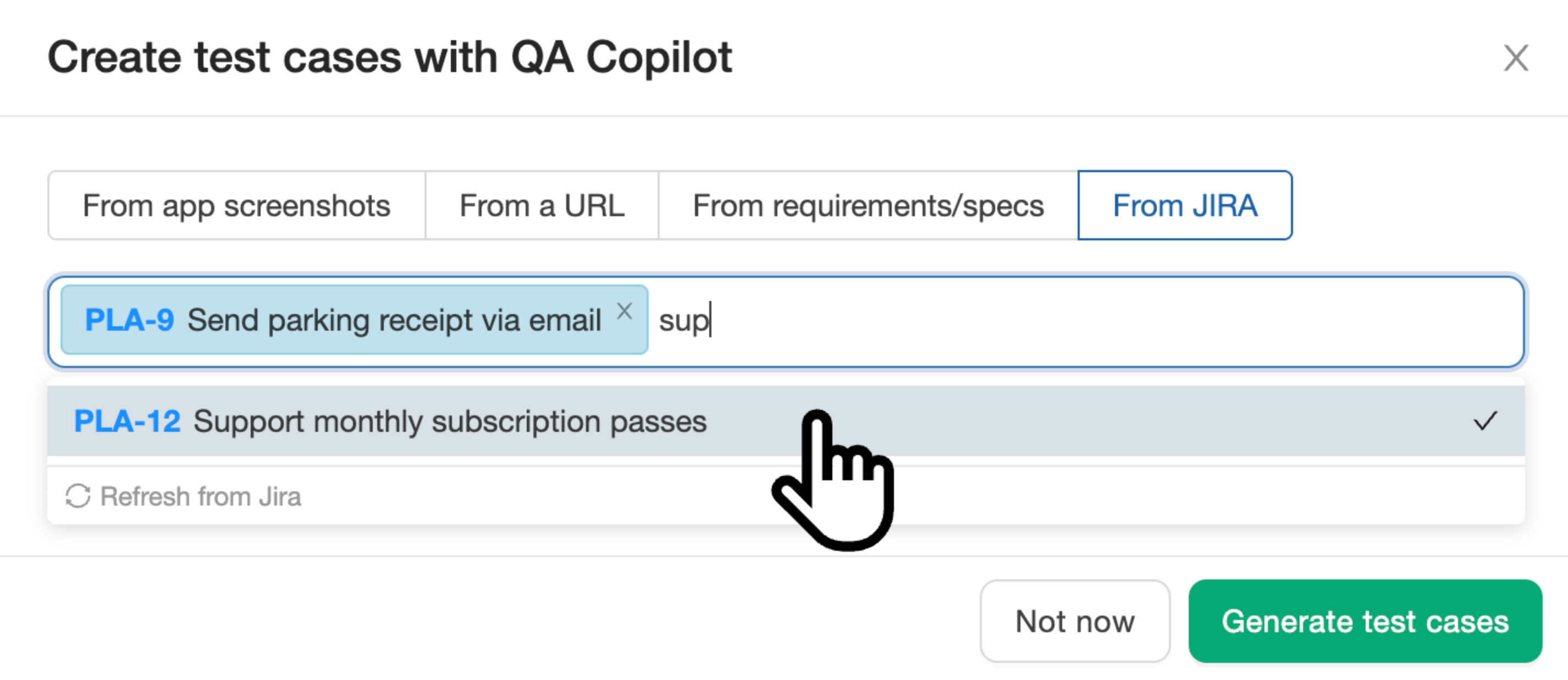
Generate test cases from Jira requirements with QA Copilot
QA Copilot now generates test cases from your synced Jira requirements. Connect your Jira instance, select up to 5 user stories, and let AI generate structured test cases with steps and expected results - automatically linked to their source requirement.

Read more →
Feature

Jira Forge App 2.0: Test Management Inside Jira

The TestCollab Jira app has been completely rebuilt on Atlassian's Forge platform - faster, more secure, and natively integrated into every Jira issue, project, and admin page.

Version 2.0 of the TestCollab Jira app is now live on the Atlassian Marketplace. This is a ground-up rebuild on Forge, replacing the previous Connect-based architecture.

- Issue panel & activity tab — View, add, edit, and link test cases directly on any Jira issue. Configure placement per project (sidebar panel or activity tab).
- Test plan management — Create test plans, assign testers, and track execution progress without leaving Jira.
- One-click defect pushing — Failed test? Push a bug to Jira in one click with automatic bidirectional linking.
- Requirements traceability — Link user stories and epics as requirements and generate traceability matrices for coverage visibility.
- Project dashboard — Each Jira project gets a dedicated TestCollab page with suites, recent executions, and coverage metrics.
- Project-level settings — Project admins can configure the TestCollab connection from project settings (no Jira admin access needed).
- Global admin page — Manage the TestCollab connection and control which projects have the integration enabled.
- Free — No charge on the Atlassian Marketplace.

Read more →
Improvement

MCP Server: Suites, Test Plans & Simplified Setup

The MCP server now supports test suites, test plans, and smart context loading — and connects via npx with zero hosted infrastructure.

The TestCollab MCP server has been updated with new capabilities and a simplified connection method.

- Test suite management — Create, list, update, delete, move, and reorder test suites directly from your AI assistant.
- Test plan management — Create, list, update, and delete test plans with configurations and tester assignments.
- Smart context loading — A new project context tool loads suites, tags, users, and custom fields upfront so you can reference everything by name instead of numeric ID.
- Simplified setup — The server now runs locally via npx @testcollab/mcp-server with environment variable authentication. The previous hosted HTTP endpoint (mcp.testcollab.com) has been deprecated.

See the MCP Server integration page for setup instructions and the full list of 17 available tools.
Improvement

CLI Renamed to @testcollab/cli & JUnit XML Support

The TestCollab CLI is now published as a scoped npm package (@testcollab/cli) with npm provenance, and adds native JUnit XML report support alongside Mochawesome.

Two updates to the TestCollab CLI:

- Package renamed to @testcollab/cli — The CLI has moved from testcollab-cli to the scoped @testcollab/cli package on npm. The new package includes npm provenance so you can verify every published build traces back to its GitHub Actions workflow. Update your install commands and CI pipelines:
npm install -g @testcollab/cli
- JUnit XML report support — The tc report command now accepts JUnit XML files in addition to Mochawesome JSON. This means test results from Java (JUnit, TestNG, Maven Surefire), Python (pytest), C# (NUnit, xUnit), .NET, and most other frameworks that output JUnit XML can now be uploaded directly — no format conversion needed:
tc report --project 42 --test-plan-id 100 --format junit --result-file ./test-results/junit.xml


The old testcollab-cli package is deprecated. All existing commands and flags work the same way under the new package name.
Feature

Release Readiness Dashboard & Defect Status Sync

A live GO/NO-GO dashboard for every release, plus automatic defect status sync from your issue manager.

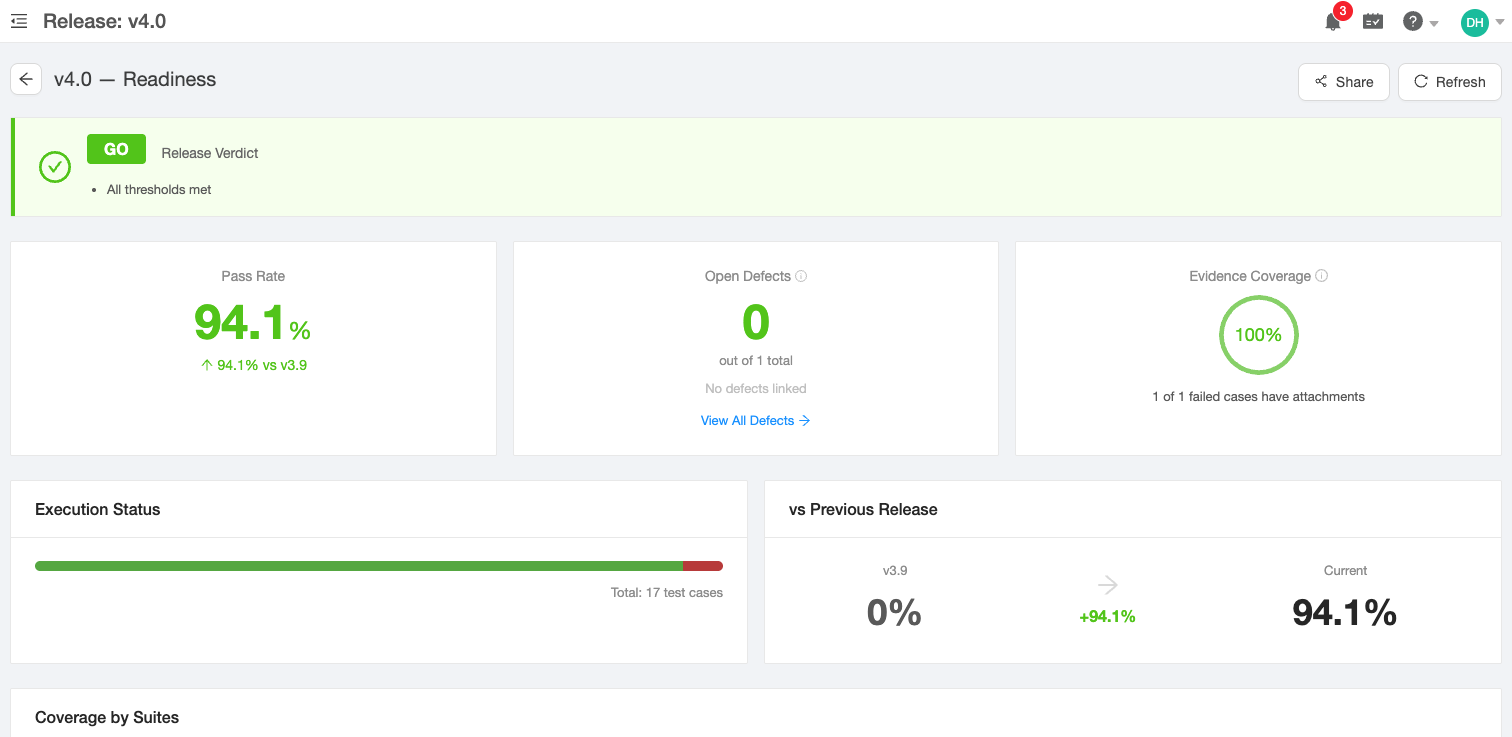
Release readiness dashboard showing GO verdict, pass rate, open defects, evidence coverage, and release comparison
Two new capabilities for release management:

- Release readiness dashboard — Every release now has a readiness page showing a computed GO/NO-GO verdict based on configurable thresholds. See pass rate, open defect count, evidence coverage, execution progress, coverage breakdowns by suite/environment/configuration, and a comparison against the previous release — all computed live from your test plan data
- Defect status sync — Defect statuses now sync automatically from your connected issue manager (Jira, GitLab, Azure DevOps, GitHub, ClickUp). When a bug moves to Resolved or Closed in your tracker, the status updates in TestCollab and the release readiness verdict recalculates immediately
- Defects filtered by release — Click "View All Defects" from the readiness dashboard to jump to the defects page pre-filtered to that release. A banner shows the active filter and can be cleared with one click

Read more →
Feature

External Email Notifications, ClickUp Integration & More

Notify external stakeholders via email without adding seats, file bugs to ClickUp, exclude test cases per config, and reassign reviewers.

This release brings several new capabilities:

- External email notifications — Add up to 10 external email addresses per project to automatically receive test plan status updates when a plan finishes, is delayed, or approaches its deadline. Recipients get a summary with a public link to drill into details — no account or paid seat required. Read the announcement →
- ClickUp integration — ClickUp is now available as a bug tracker alongside Jira, GitLab, Azure DevOps, and GitHub. File defects directly from failed test executions with streamlined field mapping
- Config-level test case exclusion — Remove individual test cases from specific configurations in a test plan. Execution counts and progress stats automatically adjust per configuration
- Reassign test case reviewer — Change the assigned reviewer on a pending review. Both the old and new reviewer are notified, and the change is logged in the review trail
Improvement

Failed Click Detection

QA Copilot now detects when a click has no effect, preventing false-positive test results.

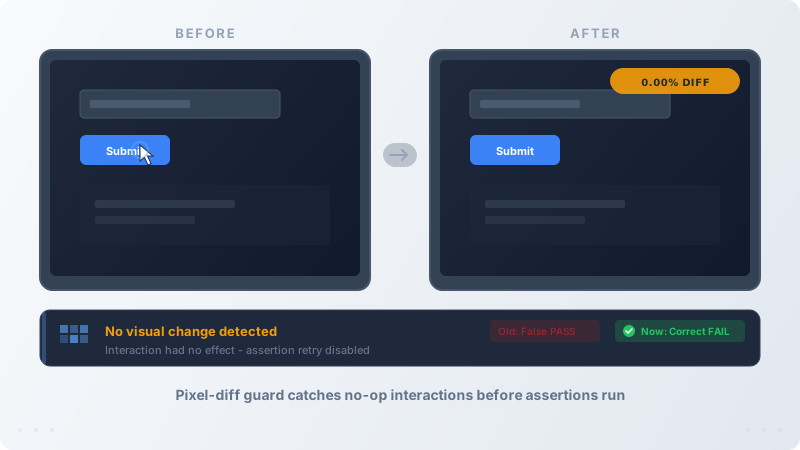
Pixel-diff comparison showing no-op interaction detection
QA Copilot's AI test engine received several core improvements:

- No-op interaction detection - Uses pixel-diff comparison to detect when a click or action has no visual effect on the page. When no change is detected, assertion retries are disabled, preventing the AI from "self-healing" into a false positive
- Smarter step boundaries - The AI reasoning engine now looks ahead at the next test step to determine whether to perform additional actions (e.g., clicking submit) or stop. This prevents both under-execution and over-execution of test steps
- Improved element confidence - When an instruction references an element by name but no matching element exists in the HTML, the AI now correctly returns low confidence instead of guessing, allowing visual fallback strategies to take over
- Negative test case support - The evaluation framework now supports expected-fail test cases, making it easier to validate that the engine correctly catches real bugs
Improvement

QA Copilot Training Fixes

Improved AI test generation accuracy for complex UI patterns like row-scoped dropdowns and list interactions.

QA Copilot now handles complex UI patterns more reliably:

- List and table interactions - Correctly targets elements within specific rows, such as clicking a dropdown next to a particular user's email
- Smarter step completion - The AI now finishes each test step precisely as described without performing extra unintended actions
- Better page understanding - Improved ability to identify the right interactive elements on dense, content-heavy pages
Feature

Screen Recording for Test Execution

Record your screen while executing tests to capture visual evidence of bugs and test results.

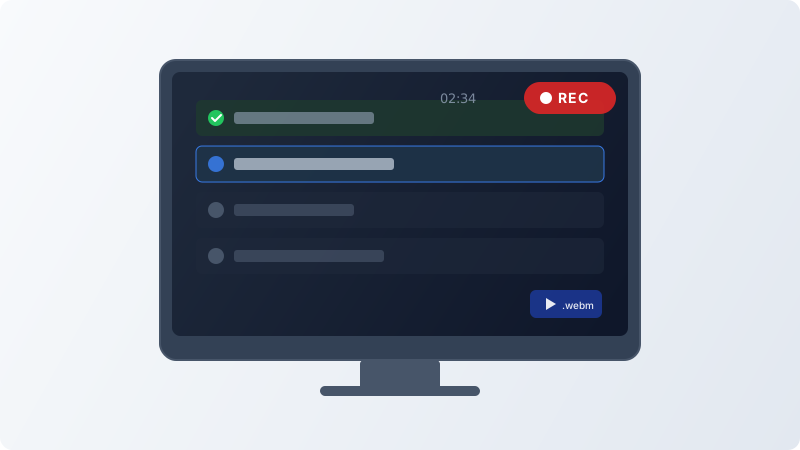
Screen recording indicator on test execution interface
You can now record your screen during test plan execution. Recordings are automatically saved as attachments to each executed test case.

- Enable per project in Project Settings with a simple toggle
- Optional audio capture for narrating your test steps
- Auto-transitions - recording seamlessly moves to the next test case as you navigate
- Recordings are saved as WebM files and attached to the executed test case for easy review
Feature

Custom Reports and ServiceNow Integration

Added custom reports for test execution data and ServiceNow integration support

Fix

Fixed Test Execution Notification

Fixed crash in test case execution notification system

Feature

MCP Server for AI-Assisted Test Management

Connect AI coding assistants like Claude Code, Cursor, and Codex to TestCollab via the Model Context Protocol. Create, query, and update test cases without leaving your IDE.

AI assistant conversation showing test case operations via MCP
We've released an open-source MCP Server that lets AI assistants manage test cases directly. The server supports:

- list_test_cases – Query test cases with filtering, sorting, and pagination
- create_test_case – Create test cases with steps, custom fields, and tags
- update_test_case – Update existing test cases

Works with any MCP-compatible client including Claude Code, Cursor, Windsurf, and OpenAI Codex. Available as a hosted endpoint or self-hosted via GitHub.
Fix

Boldface Tool On Rich Text Boxes Do Not Work

Feature

Added QA Copilot Proposed Test Cases

Automatically generate and manage proposed test cases using AI-powered QA Copilot functionality.

Improvement

MySQL Database Migration

Enhanced database migration system with MySQL upgrade support and stepwise execution

Feature

Added Linear Integration

Added Linear project management platform to available integrations list

Fix

Fixed Test Plan Run Automation

Fixed automation trigger and data handling issues in test plan run creation workflow.

Fix

Fixed Onboarding Nudge Timing

Resolved timing calculation issues in onboarding nudge delivery system.

Improvement

Added Empty States UI

Added empty state illustrations and components for defects, reusable steps, test cases, and tags pages.

Fix

Fixed Onboarding Nudge Service

Resolved issues in onboarding nudge service functionality

Fix

Fixed BDD Background Processing

Fixed BDD feature background array processing and error handling in test suite creation

Fix

Fixed Training URL Validation

Fixed URL validation regex pattern for training URLs in QAC functionality

Feature

Nudge System & Company Goals

Added onboarding nudge delivery system and company goal tracking functionality.

Improvement

Enhanced Unsubscribe Flow

Added feedback collection for unsubscribe process and improved email validation messaging

Fix

QAC UI Fix

Feature

Added Sample Project Flag

Projects can now be marked as sample projects with new is_sample field

Fix

Issue With Users Count When Qa Copilot Is Enabled For A Company

Feature

Added Newsletter System

Introduced automated newsletter generation and delivery functionality with weekly preview capabilities.

Feature

Added Sample Project Preview

Added modal to preview sample project during company setup process.

Fix

We Have Stopped Showing Title On The Full Screen View Of Test Case

Feature

Added Real-time Notifications

Added Ably integration for real-time test execution notifications and project sample data creation.

Feature

Added TC API

Integrated new TC API functionality for enhanced system capabilities.

Improvement

Optimized Service Performance

Improved string replacement operations and enhanced debugging for better system performance

Feature

Distributed Cron Locking System

Added distributed locking mechanism to prevent concurrent cron job execution conflicts

Improvement

Test Case Management Updates

Enhanced test case handling, requirements processing, and user interface components

Fix

It Does Not Allow Me To Invite New Users Even If I Have Lesser Number Of Users Added To Trial Account

Improvement

Enhanced API Performance & UI Updates

Optimized database queries and added bulk test case review functionality for better performance.

Improvement

Updated Service and Logging

Enhanced linked project queries, request logging, and deployment configuration

Fix

Users Are Not Able To Add Comments To Test Cases On Test Cases Manage Page Or Test Plan Test Cases List Page

Feature

Added Request Logging and CloudWatch

New middleware for request logging with CloudWatch integration and enhanced project management capabilities

Feature

Added BDD Sync & Execution Timer

Introduced BDD synchronization endpoints and test execution timing functionality

Improvement

Removed QAC Banner

Cleaned up header component by removing QAC banner display functionality.

Improvement

Enhanced Company Access Controls

Improved user access validation and company scoping across API services and UI components.

Fix

Requirements Traceability Matrix Is Not Being Shown

Feature

Status Management API

Added new status API endpoints and removed deprecated UI components for cleaner codebase