

Your developers just adopted Cursor, Copilot, or Claude Code. Commits are up. Pull requests are flying. Everyone's thrilled. Ship faster, hire fewer - the dream, right?
Not so fast. A rigorous new study from Carnegie Mellon University analyzed 806 open-source repositories and found something that every QA team should pay attention to: AI coding assistants make developers faster in the short term, but the code quality problems they create are permanent.
Let's break down the findings and what they mean for your testing strategy.
The Study: What CMU Measured
Researchers Hao He, Courtney Miller, Shyam Agarwal, Christian Kastner, and Bogdan Vasilescu tracked open-source projects that adopted Cursor AI between January 2024 and March 2025. They used a quasi-experimental design with 806 Cursor-adopting repositories matched against 1,380 control repositories.
They measured two things: development velocity (commits and lines of code added) and software quality (static analysis warnings, code complexity, and duplicate code density).
The methodology is solid - they used Difference-in-Differences with staggered adoption, propensity score matching, and ran extensive robustness checks. This isn't a blog post with anecdotes. It's peer-reviewed research accepted at MSR 2026, one of the top venues for empirical software engineering.
The Numbers Tell a Stark Story
Here's what they found:
| Metric | Change After AI Adoption | Duration |
|---|---|---|
| Lines added (month 1) | +281% | Temporary |
| Lines added (average) | +28.6% | Fades after 2 months |
| Commits (month 1) | +55.4% | Fades after 2 months |
| Static analysis warnings | +30.3% | Persistent |
| Code complexity | +41.6% | Persistent |
| Duplicate line density | No significant change | - |
The pattern is clear. Velocity gains are temporary - they spike dramatically in the first month and return to baseline within two months. But the quality degradation is persistent - static analysis warnings and code complexity go up and stay up, with no signs of recovery.
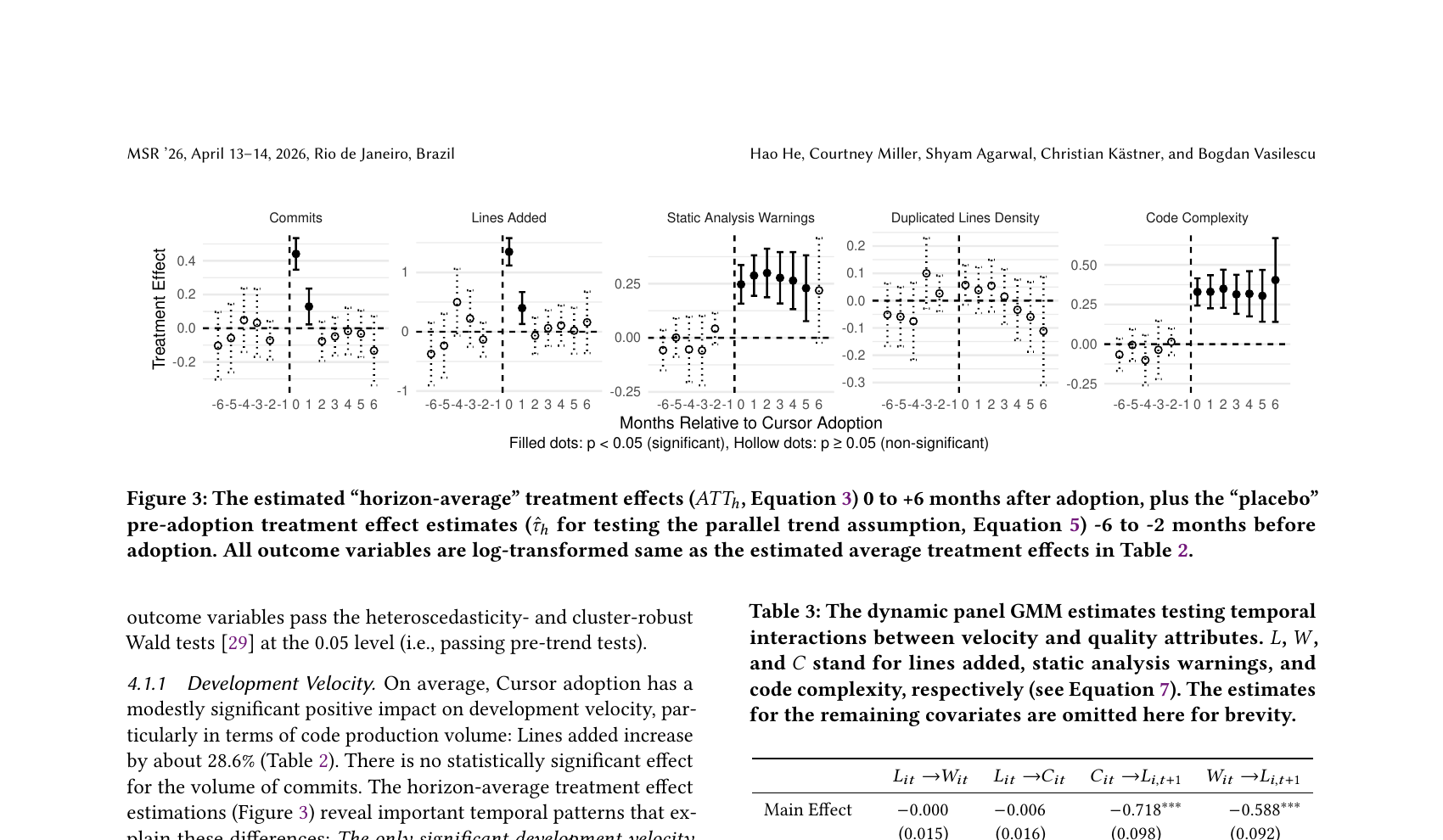
Figure from the CMU study: velocity metrics (left columns) spike then fade, while quality metrics (right columns) remain elevated months after adoption.
The Vicious Cycle
Here's where it gets worse. The researchers ran additional analysis on the temporal interactions between velocity and quality, and found a self-reinforcing cycle:
- AI tools boost velocity - developers ship more code faster
- More code means more complexity - AI-generated code is inherently 9% more complex even after controlling for project size
- Complexity slows future velocity - a 100% increase in code complexity leads to a 64.5% decrease in lines added the following month
- The initial gains cancel out - the velocity boost disappears, but the technical debt remains
In other words, AI coding assistants create a burst of productivity that teams pay for with compounding interest. The CMU team calls this the "excitement-frustration-abandonment" cycle.
Why AI-Generated Code Is More Complex
The study found that even after controlling for codebase size and development dynamics, Cursor adoption led to a baseline 9% increase in code complexity compared to similar projects. Static analysis warnings increased across 16 of 20 categories tracked, with the largest spikes in:
- Naming conventions - inconsistent or unclear variable and function names
- Code hygiene - unused imports, dead code, unnecessary operations
- Code complexity - deeply nested logic, long methods, high cognitive complexity
- Code style - inconsistent formatting and patterns
But it wasn't just cosmetic issues. The researchers also observed increases in logic errors and security warnings - the kind of problems that lead to production bugs. This is exactly why security testing has become the proof of work for AI slop code: the expensive human verification step is now the strongest signal that anyone actually checked.
What This Means for QA Teams
If your organization is adopting AI coding assistants - and most are - here's what you need to prepare for:
1. More Code Means More Surface Area to Test
A 28% increase in code output means a proportional increase in what needs to be tested. If your test coverage doesn't scale with the codebase, you're falling behind.
This isn't just about writing more tests. It's about ensuring your test management process can handle the increased throughput - more test cases to maintain, more regression tests to run, more results to analyze.
2. AI-Generated Code Needs Extra Scrutiny
The study shows AI code is inherently more complex and introduces more static analysis warnings. This means:
- Code reviews take longer, not shorter, because reviewers need to verify AI-generated logic they didn't write
- Test cases need to cover more edge cases, because complex code has more branching paths
- Regression testing becomes critical, because changes to complex code have more unpredictable side effects
3. Don't Cut QA Because Developers Are "Faster"
The temptation is obvious: if AI makes developers 2-3x more productive, maybe you need fewer testers. The data says the opposite. More velocity with degrading quality means you need more quality assurance, not less.
The velocity gains are temporary anyway. After two months, development speed returns to baseline - but the accumulated complexity persists. Teams that cut QA during the honeymoon period will be left with a harder-to-test codebase and fewer people to test it.
4. Track AI-Assisted vs. Human-Written Code
The study suggests that AI-generated code has measurably different quality characteristics. Consider tracking which code is AI-assisted so you can:
- Prioritize those modules for deeper testing
- Monitor complexity trends in AI-heavy areas
- Make data-driven decisions about where AI assistance helps vs. hurts
5. Add Quality Gates to Your Pipeline
If your CI/CD pipeline doesn't already enforce complexity thresholds, now is the time. A quality gate can take several forms. Consider:
- Static analysis gates that block PRs exceeding complexity thresholds
- Mandatory test coverage for new code, especially in AI-assisted modules
- Scheduled refactoring sprints triggered by quality metrics, not just timelines
- Complexity budgets that teams track alongside velocity metrics
The Bigger Picture
This study doesn't say AI coding assistants are bad. It says they change the dynamics of software development in ways that require adaptation. The productivity narrative - "AI makes developers 10x faster" - is at best incomplete and at worst misleading.
The reality is more nuanced: AI makes developers faster at writing code, but writing code was never the bottleneck. Understanding requirements, designing solutions, reviewing changes, and - critically - testing thoroughly are what determine software quality. Speeding up code generation without scaling these activities just means you accumulate technical debt faster.
For QA teams, this is both a challenge and an opportunity. The teams that adapt their test management practices to match AI-era velocity will be the ones shipping quality software. The ones that don't will spend the next year debugging code that was "shipped fast" six months ago.
Our Recommendation
Start by auditing your current test coverage relative to recent code growth. If your codebase grew 20-30% in the last quarter but your test suite didn't keep pace, you have a gap that's only going to widen.
Then, build quality metrics into your development workflow alongside velocity metrics. Track complexity, static analysis warnings, and test coverage as first-class indicators - not afterthoughts.
AI coding assistants are here to stay. The question isn't whether to use them, but whether your quality processes can keep up with them. Your release process is where that pressure shows up first - we cover the specific behaviors that hold up under it in release management best practices when AI writes code.
The full paper, "Speed at the Cost of Quality: How Cursor AI Increases Short-Term Velocity and Long-Term Complexity in Open-Source Projects" by He et al. (2026), is available on arXiv. It was accepted at MSR 2026 (International Conference on Mining Software Repositories).