

Test Automation
Test automation reporting and dashboards
Your frameworks run the tests. TestCollab turns the results into shared reports, dashboards, and test plans. Send JUnit XML or Mochawesome JSON from any CI pipeline with one CLI command, then gate the build on what comes back.
No credit card required. Upload your first results in under 5 minutes.
Trusted by QA teams at



Key advantages
What teams get with Test Automation Management
One command from any CI
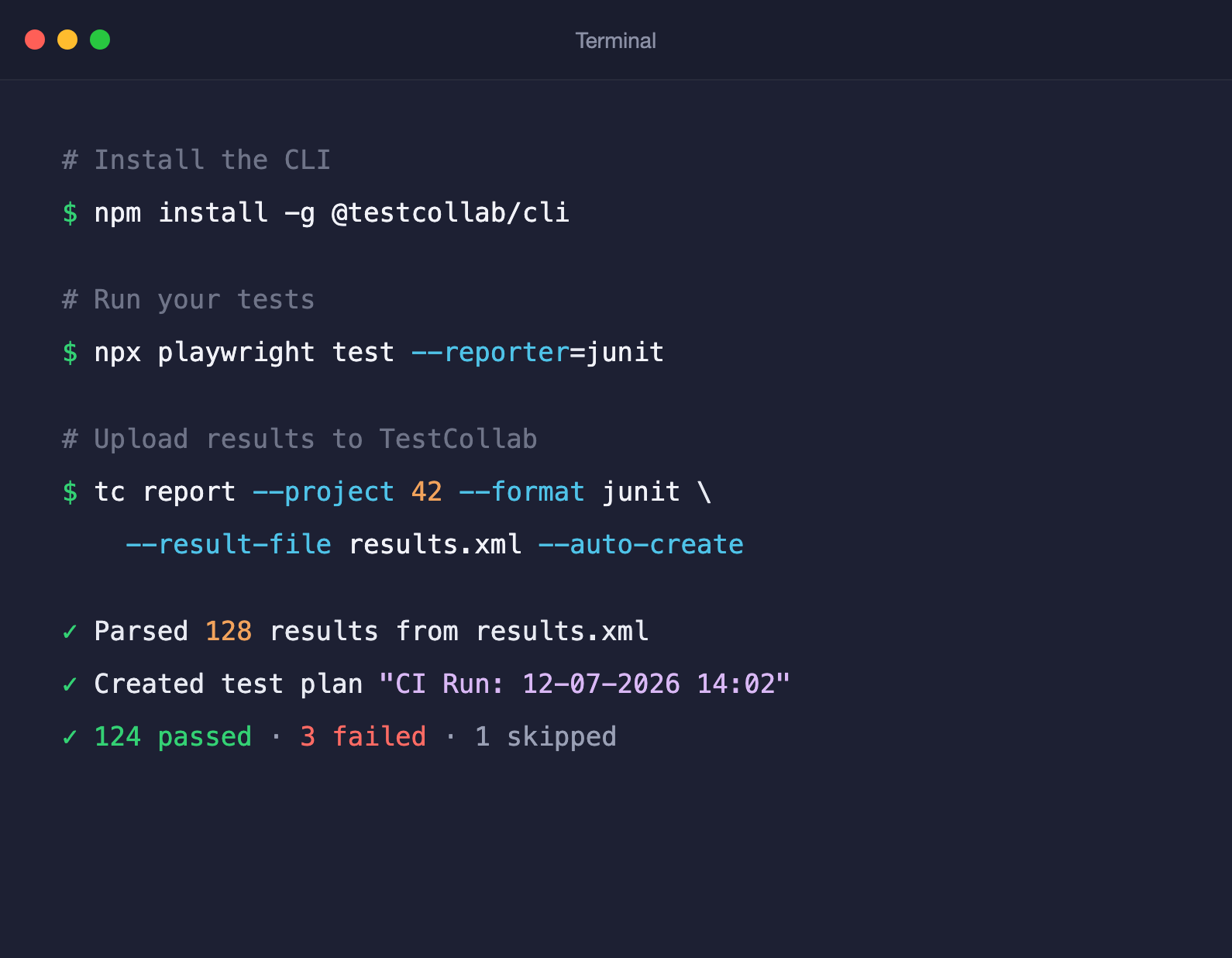
tc report uploads JUnit XML or Mochawesome JSON from GitHub Actions, GitLab CI, Jenkins, or any pipeline that can run Node.js 18+. Test automation reporting without a rebuild of your workflow.
Zero setup with auto-create
Point --auto-create at your result file and TestCollab creates the suites, test cases, and test plan for you. No manual mapping before your first upload.
Any framework, two formats
Playwright, Cypress, pytest, Jest, Selenium-based runners and 10+ more - anything that outputs JUnit XML or Mochawesome JSON works out of the box.
Manual and automated in one place
Automated runs land next to your manual test plans, so coverage, history, and release readiness are reported across both - not in two disconnected tools.
Report from CI
Test automation reporting from any CI pipeline
Install the CLI, run your tests, upload the results. Automated runs become test plans your whole team can see.
One command to upload results
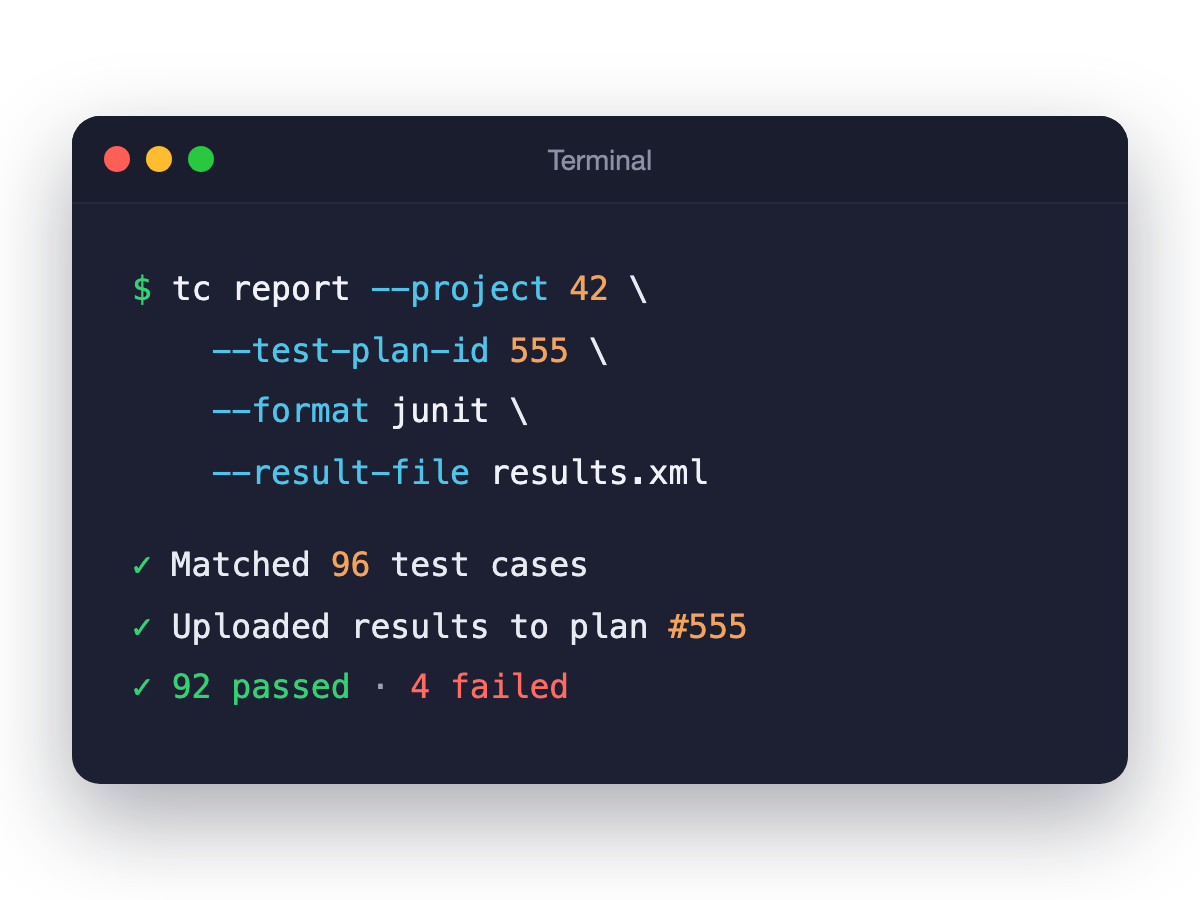
Install @testcollab/cli and run tc report after your test job. It parses your result file and records pass, fail, and skip statuses against a test plan in TestCollab.
Results become test plans, not log files
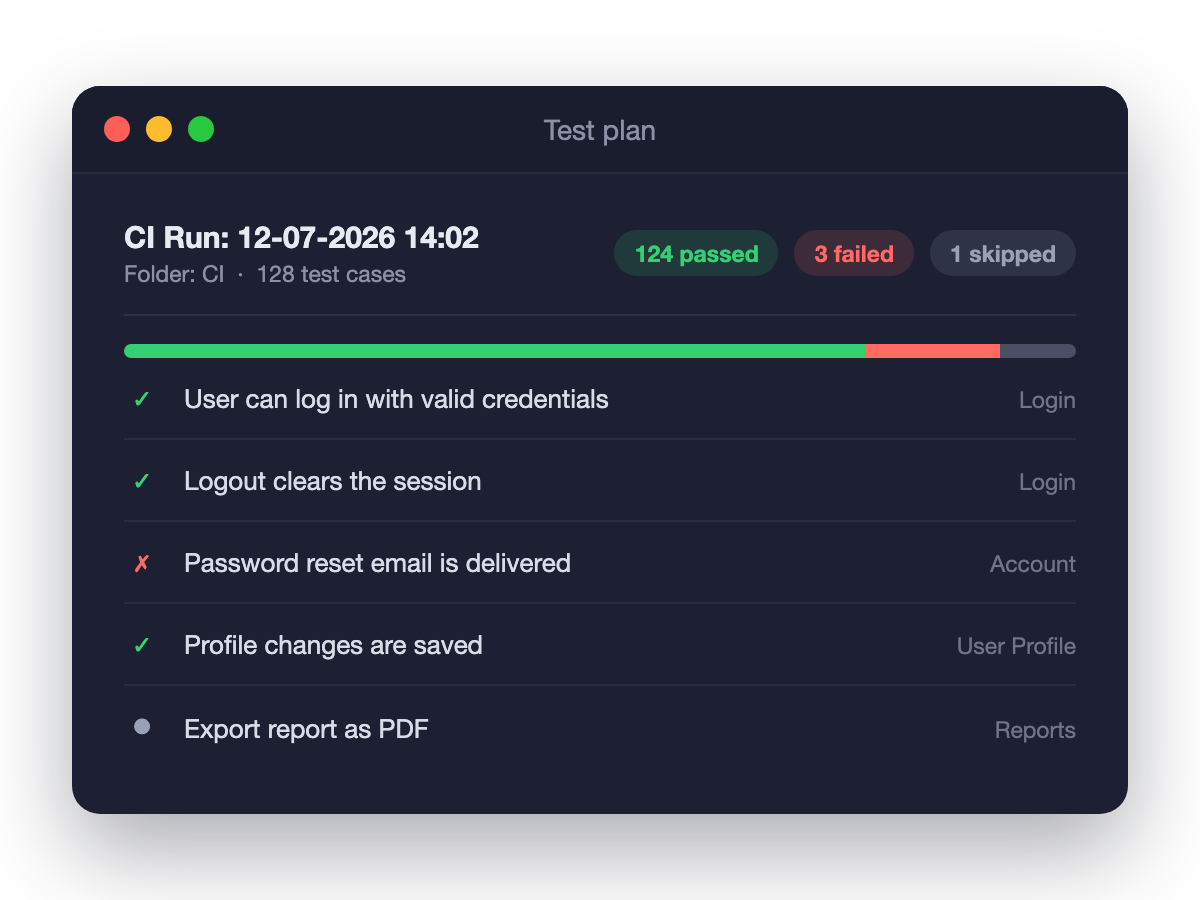
Every upload lands in your test case management workspace: per-case statuses, execution history, and plans organized in folders. Use --skip-missing to mark cases that did not run as skipped.
Configuration matrix support
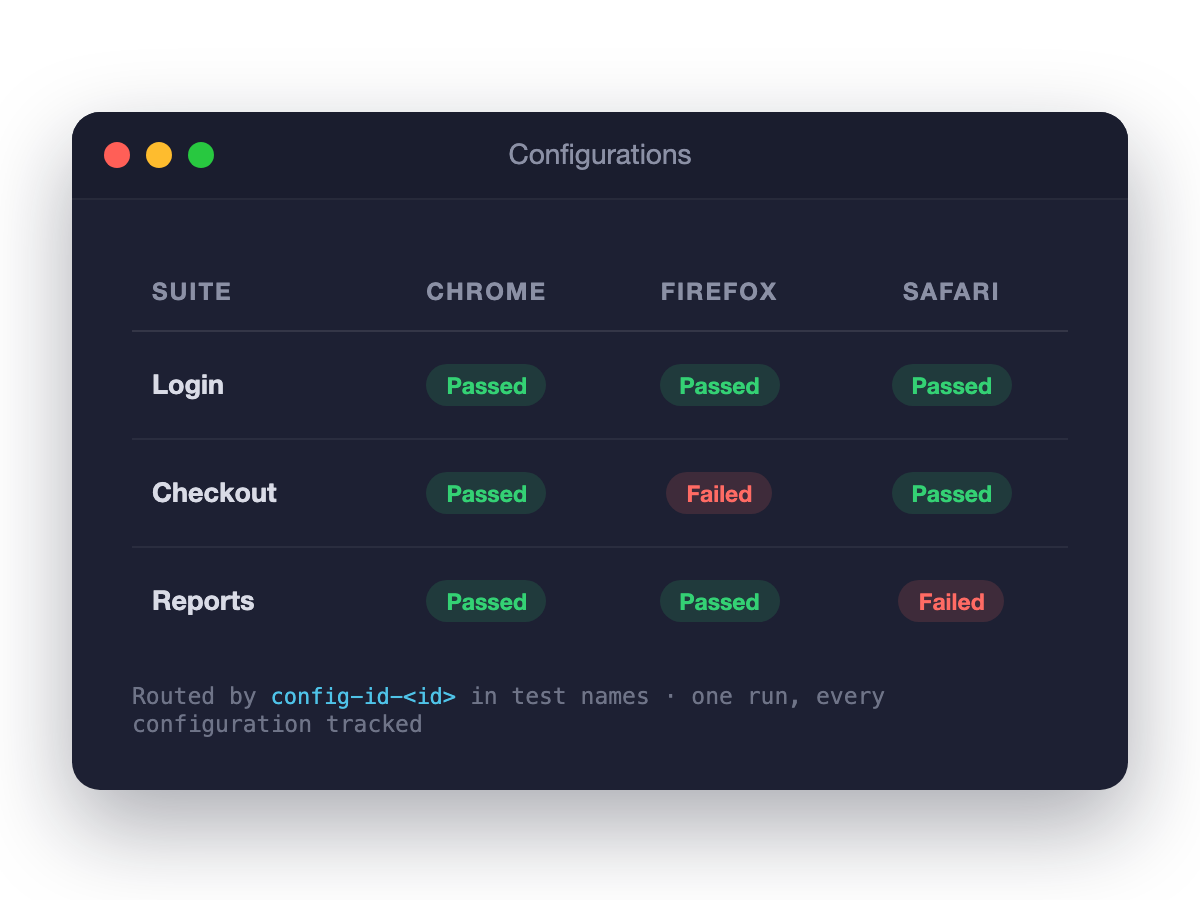
Running the same suite across Browser x OS combinations? Include config-id-<id> in your test names or suite titles and tc report routes each result to the right configuration slot. Works with pre-created plans reported by --test-plan-id.
Dashboards
Test automation dashboards and reports your team can read
After the upload, the results show in dashboards and reports that update with each run. Nobody has to open a CI log to know what passed.
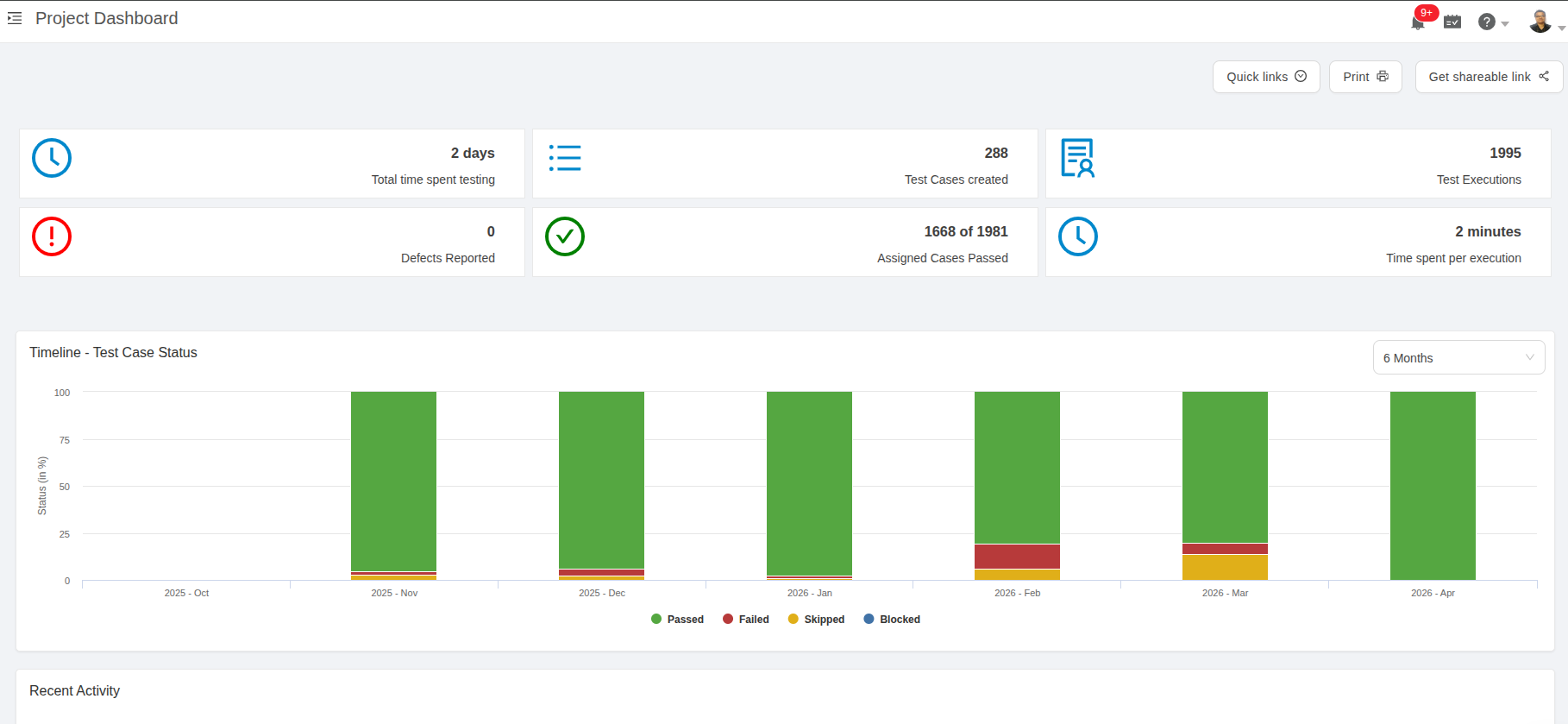
A test automation dashboard for the project
The project dashboard shows the status of your test cases over time: passed, failed, skipped, and blocked for the period that you select. It also lists the test cases that fail most often.
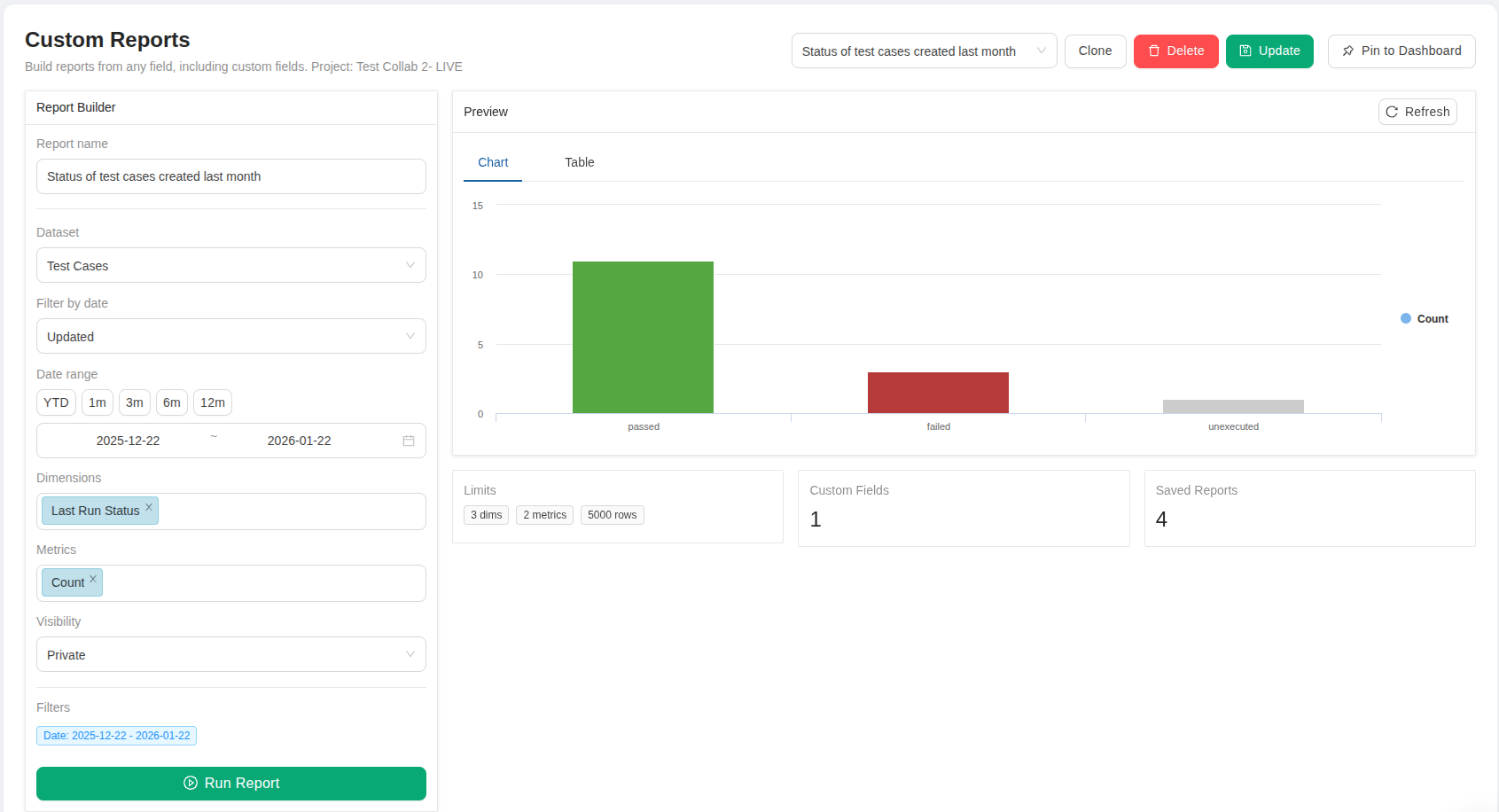
Custom reports from your results
Build a chart or a table from the execution data. Group it by status, priority, or a custom field, and filter it by date. Pin a report to the project dashboard, where it shows as a column, bar, line, or pie chart.
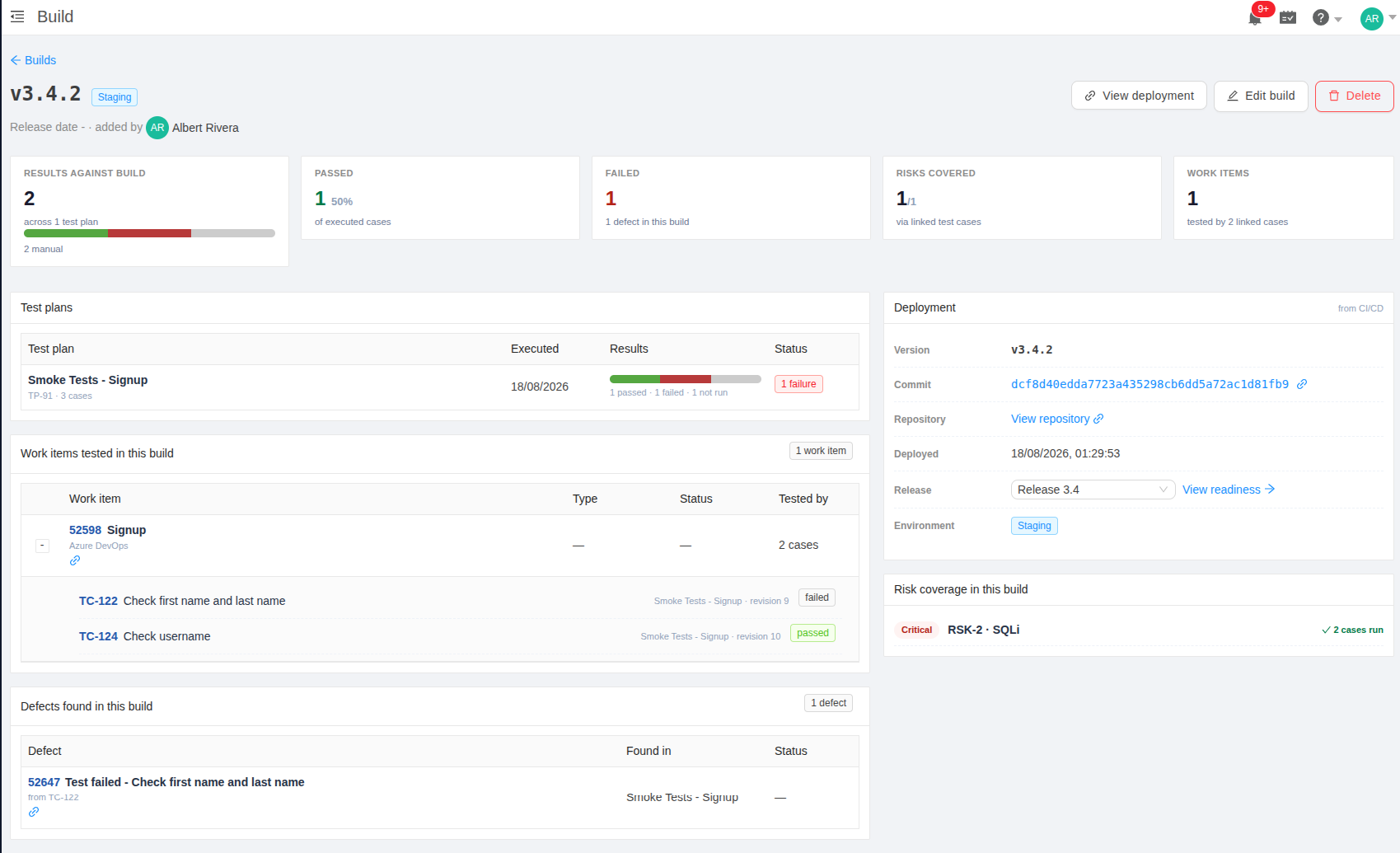
Results tied to the build
A build page shows the results for one version: the passed and failed cases, the test plans, the defects, and the commit and environment that the pipeline sent. Builds are part of the Elite and Enterprise plans.
Manual or CI: each result shows its source
Each result has a run mode: manual, CI, or API. tc report sets it for you. Plan summaries split the results by run mode, so you see how much of the testing is automated.
Failures arrive with their evidence
Screenshots, traces, and logs from the pipeline attach to the test case that failed. tc report reads the attachment markers in the JUnit XML file and uploads the files. The JUnit reporter of Playwright writes these markers for you.
Share and export
Share the project dashboard or a test plan through a read-only public link. Viewers need no account. Export the execution report of a plan as a CSV or PDF file.
Pipelines
Drop-in recipes for your pipeline
Add a few lines to your pipeline config. Every build reports back to TestCollab automatically.
GitHub Actions
Run your tests, then upload results with auto-create:
jobs:
  test:
    runs-on: ubuntu-latest
    env:
      TESTCOLLAB_TOKEN: ${{ secrets.TESTCOLLAB_TOKEN }}
    steps:
      - uses: actions/checkout@v4
      - uses: actions/setup-node@v4
        with:
          node-version: '22'
      - run: npm install -g @testcollab/cli && npm ci
      - run: PLAYWRIGHT_JUNIT_OUTPUT_NAME=results.xml npx playwright test --reporter=junit
      - run: |
          tc report \
            --project ${{ secrets.TC_PROJECT_ID }} \
            --format junit \
            --result-file results.xml \
            --auto-create
GitLab CI
Add a report step to .gitlab-ci.yml:
test-and-report:
  stage: test
  image: node:22
  variables:
    TESTCOLLAB_TOKEN: $TESTCOLLAB_TOKEN
  before_script:
    - npm install -g @testcollab/cli && npm ci
  script:
    - PLAYWRIGHT_JUNIT_OUTPUT_NAME=results.xml npx playwright test --reporter=junit
- tc report --project $TC_PROJECT_ID --format junit --result-file results.xml --auto-createQuality gates
Turn a test plan into a CI quality gate
Reporting tells you what happened. A quality gate decides what happens next. The tc gate command reads a test plan's latest run and fails the CI step when the results do not meet your rule.
Fail the build when tests fail
Add one step after your upload. tc gate exits non-zero the moment a case in the run has failed, which fails the surrounding CI step in Azure DevOps, Jenkins, GitLab CI, GitHub Actions, or Ansible.
# after tc report has uploaded
tc gate --project 45 \
  --test-plan-id 123 \
  --fail-on failed
Set the rule that fits your team
Not every team blocks on a single failure. Pass --fail-on failed,blocked to widen the statuses, --max-failed 2 to tolerate a known-flaky handful, --min-pass-rate 95 to gate on a percentage, or --require-complete to reject a run that still has unexecuted cases. Every criterion you set has to pass. Your own custom statuses work here too.
Hold the deploy until QA signs off
Automated results arrive in seconds. Manual sign-off does not. --wait 1800 polls the run until no case is left unexecuted, so a deployment stage waits for QA instead of shipping ahead of it. Exit codes stay simple: 0 gate passed, 1 gate failed, 2 usage or API error.
Auto-create
Zero-setup reporting with auto-create
No test cases in TestCollab yet? Pass --auto-create and your result file becomes a fully organized test library on the first upload.
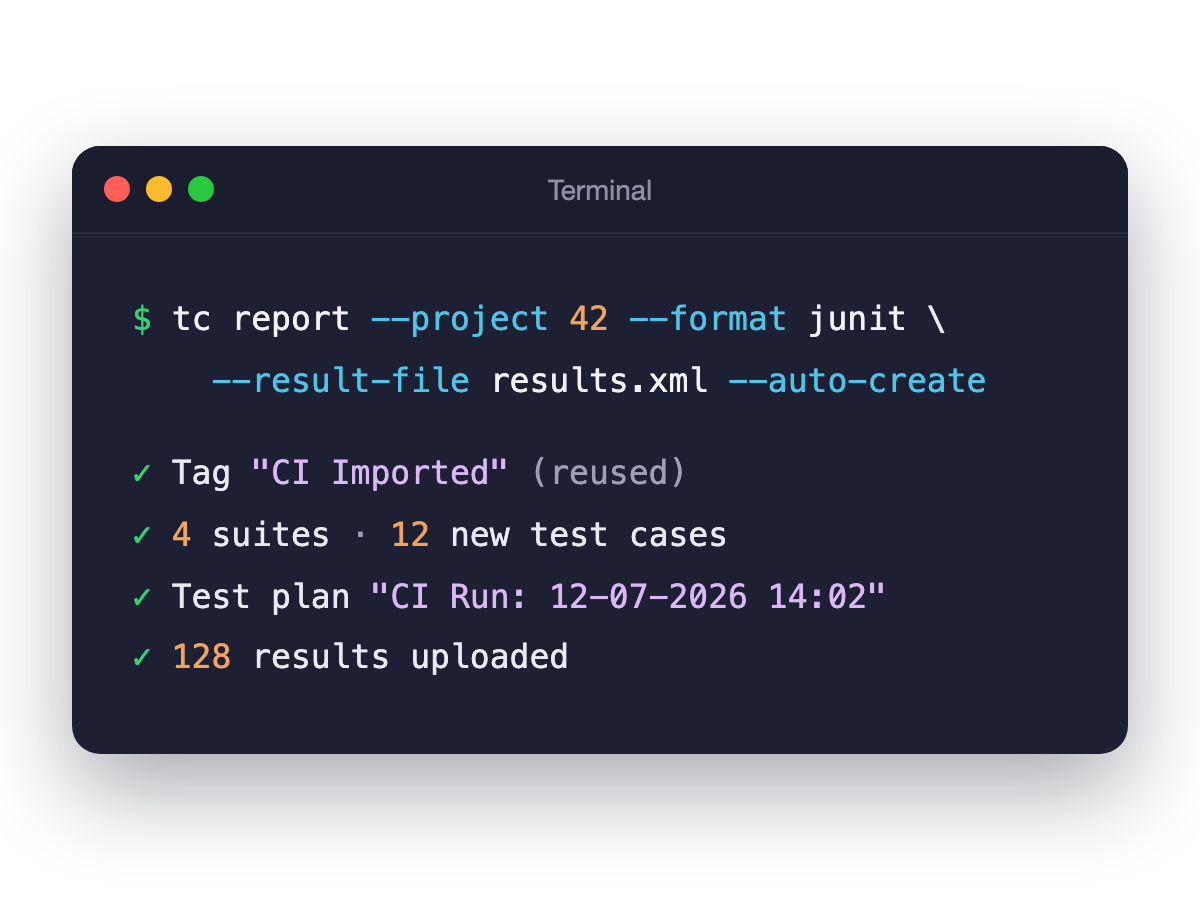
Everything created for you
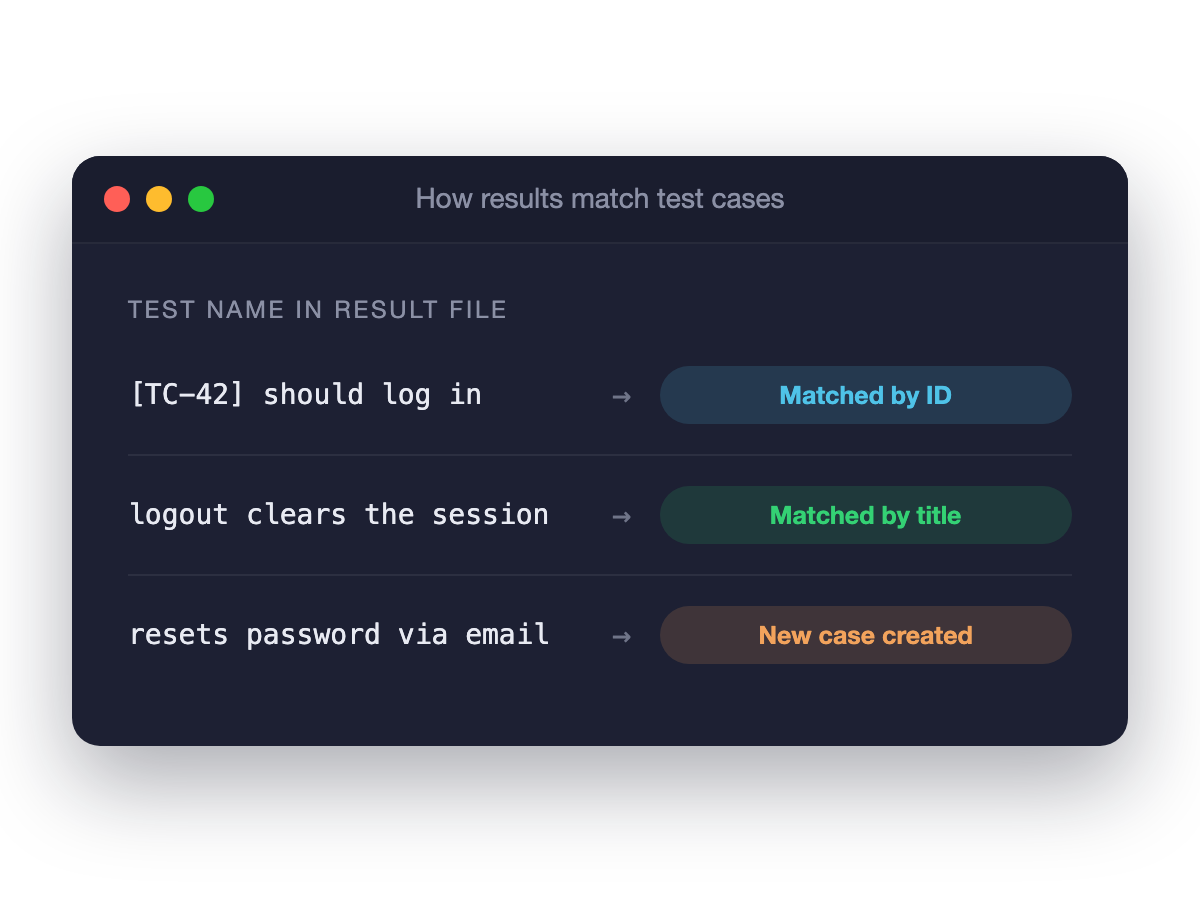
From the result file alone, the CLI creates a CI Imported tag, test suites, test cases, a CI plan folder, and a dated test plan - then uploads the results. Suites and cases are matched by ID or exact title on later runs, so reruns don't recreate them.
Smart test matching
Tests named [TC-42] should login match by ID. Tests without IDs match by normalized title within their suite. Both can coexist in one result file, so you can adopt IDs gradually.
Readable suite names
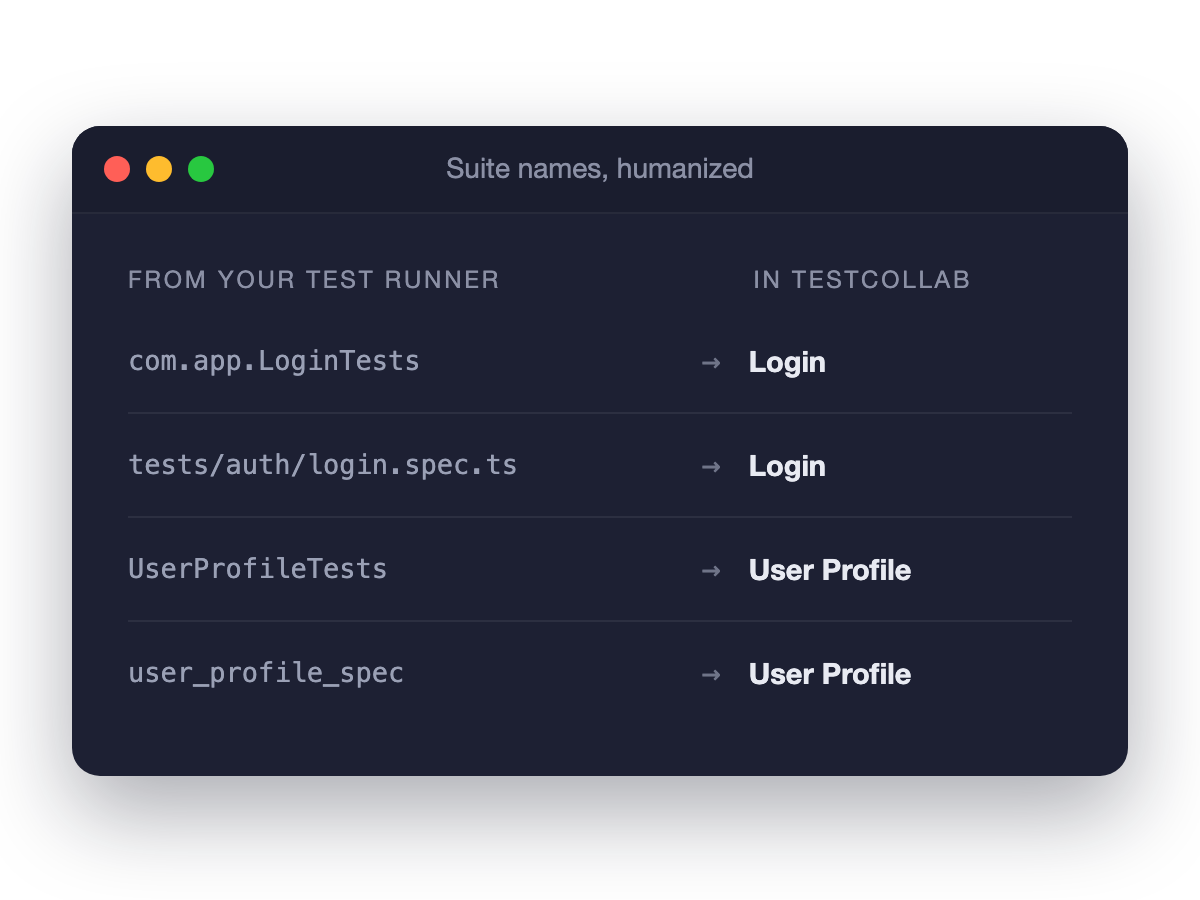
Raw runner names are humanized automatically: com.app.LoginTests becomes Login, tests/auth/login.spec.ts becomes Login, user_profile_spec becomes User Profile. Your test library stays readable for the whole team.
Frameworks
Works with the frameworks you already use
If it can output JUnit XML or Mochawesome JSON, it works. Most frameworks support one of the two natively.
JUnit XML from anything
Playwright (--reporter=junit), pytest (--junitxml), Jest (jest-junit), Robot Framework, PHPUnit, WebdriverIO, TestCafe, Newman, Behave, go test and more - JUnit XML is the lingua franca of test results, and tc report speaks it fluently.
Cypress via Mochawesome
Cypress teams upload Mochawesome JSON directly with --format mochawesome. There is also a dedicated Cypress reporter plugin
Selenium and everything JVM
TestNG and JUnit-based Selenium suites produce compatible XML natively. Follow the Selenium CI/CD guide
Beyond automation
Beyond scripted automation
The same CLI powers BDD sync from Git and AI-agent test execution, so every kind of testing reports into one workspace.
AI agents execute your plans
tc getTestPlan outputs a plan as clean JSON for AI coding agents. The agent executes cases via browser automation and tc report uploads the outcome. Pair it with QA Copilot for AI-generated test cases.
BDD suites synced from Git
Keep Gherkin feature files in your repo and sync them with tc sync - features become suites, scenarios become test cases. See BDD testing with Gherkin for the full workflow.
One answer to "can we ship?"
Manual runs, CI automation, and agent-driven checks all feed the same dashboards. The release dashboard shows readiness across every testing type, not just the automated slice.
FAQ
Answers teams look for
What is test automation reporting?
Test automation reporting turns the raw output of automated test runs into results that a team can read: which tests passed and failed, on which build, with what evidence, and how the numbers change over time. In TestCollab, tc report uploads the result file from your pipeline, and the results show in test plans, dashboards, and reports.
Can I use TestCollab as a test automation dashboard?
Yes. The project dashboard shows the status of automated and manual results over time, and you can pin custom reports to it as charts. A read-only public link lets people with no account see the dashboard.
Which test automation metrics does TestCollab show?
The pass, fail, skip, and block counts of each run. The status of the test cases over time. The test cases that fail most often. The share of results from CI and from manual runs. The time spent on executions. Custom reports group the execution data by status, priority, or a custom field.
What is test automation management?
Test automation management is organizing, tracking, and reporting on automated test results alongside the rest of your QA work - as opposed to test execution, which your frameworks and CI pipeline handle. TestCollab combines automated test management and manual testing in one workspace: results from any framework become test plans, execution history, and reports your whole team can use.
Does TestCollab run my automated tests?
No - your test framework and CI pipeline execute the tests, which means no vendor lock-in on execution. TestCollab manages what happens after: collecting results, organizing them into test plans, and reporting across manual and automated testing. For AI-agent-driven execution of manual test plans, see QA Copilot.
How do I send automated test results to TestCollab?
Install @testcollab/cli from npm, set your API token, and run tc report --project <id> --format junit --result-file results.xml --auto-create after your tests finish. The CLI parses the file and uploads every result. Ready-made recipes exist for GitHub Actions and GitLab CI, and any CI that runs Node.js 18+ works the same way.
Which test automation frameworks are supported?
Any framework that outputs JUnit XML or Mochawesome JSON: Playwright, Cypress, Jest, Pytest, TestNG, JUnit 4/5, Robot Framework, PHPUnit, Cucumber (JS and JVM), WebdriverIO, TestCafe, Newman, Behave, Go, Kaspresso, and Selenium suites built on TestNG or JUnit.
Do I need to create test cases in TestCollab before uploading results?
No. With --auto-create, the CLI creates suites and test cases directly from your result file on first upload and reuses them on later runs; each run gets its own dated test plan. If you prefer curated plans, pre-create one with tc createTestPlan and report against it by ID.
How does test matching work?
Two ways, which can coexist in one result file: include a TestCollab ID in the test name (like [TC-42] should login) for exact ID matching, or let tests without IDs match by normalized title within the same suite. Unmatched tests create new cases automatically in auto-create mode.
Can I report results for different browser and OS configurations?
Yes. For test plans with configurations (like a Browser x OS matrix), include config-id-<id> in your JUnit test names or as a Mochawesome suite title, and results are recorded against the right configuration. This works with pre-created plans reported by ID.
Do screenshots and logs from the pipeline reach TestCollab?
Yes, for JUnit XML results. tc report reads [[ATTACHMENT|path]] marker lines in the result file and uploads each file to the matching test case execution. The JUnit reporter of Playwright writes the markers for each attachment that it recorded. See how to attach screenshots, logs, and traces.
Can TestCollab fail a CI build when tests fail?
Yes. The tc gate command reads a test plan's latest run and exits non-zero when the results do not meet your rule, which fails the surrounding CI step. It works in Azure DevOps, Jenkins, GitLab CI, GitHub Actions, and any runner that reacts to an exit code.
What is a quality gate in CI/CD?
A quality gate is an automated checkpoint that lets a pipeline continue only when defined conditions are met. Most tools gate on static code analysis. TestCollab gates on test execution results, so the check reflects what actually passed rather than what the code looks like. See the guide to quality gates in testing.
Can I hold a deployment until manual QA finishes?
Yes. Pass --wait with a timeout in seconds and the gate polls the run until no test case is left unexecuted. The deploy stage waits for the sign-off instead of running ahead of it.
Is EU data residency supported?
Yes. TestCollab offers an EU region hosted in Frankfurt. Pass --api-url https://api-eu.testcollab.io to any CLI command and your results stay in the EU.
Your automation is running. Start managing it.
One workspace for manual, automated, and agent-driven testing.



