

QA agent guide
The Hermes QA agent: close the QA loop - generate, curate, run
Hermes Agent is an open-source AI agent by Nous Research. With TestCollab it can write test cases from your code and specs, and run a human-curated test plan in a real browser, reporting pass, fail, and skip results back to your test management tool.
TL;DR
- The Hermes QA agent does two co-equal jobs: it writes test cases (generating them from your code or specs) and it runs a test plan you curated in TestCollab, clicking through the app in a real browser and recording pass, fail, or skip for each case.
- A human sits between the two halves. Hermes drafts cases and drives the browser; people curate the plan and own coverage. That is the line between an AI QA agent and AI test-case generation.
- Generation runs through the TestCollab MCP server (17 tools for cases, suites, and plans). Execution runs through the TestCollab CLI (
tc getTestPlanthentc report). - Setup is one-time: install Hermes, then wire up whichever capability you need - the MCP server for writing, the
tcCLI and the TestCollab QA skill in~/.hermes/skills/for running. - Results map back to TestCollab through JUnit XML with a
[TC-ID]prefix on each test case, so every result lands on the right test case instead of creating duplicates.
QA leads, SDETs, QA engineers, and developers who want an AI agent both to draft test cases and to execute a curated test plan against the app. Hermes is open source and brings-your-own-API-key, so it suits teams that want model flexibility and no per-seat agent cost.
Start a 14-day TestCollab trial, connect Hermes, and follow the steps below. No credit card needed.
Start free trialWhat is the Hermes QA agent?
The Hermes QA agent is what you get when you point the open-source Hermes Agent by Nous Research at TestCollab, and it covers both halves of QA. It can WRITE test cases - reading your code or specs and generating structured cases, suites, and plans in your workspace - and it can RUN a curated plan, driving a real browser through every test case and reporting the results back. A human curates in between: people decide what to test and refine the plan, the agent does the drafting and the clicking.
On its own, Hermes is a general-purpose agent with built-in browser automation and a skill system that lets you teach it new workflows. The TestCollab QA skill turns it into a focused QA worker for execution, and the TestCollab MCP server gives it the tools to author cases. Either way, the important distinction is what the agent does and does not do. It executes and drafts; it does not invent coverage, decide product strategy, or make the release call. Your QA team still owns the test plan and the expected results. The agent handles the parts that are slow and tedious for humans and brittle for hand-written end-to-end scripts: drafting first-pass cases, clicking through the flow, filling forms, and verifying that the right things appear in the right places.
Generation answers what to test. Execution answers how to click through what was already decided. The two complement each other, and Hermes can do both, but they are not the same job, and conflating them is the most common source of confusion about AI in software testing.
- Open source, by Nous Research
- Hermes Agent is a free, open-source agent. You can read the source, self-host it, and there is no per-seat license. See the Hermes Agent repo.
- Writes and runs
- Hermes drafts test cases from code or specs (through the MCP server) and executes a human-curated plan in a browser (through the
tcCLI). One agent covers both halves of QA. - Curated by humans
- The agent never decides what to test or what counts as correct. People own coverage and the expected results; the agent drafts cases and checks each step against what you wrote.
- Built-in browser automation
- Hermes drives a real browser through MCP, using the page's accessibility tree rather than fragile CSS selectors, so it survives styling and layout changes.
- Skill-driven
- The TestCollab QA skill teaches Hermes the full
getTestPlanto browser to report cycle. You install it once and Hermes loads it automatically when your prompt matches. - Bring your own model
- Hermes supports 200+ models via OpenRouter plus Anthropic, OpenAI, and other providers. Strong instruction-following models (Claude, GPT-4, Gemini) work best for QA.
Because the agent works from a structured plan, the quality of a run depends on the quality of your test cases, not on the agent guessing intent. That is why TestCollab keeps humans in the loop on the plan and lets the agent handle drafting and execution: the test plan is the contract between the two.
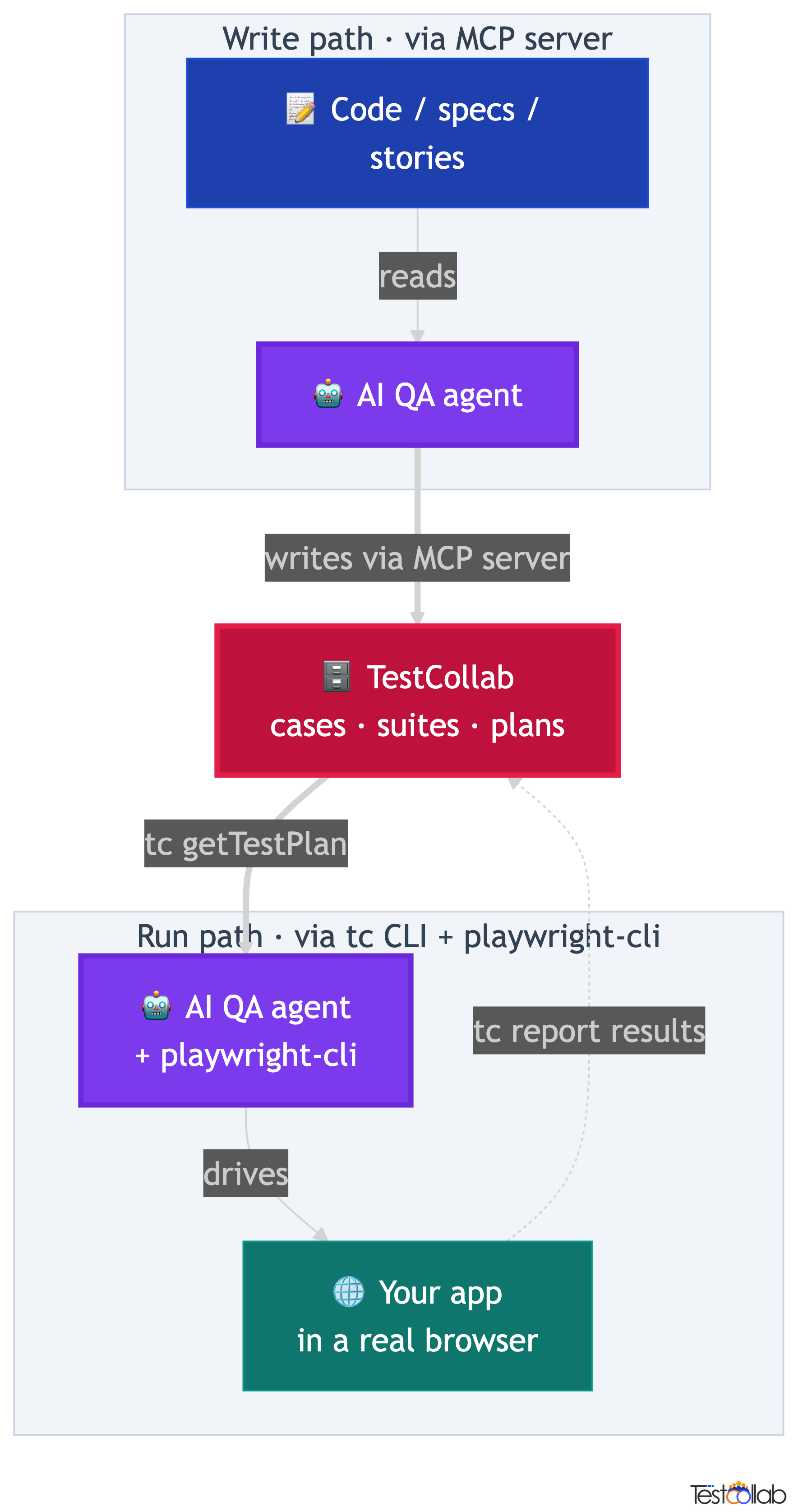
How Hermes closes the QA loop: write, curate, run, report
Put both halves together and you get a full cycle. Hermes writes the first-pass test cases, a human curates them into a plan, the same agent runs that plan in a browser, and the results report straight back onto the cases. Nothing leaves TestCollab, and no one copy-pastes between the UI and the agent.
What makes this durable is that the loop is agent-agnostic. The tc getTestPlan and tc report commands are the same regardless of which agent drives the browser, and the MCP generation tools are shared too. Hermes, Claude Code, and Codex all author into the same workspace and consume the same plan JSON, producing the same JUnit XML. You can swap agents without rewriting your QA process, and the test plan stays the single source of truth.
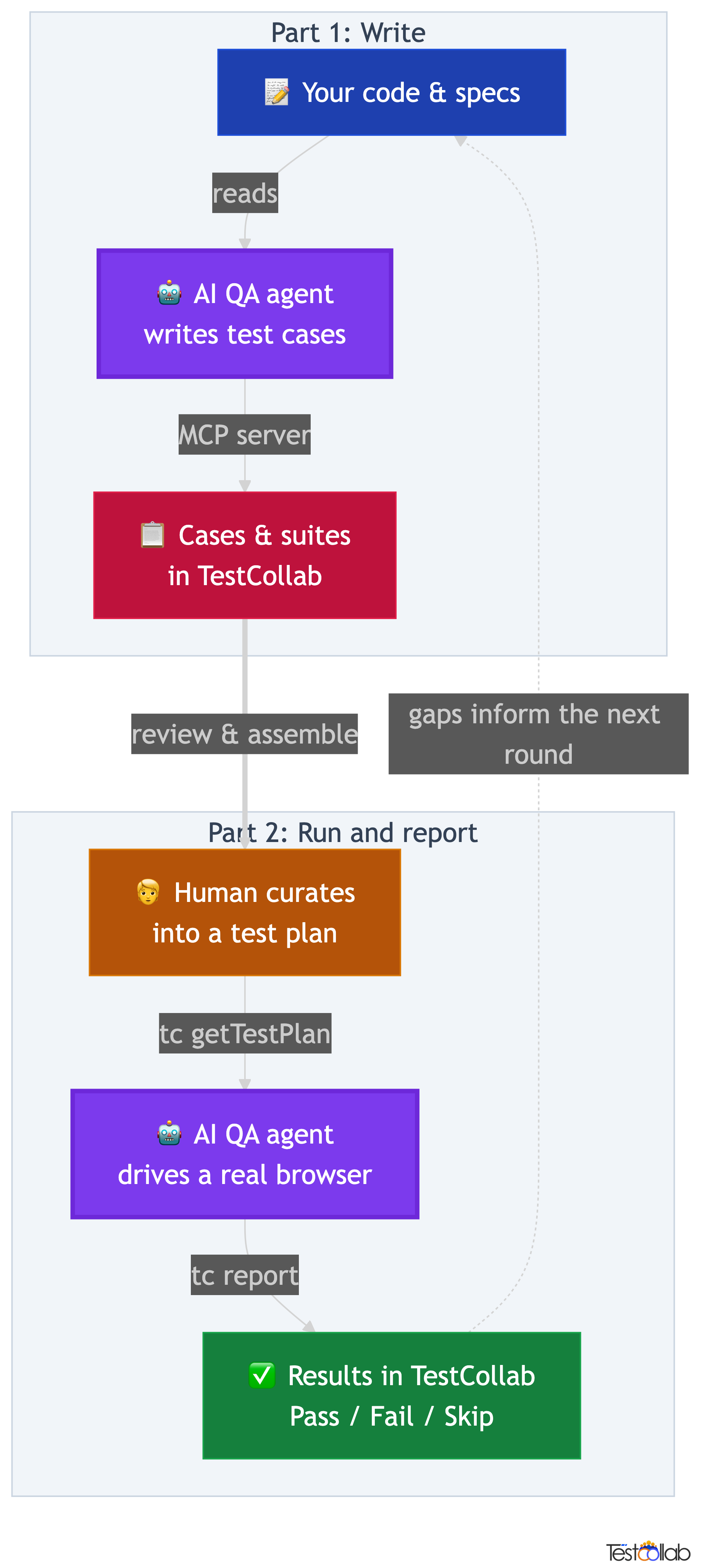
The full QA loop
- Hermes writes test cases: it reads your code or specs and drafts cases, suites, and plans in TestCollab through the MCP server.
- A human curates the plan in TestCollab: refining steps and expected results, choosing which cases to run, and assembling them into a test plan.
- Hermes runs the plan:
tc getTestPlanexports it as JSON, the agent opens a browser and executes each case, recording pass, fail, or skip. tc reportuploads the JUnit XML results back to TestCollab, where each result lands on the matching test case.
The contract between TestCollab and the agent is just those CLI commands plus the JUnit [TC-ID] convention for execution, and the MCP tools for generation. Everything else (which model runs, how the browser is driven) is an implementation detail of the agent. That is why the same plan that runs on Hermes today can run on a different agent tomorrow with no changes to the plan itself.
Generate test cases
Want Hermes to author cases from your code or specs into TestCollab? Jump to Part 1 for the MCP server setup and the generation workflow.
Run and report
Already have a curated plan and just want it executed in a browser? Jump to Part 2 for the tc CLI, the QA skill, and the run loop.
Set up Hermes for TestCollab
Both halves share the same base prerequisites. Get these in place once and you are ready to wire up whichever capability you need. Generation and execution each add one extra bit of setup, covered in their own parts below, so you only configure what you actually use.
Shared prerequisites
- - Create a TestCollab account if you do not already have one.
- - Generate an API token: Profile then API Token.
- - Note your project ID so the agent knows which workspace to write into and read from.
- - Install and authenticate Hermes itself (via its install script, then
hermes setup), and have an LLM API key ready.
Generation and execution each need one extra step beyond the shared prerequisites. To WRITE cases, connect the TestCollab MCP server in Part 1. To RUN plans, install the <code class="edu-inline-code">tc</code> CLI and the TestCollab QA skill in Part 2. Set up only the half you need, or both.
Part 1: Write test cases with Hermes
The first half of the loop is generation: Hermes reads your code, specs, or user stories and creates structured test cases, suites, and even test plans directly in TestCollab. Today that runs through the TestCollab MCP server, which exposes 17 tools for test cases, suites, and test plans over the Model Context Protocol. Connect it once and Hermes can author cases in your workspace the same way it drives a browser: through natural language.
From code to cases
Point Hermes at a feature or module. It reads the implementation, identifies happy paths, edge cases, and error handling, then creates test cases with steps and expected results, organized into suites.
From specs to scenarios
No code access needed for generation either. Give Hermes a user story, requirement, or API spec and it drafts cases covering success paths, failure modes, and corner cases for you to review and keep.
Close the loop
Generate cases, curate them into a plan, then execute that plan with the same agent using the tc getTestPlan loop in Part 2. One agent covers both halves of QA.
Connect the MCP server so Hermes can write cases
Generation needs one extra bit of wiring on top of the shared prerequisites: the TestCollab MCP server, registered with Hermes. Add it once and Hermes discovers its tools and can author cases into your workspace. A write-only reader needs nothing from Part 2.
Connect the TestCollab MCP server
- Get your API token from TestCollab: Profile then API Token. Note your project ID as well.
- Register the TestCollab MCP server with Hermes using the config below.
- Restart Hermes so it discovers the server's tools.
- Prompt it in natural language, for example: "Generate test cases for the checkout module and add them to project 16."
Hermes already speaks MCP - it is the same machinery it uses to drive a browser - so it accepts a standard MCP server block. Add the TestCollab server to your Hermes MCP configuration and restart it.
{
  "mcpServers": {
    "testcollab": {
      "command": "npx",
      "args": ["-y", "@testcollab/mcp-server"],
      "env": {
        "TC_API_TOKEN": "your-api-token",
        "TC_API_URL": "https://api.testcollab.io",
        "TC_DEFAULT_PROJECT": "your-project-id"
      }
    }
  }
}Today, test-case generation runs through the MCP server, while the tc CLI handles execution (tc getTestPlan and tc report). CLI-driven generation is coming soon, so you will be able to script case creation the same way you already script runs. Until then: MCP server for generating, CLI for executing.
For a deeper look at AI-driven test authoring, see our guide to AI test case generation with the MCP server.
Generate test cases, suites, and plans with Hermes
With the MCP server connected, generation is a natural-language conversation. You describe a feature, paste a spec, or point Hermes at a module, and it drafts cases through the server's 17 tools for test cases, suites, and test plans. The output lands directly in your TestCollab project, structured into suites and ready for a human to curate.
Because Hermes can both read source and call the MCP tools, the same prompt that asks it to study the checkout flow can also ask it to write the resulting cases into the right project. From code, it identifies happy paths, edge cases, and error handling. From a spec or user story, it drafts cases for success paths, failure modes, and corner cases. Either way the result is a set of structured cases you review and keep, not a wall of text to transcribe.
Generate test cases for the checkout module and add them to project 16.Once the cases are in your workspace, the next step is human: review the drafts, refine them, and assemble a plan. That curation step is what turns generation output into something the agent can run, and it is covered next.
Curate generated cases into a test plan
Generation gives you a first draft, not a finished plan. The curation step is where a human turns WRITE output into RUN input, and it is the most important step in the whole loop because it is where coverage and correctness get decided.
Read through the AI-drafted cases the same way you would review a teammate's work. Fix anything the agent got wrong, tighten the steps, and make the expected results concrete enough to verify. Then organize the cases into suites and assemble the ones you want to run into a test plan. This is also where you note the plan ID and project ID, because Part 2 consumes them directly when the agent fetches and executes the plan.
Turn drafts into a runnable plan
- - Review the AI-drafted cases for accuracy, gaps, and anything the agent misunderstood.
- - Refine steps and expected results so each check is specific and deterministic.
- - Organize cases into suites that match how your team thinks about the feature.
- - Assemble a test plan from the cases you want to run.
- - Note the plan ID and project ID - Part 2 needs both to fetch and run the plan.
Part 2: Run and report with Hermes
The second half of the loop takes a human-curated plan and drives a real browser through it. You hand Hermes a plan ID and a target URL; it fetches the plan, executes each case step by step, and reports the results back. This is the execution half, and it carries the run/execute intent: the agent does the clicking, you own the plan.
The contract is three moves, the same regardless of which agent runs them. tc getTestPlan exports the plan as structured JSON, the agent drives the browser, and tc report uploads the JUnit XML results. Hermes slots into the middle of that loop as the thing that does the clicking.
The four-step QA loop
- Humans curate the test plan in TestCollab: which test cases to run, the steps, and the expected result for each step.
tc getTestPlanexports the plan as structured JSON that the agent can read, so there is no copy-paste from the UI.- Hermes opens a browser, executes each test case step by step, and records pass, fail, or skip for every case.
tc reportuploads the JUnit XML results back to TestCollab, where each result lands on the matching test case.
The contract between TestCollab and the agent is just those two CLI commands plus the JUnit [TC-ID] convention. Everything else (which model runs, how the browser is driven) is an implementation detail of the agent. That is why the same plan that runs on Hermes today can run on a different agent tomorrow with no changes to the plan itself.
Install the tc CLI and QA skill so Hermes can run plans
Execution needs the TestCollab CLI plus the TestCollab QA skill installed into Hermes' global skills directory, on top of the shared prerequisites. Install both once and you never touch them again; you just launch Hermes from whatever app you want to test. A run-only reader needs nothing from Part 1.
The key idea is that the skill lives in Hermes' global skills directory, not in your project. Install it one time and it is available from every directory on your machine. You launch the agent from your own app's project folder, the same place you would cd into to run tests by hand, and Hermes auto-loads the skill from its description when your prompt mentions the work.
npm install -g @testcollab/cli
tc --versionexport TESTCOLLAB_TOKEN=your-token-herecurl -fsSL https://raw.githubusercontent.com/TCSoftInc/testcollab-cli/main/hermes-skill/testcollab-qa/scripts/install.sh | bashHermes loads skills from ~/.hermes/skills/. The install script copies SKILL.md into ~/.hermes/skills/software-development/testcollab-qa/, because software-development is the category declared in the skill's manifest. That nesting is expected. One install makes the skill available from every directory on your machine.
ls ~/.hermes/skills/software-development/testcollab-qa/
echo "TESTCOLLAB_TOKEN=your-token-here" >> ~/.hermes/.envAdding the token to ~/.hermes/.env lets the skill call the TestCollab API during a run, even in a fresh shell. Hermes has built-in browser automation, so there is nothing extra to install for the browser itself. With the CLI, the skill, and the token in place, execution setup is done and you do not repeat it for future test plans.
Run a test plan with Hermes
To run a plan, change into the directory of the app you actually want to test (your app's repo), not testcollab-cli. Launch Hermes, then describe the job in plain English: which test plan, which project, the target URL, and the login credentials. Hermes finds the TestCollab QA skill from your prompt, fetches the plan, drives the browser, and reports back.
Give the agent everything it needs in one prompt. The plan ID and project ID tell it which test cases to run; the URL tells it where the app lives; the credentials let it log in without guessing. The clearer the prompt, the cleaner the run.
cd ~/your-app
hermesExecute test plan 555 in project 16 against http://localhost:3000.
Login: testuser@example.com / password123.What Hermes does after your prompt
- Matches your prompt to the
testcollab-qaskill via its description and loads it. - Runs
tc getTestPlanto fetch test plan 555 from project 16 as structured JSON. - Opens a real browser and navigates to your target URL, logging in with the credentials you provided.
- Executes each test case step by step, checking each expected result against the page.
- Generates a JUnit XML result file with a
[TC-ID]prefix on every test case. - Uploads the results with
tc reportand prints a pass, fail, skip summary.
For CI or scripted runs, skip the interactive session and pass the prompt inline. The non-interactive flag runs the same loop without prompting, which is what you want inside a pipeline step.
hermes -z "Execute test plan 555 in project 16 against http://staging.example.com. Login: testuser@example.com / password123." --accept-hooksHermes interacts with your app like a real user. It submits forms, creates records, and changes data. Always point it at a local or staging environment, and use a dedicated test account, so a run cannot touch real customer data.
How Hermes drives a real browser
Hermes drives the browser through accessibility-tree based automation rather than CSS selectors. The accessibility tree is a text representation of what is on the page, with reference IDs for interactive elements. The agent takes a snapshot of that tree, finds the element it needs by its accessible name or role, and acts on it by reference ID.
This approach is resilient to the kind of change that breaks brittle end-to-end scripts. A new CSS class, a re-render, a restyled button, or a reordered layout does not move the element in the accessibility tree as long as the label and role stay the same. For verification steps, the agent reads the tree and checks whether the expected text or element is present, which is exactly what a human would look for. If the expected result is not there, the test case is marked failed with a note describing what was expected versus what was found.
| Test step | What the agent does |
|---|---|
| Navigate to /settings | Navigates the browser to the full URL built from your base URL |
| Click the Save button | Snapshots the page, finds the Save button by its label, clicks it by reference ID |
| Enter admin@example.com in the email field | Snapshots the page, locates the email input, fills it with the value |
| Verify the success message appears | Snapshots the page and checks the accessibility tree for the expected text |
| The page title should be Dashboard | Snapshots and verifies the heading element contains Dashboard |
Each verification step is a real check against the page, not an assumption. Because the agent reasons over a structured text tree rather than pixels, runs stay token-efficient and the failure messages are specific enough to act on. For the deeper reasoning behind accessibility-tree automation, see our Playwright CLI guide.
Results back in TestCollab
Results map back to your test cases through the [TC-ID] convention in the JUnit XML the agent produces. Each <testcase> name starts with the bracketed TestCollab test case ID, and tc report uses that ID to attach the result to the correct test case. Without the prefix, results would create new test cases instead of updating the ones you curated.
After the upload, results appear in the test plan's Test Cases tab in TestCollab, each with a color-coded status. You can click any test case to see the full execution detail, including the failure message with expected versus actual for cases that did not pass.
<testsuites>
  <testsuite name="Sprint 12 Regression" tests="3" failures="1">
    <testcase classname="Login" name="[TC-42] Valid login redirects to dashboard" time="4.2"/>
    <testcase classname="Login" name="[TC-43] Invalid password shows error" time="3.1">
      <failure message="Error message not found">
        Expected: Error banner visible after wrong password.
        Actual: Page reloaded without error indication.
      </failure>
    </testcase>
    <testcase classname="Settings" name="[TC-44] User can update email" time="5.8"/>
  </testsuite>
</testsuites>- Passed (green)
- Every step's expected result matched what the agent found on the page.
- Failed (red)
- At least one expected result did not match. The failure message records expected versus actual so you can triage quickly.
- Skipped (yellow)
- The agent could not run the case, for example a precondition was not met or a prior step blocked it.
- Unexecuted (grey)
- The case was in the plan but produced no result, so its status in TestCollab stays untouched.
Because the results live on your real test cases inside test plan management, the run becomes part of your normal QA record: dashboards, history, and reports update the same way they do for a human-executed run.
Tips for better results with Hermes
The agent is only as good as the cases it drafts, the plan it executes, and the prompt it receives. A few habits make the difference between a clean run and a noisy one full of false failures - and one of them helps both halves of the loop. The bullets below are tagged by where they help: WRITING, RUNNING, or both.
- Write concrete expected results (helps WRITING and RUNNING). The agent needs something specific to check. Vague: the page loads correctly. Concrete: URL is /dashboard and a table with at least three rows is visible. Specific expected results make generated cases sharper and make runs verify deterministically.
- Keep plans small (RUNNING). 10 to 30 test cases per plan works best. Larger plans risk context drift, where the agent loses track of what it is doing late in the run. Split big suites into several plans.
- Provide credentials in the prompt (RUNNING). Do not make the agent guess. Give it the login URL, email, and password upfront so it can authenticate without trial and error.
- Use staging or local, never production (RUNNING). The agent submits forms and modifies data like a real user. Point it at a non-production environment with a disposable test account.
- Review failures manually (RUNNING). Agents sometimes misread a slow page load as a failure or miss a subtle UI state. Treat results as a first pass, then verify failures with human eyes before filing bugs.
The single highest-leverage change is writing expected results the agent can verify deterministically. A test case that says verify the table shows exactly the three expected rows will pass or fail cleanly. A test case that says verify it looks right gives the agent nothing to anchor on - and the same vagueness makes generated cases weaker too.
Hermes vs other QA agents
Hermes is one of four agents that run the same tc getTestPlan to browser to tc report loop and connect to the same MCP server for generation. All four support BOTH writing and running: they author cases into TestCollab through the MCP server and execute curated plans through the CLI. The plan JSON and the JUnit output are identical across all four, so the choice comes down to which model ecosystem and cost model fit your team. Hermes stands out for being open source, free, and model-flexible: you bring your own API key and can pick from 200+ models.
| Aspect | Hermes Agent | Claude Code | Codex | OpenCode |
|---|---|---|---|---|
| Write and run | Both (MCP to generate, CLI to run) | Both (MCP to generate, CLI to run) | Both (MCP to generate, CLI to run) | Both (MCP to generate, CLI to run) |
| Browser automation | Built-in via MCP | Built-in via playwright-cli | Via playwright-cli (needs --full-auto) | Via playwright-cli (allow /tmp) |
| Skill install location | ~/.hermes/skills/ | ~/.claude/skills/ | ~/.codex/skills/ | ~/.claude/skills/ |
| Invocation | Natural-language prompt | Natural-language prompt | Natural-language prompt | Natural-language prompt or command |
| Non-interactive / CI | hermes -z "..." --accept-hooks | claude -p "..." | codex exec "..." | opencode run "..." |
| LLM flexibility | 200+ models via OpenRouter | Claude models | OpenAI models | 75+ providers, including local models |
| Best for | Open-source, model-flexible, dedicated QA agent runs | Developer-driven QA during coding | Repo-aware QA in an OpenAI workflow | Model-flexible QA in your coding agent |
If your team is built around Anthropic models, see the Claude Code QA agent guide. If you are in an OpenAI workflow, see the Codex QA agent guide. If you want a model-agnostic coding agent that works inside your repo, see the OpenCode QA agent guide. All four share the same TestCollab contract, so the test plan you curate works with whichever agent you choose.
Glossary
- QA agent
- An AI agent that drafts test cases and executes a human-curated test plan against an application via a real browser, reporting pass, fail, or skip. It does not decide what to test; humans own the plan.
- QA loop
- The full write-curate-run-report cycle: the agent generates test cases, a human curates them into a plan, the same agent runs the plan in a browser, and results report back onto the cases in TestCollab.
- TestCollab MCP server
- An MCP server that exposes 17 tools for creating test cases, suites, and test plans in TestCollab. Connect it to Hermes so the agent can write cases from code, specs, or user stories. See the MCP server page.
- TestCollab CLI
- The
tccommand-line tool.tc getTestPlanexports a plan as JSON for an agent, andtc reportuploads JUnit XML results back to TestCollab. See the CLI guide. - Accessibility tree
- A text representation of a page with roles and labels for interactive elements. Agents act on it by reference ID, which makes automation resilient to CSS and layout changes.
- MCP (Model Context Protocol)
- An open protocol that lets AI agents connect to external tools. Hermes uses MCP for its built-in browser automation. TestCollab also offers an MCP server for test-case generation.
- JUnit XML / [TC-ID]
- The standard test-result format the agent produces. Each
<testcase>name carries a[TC-ID]prefix sotc reportattaches the result to the right TestCollab test case instead of creating a new one. - Skill
- A reusable instruction file (
SKILL.md) that teaches an agent a workflow. The TestCollab QA skill teaches Hermes the full getTestPlan to browser to report cycle and loads automatically when your prompt matches.
FAQ
What is the Hermes QA agent?
It is the open-source Hermes Agent by Nous Research, running the TestCollab QA skill. In that configuration it reads a test plan you curated in TestCollab, drives a real browser through every test case, and reports pass, fail, or skip results back to your test management tool. The agent executes the plan; it does not decide what to test.
Can Hermes generate test cases, or only execute them?
Both. Execution and generation are two halves of the same loop. Execution uses the tc CLI (tc getTestPlan then tc report). Generation uses the TestCollab MCP server, which gives Hermes 17 tools to create test cases, suites, and plans directly in your workspace from code, specs, or user stories. CLI-based generation is on the roadmap; today, connect the MCP server for generation.
Does the Hermes QA agent generate test cases?
No. The agent executes existing, human-curated test cases. Deciding what to test and writing the expected results stays a human job. That is the difference between an AI QA agent, which runs a plan, and AI test-case generation, which proposes new cases from requirements. The two workflows complement each other but are not the same.
What do I need to install to run Hermes for QA?
Four things, one time: the TestCollab CLI (npm install -g @testcollab/cli), Hermes Agent (via its install script, then hermes setup), the TestCollab QA skill (into ~/.hermes/skills/), and your TestCollab API token added to ~/.hermes/.env. You also need Python 3.10 or newer and an LLM API key. After that, setup does not repeat.
Which language model should I use with Hermes?
Hermes supports 200+ models via OpenRouter plus Anthropic, OpenAI, and other providers, so you bring your own API key. For QA execution, models with strong instruction-following (Claude, GPT-4, Gemini) are the most reliable, because each test step is a precise instruction the agent must follow exactly. Weaker models tend to drift on multi-step cases.
How do results get back into TestCollab?
The agent generates JUnit XML where each test case name starts with a [TC-ID] prefix, then runs tc report to upload it. The CLI uses the ID to match each result to the correct test case in your plan. Results show in the test plan's Test Cases tab as Passed, Failed, Skipped, or Unexecuted, with failure detail on each failed case.
Can I run Hermes in CI?
Yes. Use the non-interactive form: hermes -z "Execute test plan ... " --accept-hooks (or hermes chat -q "..."). It runs the same getTestPlan to browser to report loop without an interactive session, so you can wire it into a pipeline step. Point it at a staging environment and use a dedicated test account.
Is the Hermes QA workflow locked to one agent?
No. The tc getTestPlan and tc report commands plus the [TC-ID] convention are agent-agnostic. The same test plan runs on Hermes, Claude Code, or Codex with no changes, because the plan JSON and JUnit output are identical. You can switch agents without rewriting your QA process.
Close the QA loop with Hermes
Let Hermes generate the test cases from your code and specs, curate them into a plan, then have the same agent run the plan in a browser while results flow back into TestCollab automatically. The TestCollab CLI and the QA skill are open source.


