

QA agent guide
The OpenCode QA agent: close the QA loop - generate, curate, run
OpenCode is the open-source AI coding agent that works with 75+ model providers. With TestCollab it writes test cases from your code or specs, then drives a real browser through your curated test plan and reports pass, fail, and skip results back.
TL;DR
- The OpenCode QA agent does two jobs: it writes test cases (generating them from your code or specs) and it runs human-curated test plans against your app in a real browser. A human curates in between.
- Writing runs through the TestCollab MCP server, which gives OpenCode 17 tools to author cases, suites, and plans. You add it under
mcpinopencode.json. - Running uses the same loop as every TestCollab agent:
tc getTestPlanpulls the plan as JSON, OpenCode drives a browser withplaywright-cli, thentc reportuploads JUnit XML results. - OpenCode also reads Claude-compatible skill folders, so the TestCollab QA skill installs once into
~/.claude/skills/with the same one-line installer Claude Code uses. - One OpenCode-specific step: the skill hands files through
/tmp, and OpenCode asks before touching paths outside your project.opencode runrejects that ask automatically, so add a/tmpallow rule toopencode.jsononce.
QA leads, SDETs, QA engineers, and developers who want an open-source agent to both draft test cases and execute curated plans on the model of their choice. OpenCode works with 75+ LLM providers, including local models, so QA runs can use a provider your team already pays for. You do not need to write any browser automation code.
Start a 14-day TestCollab trial, connect OpenCode, and follow the steps below. No credit card needed.
Start free trialWhat is the OpenCode QA agent?
The OpenCode QA agent has two co-equal capabilities. It can write test cases - generating structured cases, suites, and plans from your code or specs - and it can run a curated test plan against your app in a real browser, with a human curating in between. OpenCode is an open-source AI coding agent that runs in your terminal, as a desktop app, or as an IDE extension. It has full shell access, loads skills and MCP servers, and works with 75+ LLM providers. The OpenCode QA agent is not a separate product: it is OpenCode plus the TestCollab MCP server (for writing) plus the TestCollab QA skill and a browser driver, playwright-cli (for running).
It is worth being precise about what the agent does. When it runs a plan, it executes test cases that humans already designed: it opens your app in a real browser, follows the steps in each case, checks the expected results, and records whether each case passed or failed. It does not decide what is worth testing. The test strategy, the coverage choices, and the release call stay with your QA team. The agent is the hands, not the brain.
Generation and execution are two halves of one loop, and they get conflated constantly. Generation is when a model reads your requirements or code and proposes new test cases for you to review. Execution is when an agent takes test cases that already exist and runs them. The TestCollab MCP server covers generation; the tc CLI covers execution. OpenCode does both, and this guide walks through each in turn: write in Part 1, run in Part 2, with a human curating between them.
- Open source, any model
- OpenCode is MIT licensed and supports 75+ LLM providers, including local models through Ollama or LM Studio and subscriptions such as ChatGPT Plus or Pro and GitHub Copilot. You can pick the model per run with
-m provider/model. - Writes and runs
- OpenCode generates test cases from your code or specs, and it executes the cases in a curated plan. Humans still decide what goes into the plan and what the expected results are.
- Executes, does not decide
- When running a plan, OpenCode runs the cases your team curated. The agent never invents test coverage on its own during execution.
- Skill and MCP driven
- OpenCode loads skills from its own folders and from Claude-compatible ones, and connects MCP servers listed in
opencode.json. The TestCollab QA skill teaches it the fullgetTestPlanto browser toreportcycle. - Real browser, not mocks
- OpenCode drives an actual browser through
playwright-cli, interacting with your live UI the way a user would, rather than asserting against fixtures or stubs. - Agent-agnostic contract
- The
tc getTestPlanandtc reportpair is the contract. OpenCode is one agent that satisfies it; Claude Code, Codex, and Hermes Agent are others.
With TestCollab: the cases OpenCode writes land in your workspace ready to curate, and the plan it runs comes straight out of that same workspace, with results landing back on the same test plan. For the hands-on walkthrough of the loop, see AI in software testing: how QA agents run your test plans.
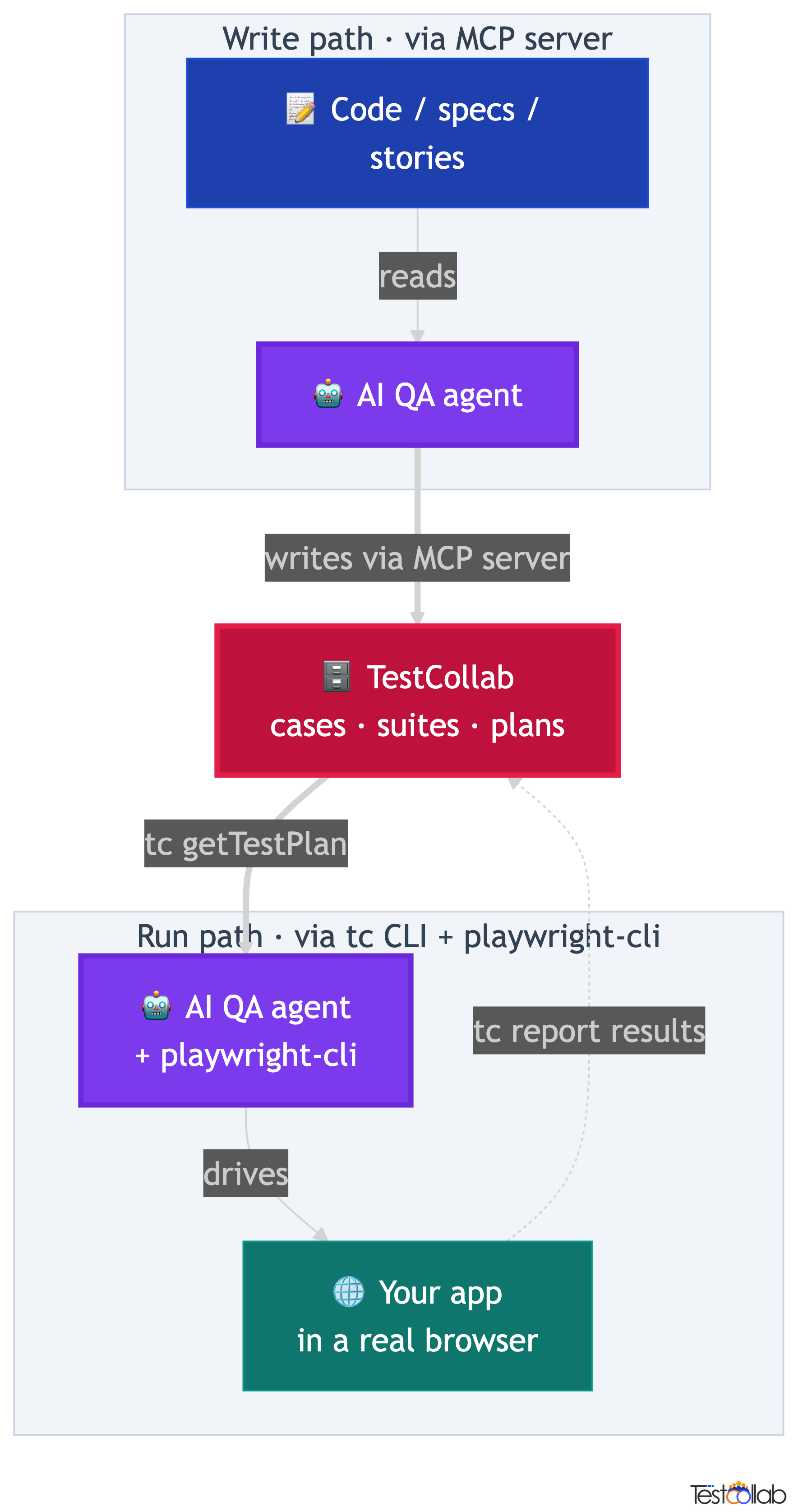
How OpenCode closes the QA loop: write, curate, run, report
The full QA loop is a cycle: the agent writes cases, a human curates them into a plan, the same agent runs the plan, and the results report back to TestCollab. Understanding the cycle matters more than memorizing any single command, because each step hands off cleanly to the next. OpenCode slots into both the write step and the run step, with the human owning the curation in the middle.
Humans own the curation step and the last decision. Your QA team reviews the AI-drafted cases, decides which to run, sets what each step does, and defines what a passing result looks like. From there the CLI exports the plan as structured JSON, OpenCode executes it in a browser, and the CLI uploads the results. You stay in control of what gets tested; the agent handles the tedious parts, which are drafting cases at volume and clicking through every expected result.
Because the contract between TestCollab and the agent is small, the run half of the loop is agent-agnostic. Any agent that can run tc getTestPlan, drive a browser, and run tc report can plug into the run step. That is why the same plan runs unchanged on OpenCode, Claude Code, Codex, or Hermes Agent: only the thing driving the browser changes.
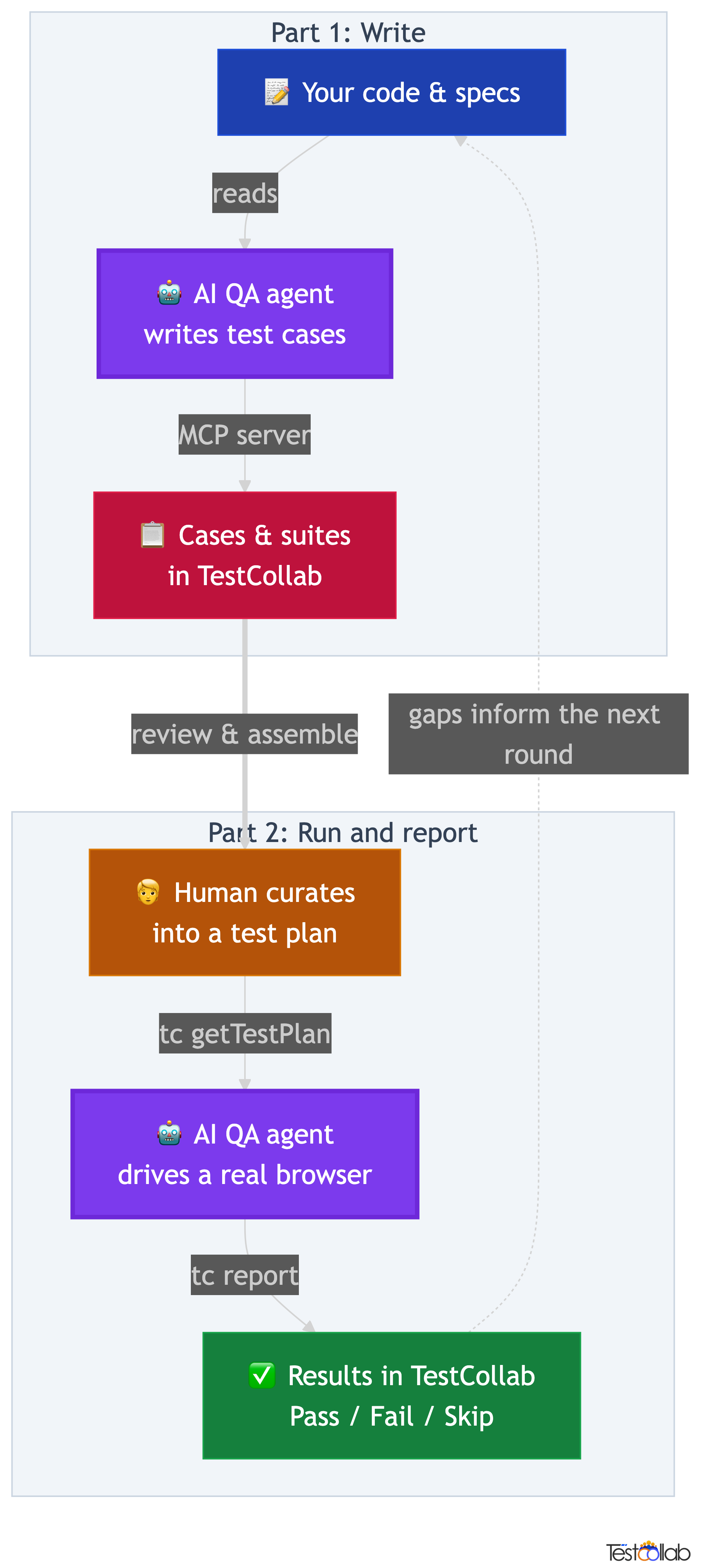
The full QA loop
- Write: OpenCode reads your code, specs, or user stories and generates test cases, suites, and plans directly in TestCollab through the MCP server.
- Curate: your QA team reviews the AI-drafted cases, refines steps and expected results, organizes them into suites, and assembles a test plan.
- Run:
tc getTestPlanexports the curated plan as JSON, OpenCode executes each case in a real browser viaplaywright-cli, and records pass, fail, or skip. - Report:
tc reportuploads the JUnit XML results back to TestCollab, where they appear against the original test cases and feed the next cycle.
Depending on what you need today, you can start with either half of the loop. The two cards below fork into the two parts of this guide so you can self-select.
Generate test cases
Have OpenCode read your code or specs and author structured cases, suites, and plans in TestCollab through the MCP server. Jump to Part 1.
Run and report
Point OpenCode at a curated plan and let it drive a real browser, then report pass, fail, and skip results back. Jump to Part 2.
Set up OpenCode for TestCollab
Both halves of the loop share a small set of base prerequisites. Get these in place once and you are ready to wire up whichever capability you need. The wiring that is specific to each half - the MCP server for writing, the tc CLI and QA skill for running - lives in its own section below.
Shared base prerequisites
- - Create a TestCollab account if you do not have one.
- - Generate a TestCollab API token from Profile then API Token.
- - Note your project ID in TestCollab.
- - Install OpenCode and connect a model provider with
/connectin OpenCode (oropencode auth loginfrom your shell).
curl -fsSL https://opencode.ai/install | bash
opencode --versionAfter the base setup, each capability needs its own connection. To have OpenCode write cases, connect the TestCollab MCP server (see Part 1). To have OpenCode run plans, install the tc CLI and the TestCollab QA skill, and allow the skill's /tmp files (see Part 2). You only need to wire up the half you plan to use, and you can add the other half later.
Part 1: Write test cases with OpenCode
This is the generation half of the loop: OpenCode reads your code, specs, or user stories and creates structured test cases, suites, and even test plans directly in TestCollab. Generation runs through the TestCollab MCP server, which exposes 17 tools for test cases, suites, and plans over the Model Context Protocol. Connect it once and OpenCode can author cases in your workspace the same way it drives a browser: through natural language, on whichever model you have connected.
From code to cases
Point OpenCode at a feature or module. It reads the implementation, identifies happy paths, edge cases, and error handling, then creates test cases with steps and expected results, organized into suites.
From specs to scenarios
No code access needed for generation either. Give OpenCode a user story, requirement, or API spec and it drafts cases covering success paths, failure modes, and corner cases for you to review and keep.
Close the loop
Generate cases, curate them into a plan, then execute that plan with the same agent using the tc getTestPlan loop in Part 2. One agent covers both halves of QA.
Connect the MCP server so OpenCode can write cases
To have OpenCode author cases, register the TestCollab MCP server with it once. OpenCode reads MCP servers from the mcp key in opencode.json: put the file in your project root to scope the server to one repo, or in ~/.config/opencode/opencode.json to make it available everywhere. A write-only reader needs nothing from Part 2 to do this.
Connect the TestCollab MCP server
- Get your API token from TestCollab: Profile then API Token. Note your project ID as well.
- Add the
testcollabserver toopencode.jsonusing the config below. - Restart OpenCode, because it loads config at startup, then run
opencode mcp listand check that the server shows as connected. - Prompt it in natural language, for example: "Generate test cases for the checkout module and add them to project 16."
OpenCode's MCP entries are shaped differently from the mcpServers blocks other clients use: type is required, command is a single array, and variables go under environment. OpenCode also expands {env:VAR} inside config values, so the server can read the same TESTCOLLAB_TOKEN you export for the tc CLI in Part 2, and the token never sits in a file you might commit.
{
  "$schema": "https://opencode.ai/config.json",
  "mcp": {
    "testcollab": {
      "type": "local",
      "command": ["npx", "-y", "@testcollab/mcp-server"],
      "enabled": true,
      "environment": {
        "TC_API_TOKEN": "{env:TESTCOLLAB_TOKEN}",
        "TC_API_URL": "https://api.testcollab.io",
        "TC_DEFAULT_PROJECT": "your-project-id"
      }
    }
  }
}export TESTCOLLAB_TOKEN=your-api-token
opencode mcp listThe usual cause is a missing token. When TESTCOLLAB_TOKEN is not exported in the shell that starts OpenCode, {env:TESTCOLLAB_TOKEN} resolves to an empty value and the MCP server exits at startup. Add the export to your shell profile, open a new terminal, and start OpenCode again.
Today, test-case generation runs through the MCP server, while the tc CLI handles execution (tc getTestPlan and tc report). CLI-driven generation is coming soon, so you will be able to script case creation the same way you already script runs. Until then: MCP server for generating, CLI for executing.
Once the server is connected, the generation tools are available in every OpenCode session that loads that config. For a deeper look at AI-driven test authoring, see our guide to AI test case generation with the MCP server.
Generate test cases, suites, and plans with OpenCode
With the MCP server connected, generation is driven entirely through natural language. You describe what you want covered - a module, a user story, an API spec - and OpenCode reads the source, reasons about coverage, and authors cases. The MCP server exposes 17 tools spanning test cases, suites, and test plans, so OpenCode does not just draft loose cases: it organizes them into suites and can assemble a plan in the same pass.
When you point OpenCode at a feature, it identifies happy paths, edge cases, and error handling, then writes each case with concrete steps and expected results. When you give it a spec instead of code, it drafts cases covering success paths, failure modes, and corner cases. One habit pays off: ask OpenCode to list the cases it intends to create before it writes anything, then approve the list. You catch gaps and duplicates while they are still one line each, and only the cases you agreed on land in your workspace, ready for a human to curate.
Generate test cases for the checkout module and add them to project 16.The cases, suites, and plans OpenCode creates appear in your workspace immediately, mapped to the project you specified, where the curation step in the next section turns generated drafts into a runnable plan.
Curate generated cases into a test plan
Curation is the human step that turns write output into run input. The agent can draft cases at volume, but a person decides which of them are worth running and what good looks like.
Generation gives you drafts; curation gives you a plan worth executing. This is where your QA judgment lives: you read what OpenCode produced, sharpen it, and shape it into something the run half can consume. Do this once and the same plan can run on any agent, unchanged.
Turn drafts into a runnable plan
- - Review the AI-drafted cases for accuracy, relevance, and duplicates.
- - Refine steps and expected results so each case has something concrete to verify.
- - Organize cases into suites that reflect how your team thinks about coverage.
- - Assemble a test plan from the suites and cases you want to run.
- - Note the plan ID and project ID here, because Part 2 consumes them when it runs the plan.
Part 2: Run and report with OpenCode
This is the execution half of the loop: OpenCode takes a human-curated plan and drives a real browser through it. Where Part 1 was about authoring, this part is about taking what your team curated and running every case against your live app, then reporting the results back.
The contract between TestCollab and the agent is just two CLI commands, and the loop is identical no matter which agent you run. The plan comes out of TestCollab as JSON, OpenCode executes it in a browser, and the results go back up. State the contract once and the rest is mechanics: tc getTestPlan to fetch, browser to execute, tc report to upload.
The four-step QA agent loop
- Humans curate the test plan in TestCollab: the cases to run, the steps for each, and the expected result for every step.
tc getTestPlanexports that plan as structured JSON that OpenCode can read and work through case by case.- OpenCode opens a real browser with
playwright-cli, executes each test case step by step, and records pass, fail, or skip for each one. tc reportuploads the JUnit XML results back to TestCollab, where they appear against the original test cases.
The tc getTestPlan plus tc report pattern is the contract, and it is deliberately small so any browser-capable agent can satisfy it. OpenCode is one such agent; the TestCollab CLI guide covers the commands in depth.
Install the tc CLI and QA skill so OpenCode can run plans
Setup for running is a one-time job. You install the TestCollab CLI and playwright-cli, set your token, install the TestCollab QA skill, and allow the skill's /tmp files. After that, every run starts from your own project folder and the skill loads automatically. A run-only reader needs nothing from Part 1.
OpenCode reads skills from its own folders (~/.config/opencode/skills/ globally, .opencode/skills/ per project) and also from Claude-compatible ones (~/.claude/skills/ and .claude/skills/). That is why the TestCollab QA skill installer built for Claude Code works for OpenCode unchanged: it drops SKILL.md into ~/.claude/skills/testcollab-qa/, and OpenCode picks it up from every directory on your machine.
- OpenCode installed, with a model provider connected.
playwright-clion yourPATH, plus a Chromium build, so OpenCode can launch a real browser.- A TestCollab API token from Account Settings, API Tokens in TestCollab.
- A curated test plan in TestCollab, plus its project ID and test plan ID.
npm install -g @testcollab/cli
tc --versionnpm install -g @playwright/cli@latest
playwright-cli install-browser chromiumexport TESTCOLLAB_TOKEN=your-token-herecurl -fsSL https://raw.githubusercontent.com/TCSoftInc/testcollab-cli/main/claude-code-skill/testcollab-qa/scripts/install.sh | bashopencode debug skill | grep testcollab-qaThe script copies SKILL.md to ~/.claude/skills/testcollab-qa/, a Claude-compatible folder that OpenCode scans automatically. If Claude Code is not installed, the script prints a note saying so; OpenCode does not need it, so you can ignore that line. Prefer OpenCode's own folder? Copy the same SKILL.md to ~/.config/opencode/skills/testcollab-qa/ instead. Either way, restart OpenCode after installing, because it loads skills at startup.
One step is specific to OpenCode. The QA skill writes the plan to /tmp/tc-plan.json and the results to /tmp/tc-results.xml, and OpenCode asks before any tool touches a path outside your project. In an interactive session you would approve that prompt; in opencode run it is rejected automatically, so the run cannot even fetch the plan. Allow /tmp once in opencode.json, in the same file as your MCP config:
{
  "$schema": "https://opencode.ai/config.json",
  "permission": {
    "external_directory": {
      "/tmp/**": "allow"
    }
  }
}Run a test plan with OpenCode
This is where most people trip up, so it is worth stating plainly: you launch OpenCode from your own app's project directory, not from testcollab-cli. The CLI is a global tool you installed earlier; you never cd into its repo to run QA. You work where you would normally work to test the app by hand.
Once you are in your project, start OpenCode and describe the run in plain English. Give it the test plan ID, the project ID, the URL to test against, and the login credentials. OpenCode matches your prompt to the testcollab-qa skill by its description, loads it, and takes over from there: it fetches the plan, drives the browser, and reports back. You are not writing a script, you are briefing a tester.
cd ~/your-app
opencodeExecute test plan 555 in project 16 against http://localhost:3000.
Login: testuser@example.com / password123.What OpenCode does after you prompt it
- Loads the
testcollab-qaskill through its skill tool, matched from your prompt. - Runs
tc getTestPlanto fetch the plan as structured JSON. - Launches a browser via
playwright-cliand navigates to your app. - Works through each test case: navigating, clicking, filling forms, and checking the expected result for every step.
- Writes a JUnit XML result file with
[TC-ID]prefixes so results map to the right cases. - Uploads results with
tc report, closes the browser, and prints a pass, fail, skip summary.
For CI or scripted runs, skip the interactive session and pass the prompt to opencode run. Add -m provider/model to choose the model for that run, which lets QA runs use a different model from your coding sessions.
opencode run "Execute test plan 555 in project 16 against https://staging.example.com. Login: testuser@example.com / password123."A non-interactive run cannot ask you anything, so it rejects every permission set to ask. Without the /tmp rule from the setup step, OpenCode rejects tc getTestPlan and ends the run without testing anything, and the command still exits with code 0, so CI will not flag it. Keep the allow rule in opencode.json. The --auto flag also gets past the prompt, but it approves every permission that is not explicitly denied, so keep it for disposable CI runners.
Running plans often? Save the prompt as an OpenCode command. Each Markdown file in .opencode/commands/ becomes a slash command, $1, $2, and $3 take positional arguments, and an optional model: line pins the model for that command. Commit the file and your whole team runs QA the same way.
---
description: Run a TestCollab test plan in a real browser
---
Execute TestCollab test plan $1 in project $2 against $3 using the testcollab-qa skill.
Log in with the credentials in the QA_USER and QA_PASSWORD environment variables./run-plan 555 16 http://localhost:3000
opencode run --command run-plan 555 16 https://staging.example.comHow OpenCode drives a real browser
OpenCode does not poke at your page by scraping pixels or guessing CSS selectors. It drives the browser through playwright-cli using the accessibility tree: a text-based representation of what is actually on the page, with reference IDs for every interactive element. The agent snapshots the page, finds the element it needs by its accessible label or text, and acts on it by reference.
The practical payoff is resilience. Because the agent locates elements by their accessible role and text rather than by brittle CSS class names or DOM positions, your runs survive restyles, re-renders, and minor markup tweaks that would break a hard-coded selector. When a test case says to verify a success message, OpenCode checks the accessibility tree for that text rather than asserting against a fragile node path. If the expected result is not there, the case is marked failed with a note describing what was expected versus what was found.
| Test step | What OpenCode does |
|---|---|
| Navigate to /settings | Drives the browser to the full URL and waits for the page to settle |
| Click the Save button | Snapshots the page, finds the Save button by its accessible text, clicks it by reference ID |
| Enter admin@example.com in the email field | Snapshots the page, finds the email input by label, fills it with the value |
| Verify the success message appears | Snapshots the page and checks the accessibility tree for the expected text |
| The page title should be Dashboard | Snapshots and verifies the heading element contains Dashboard |
Want OpenCode to know every playwright-cli command, not only the ones the QA skill uses? Run playwright-cli install --skills in your app's folder. It writes a playwright-cli skill to .claude/skills/playwright-cli/, which OpenCode discovers like any other skill.
Prefer Playwright MCP? OpenCode runs it like any local MCP server, which suits exploratory sessions where you steer the browser yourself. For plan runs the QA skill sticks with playwright-cli, because it saves page snapshots to disk instead of streaming them into the model's context, so long plans use far fewer tokens. Our Playwright CLI vs Playwright MCP comparison has the numbers.
{
  "$schema": "https://opencode.ai/config.json",
  "mcp": {
    "playwright": {
      "type": "local",
      "command": ["npx", "-y", "@playwright/mcp@latest"],
      "enabled": true
    }
  }
}Results back in TestCollab
OpenCode writes its results as JUnit XML, the standard format CI systems already understand, with one convention that makes the round trip work: every test case name is prefixed with its TestCollab ID in square brackets, like [TC-42]. That prefix is how tc report matches each result to the correct test case in your workspace. Without it, the report would create brand new cases instead of updating the ones your team curated.
Once tc report uploads the XML, the results appear in the test plan's Test Cases tab, each case showing a color-coded status. Passed is green, Failed is red, Skipped is yellow, and any case the agent did not reach stays Unexecuted in grey. Click into any case to read the full execution detail, including the failure message with expected versus actual for the cases that did not pass.
<testsuites>
  <testsuite name="Sprint 12 Regression" tests="3" failures="1">
    <testcase classname="Login" name="[TC-42] Valid login redirects to dashboard" time="4.2"/>
    <testcase classname="Login" name="[TC-43] Invalid password shows error" time="3.1">
      <failure message="Error message not found">
        Expected: Error banner visible after wrong password.
        Actual: Page reloaded without error indication.
      </failure>
    </testcase>
    <testcase classname="Settings" name="[TC-44] User can update email" time="5.8"/>
  </testsuite>
</testsuites>- Passed (green)
- Every step in the case matched its expected result. OpenCode found what the test plan said it should find.
- Failed (red)
- An expected result did not match. The case carries a failure message with expected versus actual so you can triage it fast.
- Skipped (yellow)
- The agent intentionally did not run the case, for example because a precondition was not met.
- Unexecuted (grey)
- The case was never reached, often because the run stopped early or the case was outside the prompted scope.
Tips for better results with OpenCode
Both halves of the loop are only as good as the inputs you give them. Some of these tips improve the cases OpenCode writes, others improve the runs it executes, and a couple help both. A few habits make the difference between clean output and a pile of false failures you have to sort through by hand.
- Write concrete expected results (helps writing and running). The agent needs something specific to verify. Page loads correctly is ambiguous; URL is /dashboard and a table with at least 3 rows is visible gives OpenCode something it can actually check, and it also raises the quality of the cases OpenCode generates.
- Test the model before you trust it (running). OpenCode will run the loop on any model you connect, including small local ones. Cheaper models save money but drift on multi-step cases, so run a short plan first and compare the results with what you see by hand before moving longer plans onto that model.
- Keep plans small (running). 10 to 30 test cases per plan is the sweet spot. Larger plans risk context drift, where the agent loses track of what it is doing around case 40. Split big suites into several plans.
- Provide credentials up front (running). Do not make the agent guess. Give it the login URL, email, and password in the prompt, or point a saved command at environment variables, so it never stalls on an auth wall.
- Gate CI on the results, not the exit code (running).
opencode runcan exit 0 even when a run ended early. Addtc gateafter the run with--require-complete, which fails the build when cases are still unexecuted or failed. See quality gates in CI/CD. - Review failures manually (running). Agents sometimes misread a slow page load as a failure or miss a subtle UI state. Treat the results as a first pass, then have a human look at the failures before filing bugs.
tc gate --project 16 --test-plan-id 555 --require-completeThe agent acts on your app exactly like a real user would, including destructive actions like submitting forms and creating records. Always point OpenCode at a staging, QA, or local environment. Running a plan against production can mutate real customer data.
OpenCode vs other QA agents
OpenCode is one of four agents TestCollab documents for the QA loop, and the choice between them is mostly about which models and CLI your team already uses. All four support both halves of the loop: they write test cases through the MCP server and run curated plans through the tc CLI. The execution loop is identical across all four: the same plan JSON, the same browser approach, the same JUnit XML, the same tc report upload. Only the thing driving the browser differs.
OpenCode is the pick for teams that want a coding agent without a model lock-in: it is open source, supports 75+ providers including local models, and can use subscriptions such as ChatGPT Plus or Pro, GitHub Copilot, and GitLab Duo. The one OpenCode-specific step to remember is the /tmp allow rule, because non-interactive runs reject permission prompts.
| Feature | OpenCode | Claude Code | Codex | Hermes Agent |
|---|---|---|---|---|
| Write and run support | Both (MCP to write, CLI to run) | Both (MCP to write, CLI to run) | Both (MCP to write, CLI to run) | Both (MCP to write, CLI to run) |
| Browser automation | Via playwright-cli (allow /tmp) | Built-in (playwright-cli) | Via playwright-cli (needs --full-auto) | Built-in (MCP) |
| Skill install location | ~/.claude/skills/ | ~/.claude/skills/ | ~/.codex/skills/ | ~/.hermes/skills/ |
| Invocation | Natural-language prompt or command | Natural-language prompt | Natural-language prompt | Natural-language prompt |
| Non-interactive command | opencode run "..." | claude -p "..." | codex exec "..." | hermes -z "..." |
| LLM flexibility | 75+ providers, including local models | Claude models | OpenAI models | 200+ models via OpenRouter |
| Best for | Model-flexible QA in your coding agent | Developer-driven QA during coding | Repo-aware QA in an OpenAI workflow | Dedicated QA agent runs |
Prefer a different stack? The same workflow is documented in the Claude Code QA agent guide, the Codex QA agent guide, and the Hermes QA agent guide. Pick the one that matches the CLI your team already uses; the test plan and results are interchangeable.
Glossary
- QA loop
- The full cycle of QA with an agent: the agent writes test cases, a human curates them into a plan, the same agent runs the plan in a browser, and results report back to TestCollab to feed the next cycle.
- QA agent
- An AI agent that executes a human-curated test plan against an app in a real browser and reports results. It runs cases; it does not decide what to test.
- TestCollab MCP server
- The TestCollab server that exposes test cases, suites, and plans as tools over the Model Context Protocol, letting an agent like OpenCode generate and author test cases directly in your workspace through natural language.
- TestCollab CLI
- The
tccommand-line tool that bridges TestCollab and any agent.tc getTestPlanexports a plan as JSON;tc reportuploads JUnit XML results back. - playwright-cli / accessibility tree
- The browser driver OpenCode uses. It locates elements by their accessible role and text in a structured page snapshot, making runs resilient to CSS and markup changes.
- opencode.json
- OpenCode's config file. It lists MCP servers under
mcpand permission rules underpermission. Put it in a project root for one repo, or in~/.config/opencode/for every project. - JUnit XML / [TC-ID]
- The standard result format the agent produces. The
[TC-42]prefix on each test case name is what letstc reportmatch a result to the correct TestCollab case. - Skill
- A small
SKILL.mdfile that teaches an agent a repeatable workflow. OpenCode loads the TestCollab QA skill from~/.claude/skills/or~/.config/opencode/skills/and uses it to run the full QA loop.
Further Reading
FAQ
What is the OpenCode QA agent?
It is OpenCode, the open-source AI coding agent, combined with the TestCollab QA skill and the playwright-cli browser driver. Together they let OpenCode read a curated test plan from TestCollab, execute each case against your app in a real browser, and report pass, fail, and skip results back. With the TestCollab MCP server connected, the same agent also writes test cases. OpenCode executes the plan; deciding what to test stays with your QA team.
Can OpenCode generate test cases, or only execute them?
Both. Execution and generation are two halves of the same loop. Execution uses the tc CLI (tc getTestPlan then tc report). Generation uses the TestCollab MCP server, which gives OpenCode 17 tools to create test cases, suites, and plans directly in your workspace from code, specs, or user stories. CLI-based generation is on the roadmap; today, connect the MCP server for generation.
Which model should I use with OpenCode for QA?
Any model you connect to OpenCode can run the loop, from hosted providers to local models. For execution, strong instruction-following matters most, because each test step is a precise instruction the agent must follow exactly. Validate a model on a short plan first, then choose it per run with -m provider/model or pin it in a saved command.
Why does opencode run stop before testing anything?
The QA skill hands files through /tmp, and OpenCode asks before a tool touches a path outside your project. opencode run cannot show that prompt, so it rejects the request, tc getTestPlan never runs, and the command still exits with code 0. Add an external_directory allow rule for /tmp to opencode.json, or pass --auto on a disposable CI runner.
Where does the TestCollab QA skill install for OpenCode?
The installer puts it in ~/.claude/skills/testcollab-qa/, a Claude-compatible folder that OpenCode scans automatically, so one install serves both OpenCode and Claude Code. OpenCode's own folders work too: ~/.config/opencode/skills/ for every project or .opencode/skills/ for one. Restart OpenCode after installing so it picks up the skill.
Do I launch OpenCode from the testcollab-cli folder?
No. You launch OpenCode from your own app's project directory, the same folder you would cd into to test the app by hand. The TestCollab CLI is a global tool you installed once with npm; you never cd into its repo to run QA. The user-global skill loads automatically wherever you launch OpenCode.
How do results map back to my TestCollab test cases?
OpenCode produces JUnit XML where each test case name is prefixed with its TestCollab ID, like [TC-42]. The tc report command uses that prefix to match each result to the correct existing case in your workspace. Without the prefix, the report would create new cases instead of updating the ones your team curated.
Can I run the OpenCode QA agent in CI?
Yes. Use opencode run with the plan, project, URL, and credentials in the prompt, or opencode run --command run-plan with a saved command. Commit the opencode.json that holds the /tmp allow rule so the run can fetch the plan, point it at staging rather than production, and fail the job with tc gate rather than trusting OpenCode's exit code.
Close the QA loop with OpenCode
Let OpenCode generate the cases and run the plan on the model you choose, while results flow straight back to your workspace. Author cases through the MCP server, curate them into a plan, and have the same agent execute it against your app.



