
A missing validation rule in a checkout form. A regression bug that only shows up on Safari. A performance bottleneck nobody caught until Black Friday traffic hit.
Every QA professional has a story like this. And in nearly every case, the root cause is the same: the team was testing, but without a clear strategy.
Testing without a strategy is like navigating without a map. You might cover ground, but you will waste time, miss critical areas, and arrive somewhere you did not intend. A well-defined software testing strategy gives your team the direction it needs to find the right bugs, at the right time, with the right level of effort.
This guide walks you through the most effective software testing strategies used by modern QA teams, when to apply each one, and how to build a strategy that fits your project.
What Is a Software Testing Strategy?
A software testing strategy is a high-level plan that defines how testing will be conducted across a project or organization. It answers the fundamental questions every QA team faces:
- What types of testing will we perform?
- When in the software development life cycle will each type occur?
- Who is responsible for each testing activity?
- Which tools and environments do we need?
- How will we measure whether our testing is effective?
A testing strategy is not the same as a test plan. The strategy is the overarching approach, while a test plan is a detailed document for a specific release or sprint. Think of the strategy as the constitution and the test plan as legislation that follows its principles.
Your strategy should be a living document. As your product evolves, your architecture changes, and your team grows, the strategy adapts with it.
Why Every QA Team Needs a Testing Strategy
Without a testing strategy, teams default to ad hoc testing. Testers pick what to test based on intuition, developers skip unit tests when deadlines loom, and regression suites bloat into unmanageable test runs that nobody trusts.
The consequences are predictable: bugs escape to production, release cycles slow down, and confidence in the product erodes.
A clear strategy eliminates this by providing a framework for decision-making. But the most compelling argument for a strategy is economic. The cost of fixing a bug increases dramatically the later it is found in the development cycle.
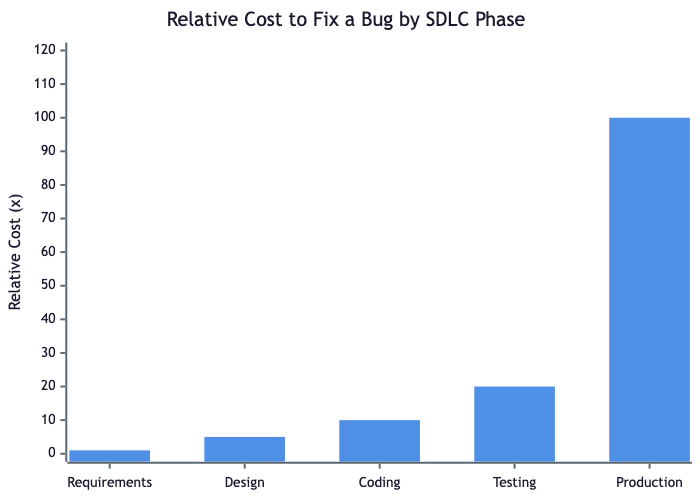
A bug caught during requirements review might cost an hour of discussion. The same bug found in production can mean hotfixes, rollbacks, customer support tickets, and reputational damage. Research from IBM and the National Institute of Standards and Technology has consistently shown that defects found in production cost 10 to 100 times more to fix than those caught during design or coding.
A testing strategy that emphasizes early testing, proper test coverage, and risk-based prioritization directly reduces this cost multiplier.
Key benefits of having a testing strategy:
- Predictable quality: every release goes through the same verification gates
- Efficient resource allocation: testers focus on high-risk areas, not everything equally
- Faster feedback loops: developers learn about issues earlier
- Measurable outcomes: you can track test metrics and improve over time
- Team alignment: everyone understands what "done" means from a quality perspective
Software Testing Strategies Across the SDLC
Testing is not something that happens only after code is written. The most effective strategies embed testing activities throughout the entire software development life cycle.
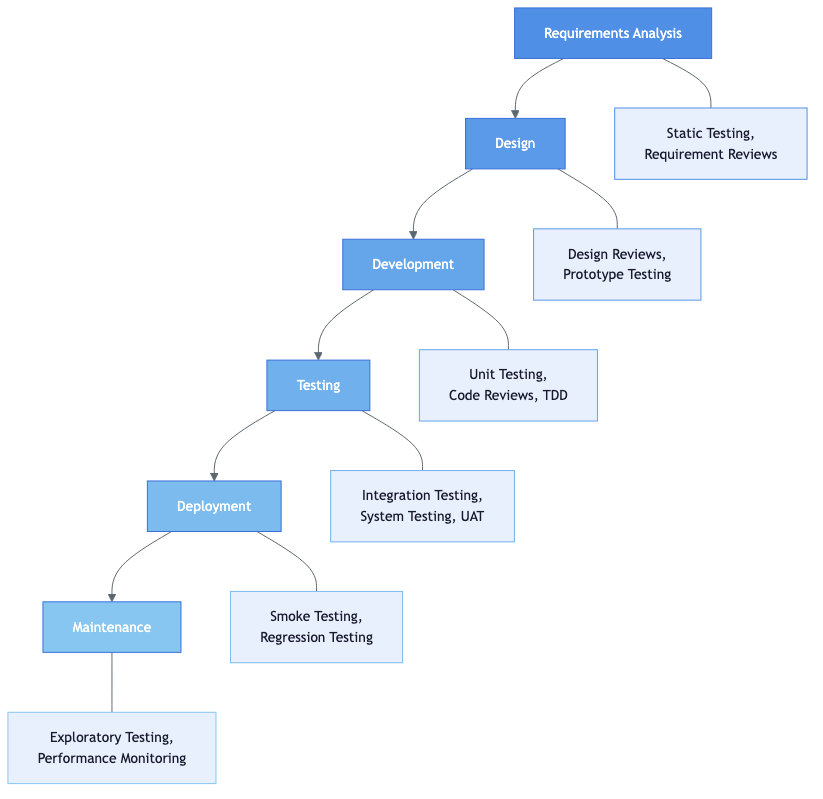
Each phase of development offers opportunities for different types of testing:
Requirements Analysis: This is where static testing begins. Requirement reviews, walkthroughs, and inspections catch ambiguities and contradictions before a single line of code is written. Teams practicing verification and validation start here.
Design: Design reviews and prototype testing validate that the architecture can support the functional and non-functional requirements. Questions like "can this scale?" and "is this secure?" get answered at the whiteboard, not in production.
Development: Unit testing, code reviews, and test-driven development (TDD) catch defects at the source. This is also where static analysis tools flag code quality issues automatically.
Testing: Integration testing, system testing, and user acceptance testing (UAT) validate the assembled system. This is the phase most people think of when they hear "testing," but by this point, the strategy has already been working for weeks.
Deployment: Smoke testing and targeted regression testing confirm that the release candidate is stable. Deployment pipelines should include automated checks that gate promotion to production.
Maintenance: Exploratory testing and production monitoring catch issues that scripted tests miss. Performance monitoring tools watch for degradation over time.
The key insight is that no single phase can carry the full testing burden. Strategies that overweight testing at the end create bottlenecks. Strategies that distribute testing across the SDLC produce faster, more reliable releases.
Types of Software Testing Strategies
There is no single "correct" testing strategy. Instead, effective teams combine multiple approaches based on their product, risk profile, and team capabilities. Here are the core strategies every QA team should understand.
Static Testing
Static testing examines code, requirements, and design documents without executing the software. It includes:
- Reviews: Peer reviews, walkthroughs, and formal inspections of requirements, design documents, and code
- Static analysis: Automated tools that scan source code for bugs, vulnerabilities, and style violations
- Linting: Enforcing coding standards automatically as part of the development workflow
Static testing is one of the most cost-effective strategies because it catches issues before they become bugs. A missing edge case in a requirements document costs almost nothing to fix during a review meeting. The same oversight found during system testing triggers a full bug lifecycle.
Structural Testing (White-Box)
Structural testing, also called white-box testing, designs test cases based on the internal structure of the code. Testers have access to the source code and create tests that exercise specific paths, branches, and conditions.
Common techniques include:
- Statement coverage: ensuring every line of code executes at least once
- Branch coverage: testing both true and false outcomes of every decision point
- Path coverage: testing all possible execution paths through a function
White-box testing is most commonly applied at the unit and integration test levels. It is particularly valuable for critical algorithms, complex business logic, and security-sensitive code paths.
Behavioral Testing (Black-Box)
Black-box testing validates the software's behavior from the user's perspective, without knowledge of internal implementation. The tester provides inputs and verifies that outputs match expected results.
Key techniques include:
- Equivalence partitioning: dividing inputs into groups that should produce similar behavior
- Boundary value analysis: testing at the edges of input ranges where bugs concentrate
- Decision table testing: systematically testing combinations of conditions and actions
- State transition testing: validating behavior as the system moves between states
Black-box testing maps naturally to user stories and acceptance criteria, making it the foundation of most functional testing efforts.
Regression Testing
Regression testing verifies that previously working features still function correctly after code changes. It is one of the most important strategies for maintaining product stability over time.
Effective regression testing requires:
- A well-maintained suite of test cases that cover core user journeys
- Prioritization based on risk and change impact
- Automation for stable, frequently-executed tests
- Regular pruning of obsolete or redundant tests
Without regression testing, every release becomes a gamble. With it, teams ship with confidence because they know the existing functionality has been verified.
Exploratory Testing
Exploratory testing combines test design and execution into a single activity. Instead of following predetermined scripts, testers simultaneously learn about the software, design tests, and execute them.
This strategy is especially valuable for:
- New features where edge cases are not yet understood
- Areas with complex user interactions
- Finding usability issues that scripted tests miss
- Complementing automated regression suites with human creativity
Exploratory testing is not ad hoc testing. Skilled exploratory testers use charters, time-boxes, and structured note-taking to ensure their sessions are focused and reproducible.
Risk-Based Testing
Risk-based testing prioritizes testing effort based on the likelihood and impact of failure for each feature or component. Instead of testing everything equally, teams concentrate resources on the areas that matter most.
The process involves:
- Identifying risk factors (complexity, change frequency, business criticality, user impact)
- Assessing each feature or component against these factors
- Allocating testing effort proportionally to risk scores
- Revisiting risk assessments as the product evolves
This strategy is essential when time and resources are constrained, which is nearly always. It ensures that if you have to cut testing short, the most critical areas have already been covered. Knowing when to stop testing is just as important as knowing where to start. For a step-by-step implementation - including AI-driven risk scoring and using it in agile sprints - see our practical guide to risk-based testing.
Shift-Left Testing
Shift-left testing moves testing activities earlier in the development process. Instead of treating testing as a phase that comes after development, it integrates quality checks from the very beginning.
Shift-left practices include:
- Writing acceptance criteria with testable conditions before development starts
- Developers writing unit tests alongside feature code (TDD)
- Running automated checks in CI pipelines on every commit
- Involving testers in requirements and design reviews
- Using BDD-style specifications that serve as both documentation and tests
The shift-left approach directly reduces the cost-of-bugs curve shown earlier. The earlier you find a defect, the cheaper it is to fix.

Manual vs. Automated Testing: When to Use Each
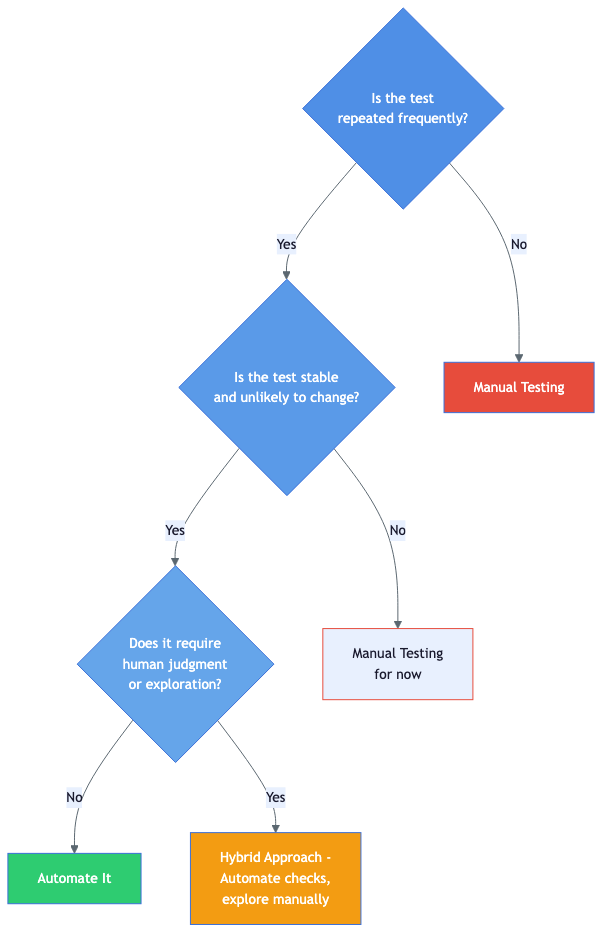
One of the most common strategic decisions QA teams face is how to balance manual and automated testing. The answer is never "automate everything" or "keep it all manual." It depends on context.
When to automate
- Regression tests that run on every build and rarely change
- Data-driven tests that execute the same logic with hundreds of input combinations
- Smoke tests that verify critical paths after deployment
- Performance and load tests that require simulating concurrent users
- API tests that validate contracts between services
When to test manually
- Exploratory testing sessions that require creativity and intuition
- Usability testing where human perception matters
- New features that are still evolving and will require frequent test updates
- One-off investigations for reported bugs or edge cases
- Accessibility testing that requires evaluating the actual user experience
The hybrid approach
Most mature teams use a hybrid strategy. They automate stable, repetitive checks that run in CI/CD pipelines, freeing up human testers to focus on exploratory testing, usability evaluation, and complex scenarios that are expensive to automate and prone to change.
The key metric is not "percentage of tests automated." It is whether your testing strategy efficiently catches the bugs that matter before users find them.
AI-Enhanced Testing Strategies in 2026
AI in QA has moved well beyond generating test case suggestions. In 2026, over 80% of development teams use AI somewhere in their testing workflow, and AI augmentation is on track to reduce manual testing effort by up to 45%. The shift is not about replacing testers - it is about giving every tester the leverage to cover more ground, faster.

From AI-Assisted to Agentic Testing
The first generation of AI testing tools were assistants. You asked them to generate a test case, and they produced one. You pointed them at a test suite, and they suggested which tests to skip.
The current generation is agentic. These tools do not wait for instructions. They autonomously plan test sessions, execute them, monitor results, and adapt when things change. Think of them as a junior QA team member that works around the clock - exploring the application, triaging failures, and proposing fixes for broken tests.
The difference matters strategically. An AI assistant speeds up individual tasks. An AI agent changes how you allocate your team. When an agent handles regression maintenance, your senior testers can spend their time on exploratory testing, risk analysis, and the kind of creative work that no AI handles well yet.
What AI Testing Tools Can Do Today
The capabilities available to QA teams today go far beyond test case generation:
- Self-healing tests - When a UI element moves, gets renamed, or changes its selector, AI detects the change and updates the test automatically. This eliminates the single biggest maintenance cost in test automation.
- Autonomous test generation - Agents crawl the application, understand user flows from the UI itself, and generate test cases without human scripting. They find paths and edge cases that manual test design misses.
- Intelligent failure triage - Instead of dumping a list of failed tests on a QA engineer, AI classifies each failure as a real bug, a flaky test, or an environment issue. This cuts triage time dramatically and reduces alert fatigue.
- Visual regression at scale - AI-powered visual comparison detects rendering issues across browsers, viewports, and themes that traditional pixel-diff tools miss or flag as false positives.
- Natural language test creation - Testers describe a scenario in plain English and the tool translates it into an executable test. This lowers the barrier for non-technical team members to contribute to test automation.
- Predictive risk analysis - By analyzing code change diffs, historical defect data, and test coverage, AI recommends which areas of the application need the most testing attention for a given release.
At TestCollab, our QA Copilot uses AI to help teams write better test cases faster, generate edge cases they might not think of, and identify gaps in their test coverage. The goal is not to replace QA expertise but to amplify it.
Testing AI-Generated Code
There is a second dimension to AI in testing that most strategy guides overlook: the code your team ships is increasingly written by AI.
Copilot, ChatGPT, and other code generation tools are now part of most development workflows. But research consistently shows that AI-generated code carries a higher defect density than human-written code. Studies have found that over half of AI-generated code samples contain logical or security flaws, and the majority of developers report needing to rewrite or refactor AI output before it is production-ready.
This has direct implications for your testing strategy:
- Start with specifications, not prompts. Spec-driven development gives AI clear instructions instead of vague prompts, producing more predictable code with fewer defects from the start.
- Increase static analysis coverage. Run linters and security scanners as automated gates on every pull request. AI-generated code is especially prone to subtle security issues that static analysis catches well.
- Add mutation testing for critical paths. Mutation testing validates that your tests actually detect defects, not just that they pass. It is particularly valuable when you cannot fully trust the code's provenance.
- Treat AI-generated code like a third-party dependency. Apply the same review rigor you would to an open-source library. Do not assume correctness because it compiled and passed basic checks.
The Human-AI Testing Balance
The most effective QA teams in 2026 are not replacing testers with AI. They are restructuring their workflow so that AI handles the work machines do well - repetitive regression, pattern recognition across thousands of test runs, and maintenance of selectors and test data - while humans focus on what they do well: understanding user intent, creative exploratory testing, and making judgment calls about what quality means for this product and these users.
The strategic question is not "how much testing can we automate with AI?" It is "what should our testers be doing now that AI handles the repetitive work?" Teams that answer this well ship faster without sacrificing quality. Teams that treat AI as a headcount replacement find that coverage drops in the areas that matter most.
How to Build a Testing Strategy: Step by Step
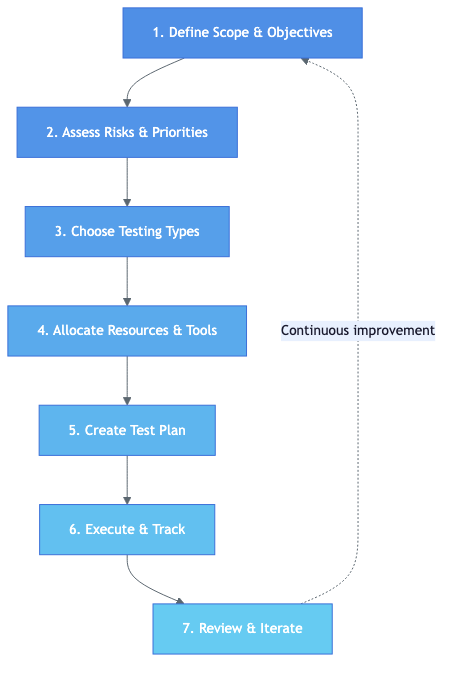
Building a testing strategy does not require months of planning. Follow these seven steps to create a strategy that is practical, actionable, and adaptable.
Step 1: Define Scope and Objectives
Start by answering: what are we testing, and what does success look like?
- Define the features, modules, or systems in scope
- Establish quality goals (e.g., zero critical defects in production, 95% regression pass rate)
- Identify constraints (timeline, budget, team size)
Step 2: Assess Risks and Priorities
Not everything needs the same level of testing. Identify which areas carry the highest risk:
- Which features do users rely on most?
- Where has the code changed recently?
- Which components have a history of defects?
- What would the business impact be if this feature failed?
Use this assessment to create a risk matrix that guides your testing effort allocation.
Step 3: Choose Testing Types
Based on your risk assessment, select which testing types to apply and where:
- Unit testing for core business logic
- Integration testing for service boundaries
- End-to-end testing for critical user journeys
- Performance testing for high-traffic features
- Security testing for authentication, payments, and data handling
Step 4: Allocate Resources and Tools
Decide who does what and with which tools:
- Which tests will be automated vs. manual?
- What test management tool will track your test plans and results?
- Which CI/CD pipeline runs your automated suites?
- How will test data be managed and refreshed?
Step 5: Create Your Test Plan
Translate the strategy into a concrete test plan for your current release or sprint. Include:
- Test cases mapped to requirements
- Entry and exit criteria for each testing phase
- Environment and data requirements
- Schedule and milestones
Step 6: Execute and Track
Run your tests and track results systematically. Use a QA management system to:
- Record pass/fail status with evidence (screenshots, logs)
- Link defects to test cases and requirements
- Monitor coverage metrics and identify gaps
- Track progress against your test plan milestones
- Answer release-readiness questions live, without exporting to a spreadsheet
Step 7: Review and Iterate
After each release, conduct a retrospective on your testing:
- Which defects escaped to production? Why?
- Were any testing activities wasted on low-risk areas?
- Did the team have the right tools and environments?
- What should change for the next cycle?
The arrow looping back from Step 7 to Step 1 in the diagram above is intentional. A testing strategy is never finished - it evolves with every release.
Ready to put your testing strategy into action? TestCollab gives your team one place to plan, execute, and track every type of test.
Start free trialSoftware Testing Best Practices
Regardless of which specific strategies you adopt, these best practices will improve your testing effectiveness:
Start testing early. The shift-left principle applies to every project. Involve testers in requirements reviews, not just test execution.
Prioritize ruthlessly. You will never have time to test everything. Use risk-based testing to focus on what matters most. Track your test metrics to validate that your priorities are correct.
Automate the right things. Automate stable, repetitive, high-value tests. Do not automate tests that change every sprint or require human judgment.
Maintain your test suite. Dead tests, flaky tests, and duplicate tests erode confidence in your test results. Regularly prune and refactor your test cases.
Use traceability. Link test cases to requirements using a requirements traceability matrix. This ensures complete coverage and makes it easy to assess the impact of requirement changes.
Invest in test environments. Unstable or inconsistent test environments produce unreliable results. Treat test infrastructure as a first-class concern.
Measure and improve. Track defect escape rates, test coverage, cycle time, and other key metrics. Use data to drive strategy improvements, not just gut feeling.
Integrate AI deliberately. Do not adopt AI testing tools just because they exist. Identify your team's biggest bottleneck - test maintenance, slow feedback loops, flaky tests, or triage overload - and apply AI there first. Measure the impact before expanding to other areas.
Frequently Asked Questions
What is the difference between a testing strategy and a test plan?
A testing strategy is a high-level document that defines the overall approach to testing across an organization or project. It covers testing types, tools, environments, and principles. A test plan is a detailed, release-specific document that outlines exactly what will be tested, by whom, when, and how. The strategy informs the plan - not the other way around.
Which software testing strategy is best?
There is no single best strategy. The most effective approach combines multiple strategies based on your product's risk profile, team capabilities, and development methodology. Most teams use a mix of risk-based testing, regression testing, and shift-left practices, supplemented by exploratory testing and automation where appropriate.
How do I convince management to invest in a testing strategy?
Frame it in business terms. Calculate the cost of recent production defects (developer time, support tickets, customer churn). Show how a structured testing strategy reduces defect escape rates. Reference industry data on the cost multiplier of late defect detection. A single prevented production incident often pays for months of improved testing infrastructure.
How often should a testing strategy be updated?
Review your strategy at least quarterly or after any major release. Update it when there are significant changes to your technology stack, team composition, product architecture, or business priorities. The strategy should be a living document, not a shelf document.
How is AI changing software testing strategies in 2026?
AI has moved from a supplementary tool to a core part of testing strategy for most teams. Agentic AI testing platforms can autonomously generate, execute, and maintain tests with minimal human oversight. The biggest practical impact is in two areas: test maintenance, where self-healing tests automatically adapt to UI changes and eliminate flaky selector failures, and intelligent triage, where AI separates real bugs from environmental noise so QA engineers spend their time investigating actual defects. That said, AI works best when paired with human testers who provide domain expertise, creative exploratory testing, and judgment about what quality means for the end user.
Conclusion
A software testing strategy is not a bureaucratic exercise - it is the foundation that determines whether your team catches bugs early or fights fires in production.
Start by understanding where your product's risks lie. Choose the testing types that address those risks. Distribute testing activities across the entire SDLC instead of piling them up at the end. Balance automation with manual testing based on what each approach does best. And iterate continuously.
If your team is ready to put a testing strategy into practice, TestCollab gives you one platform to plan test cases, execute test runs, track results, and use AI to identify coverage gaps - all in one place.