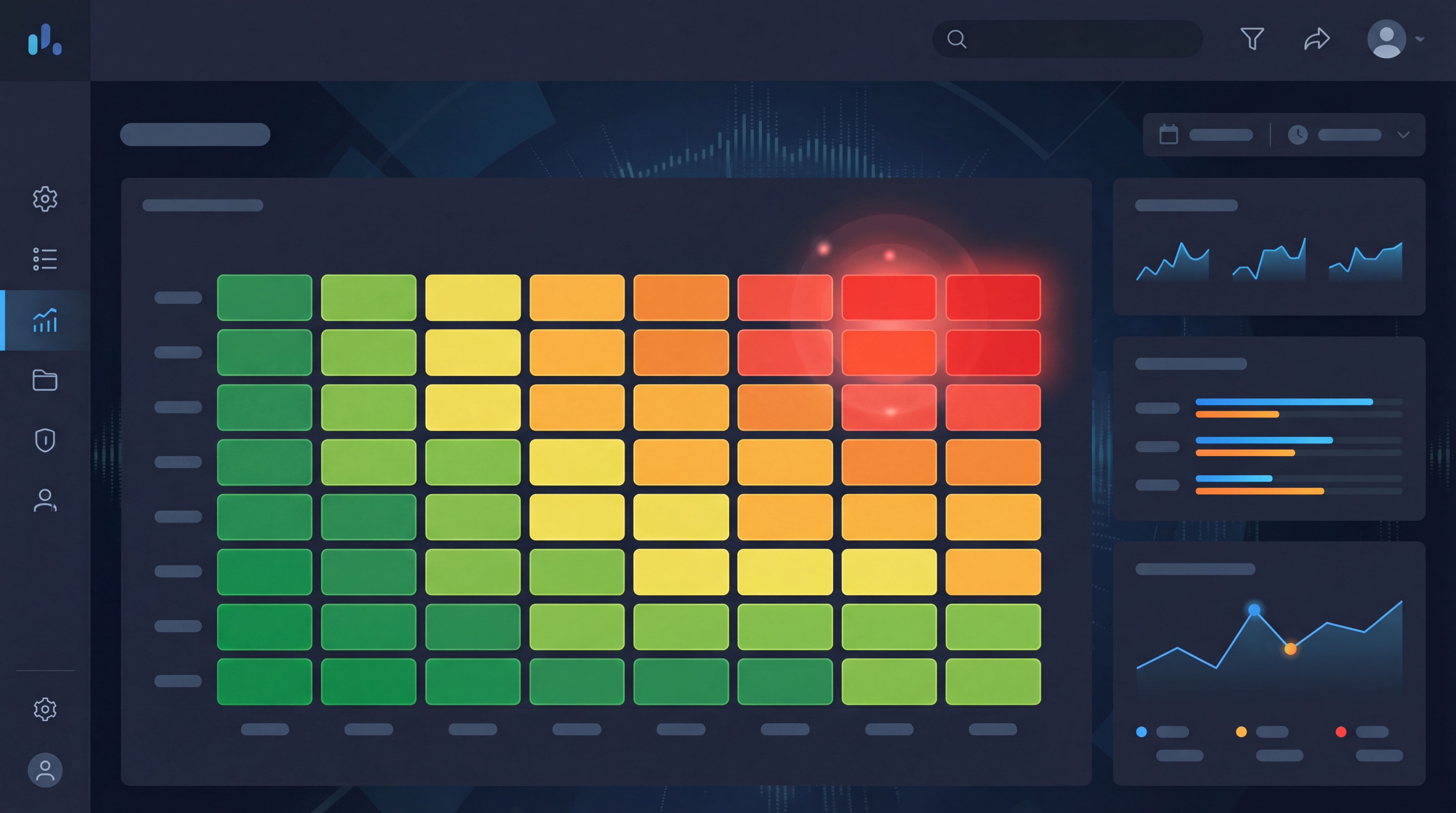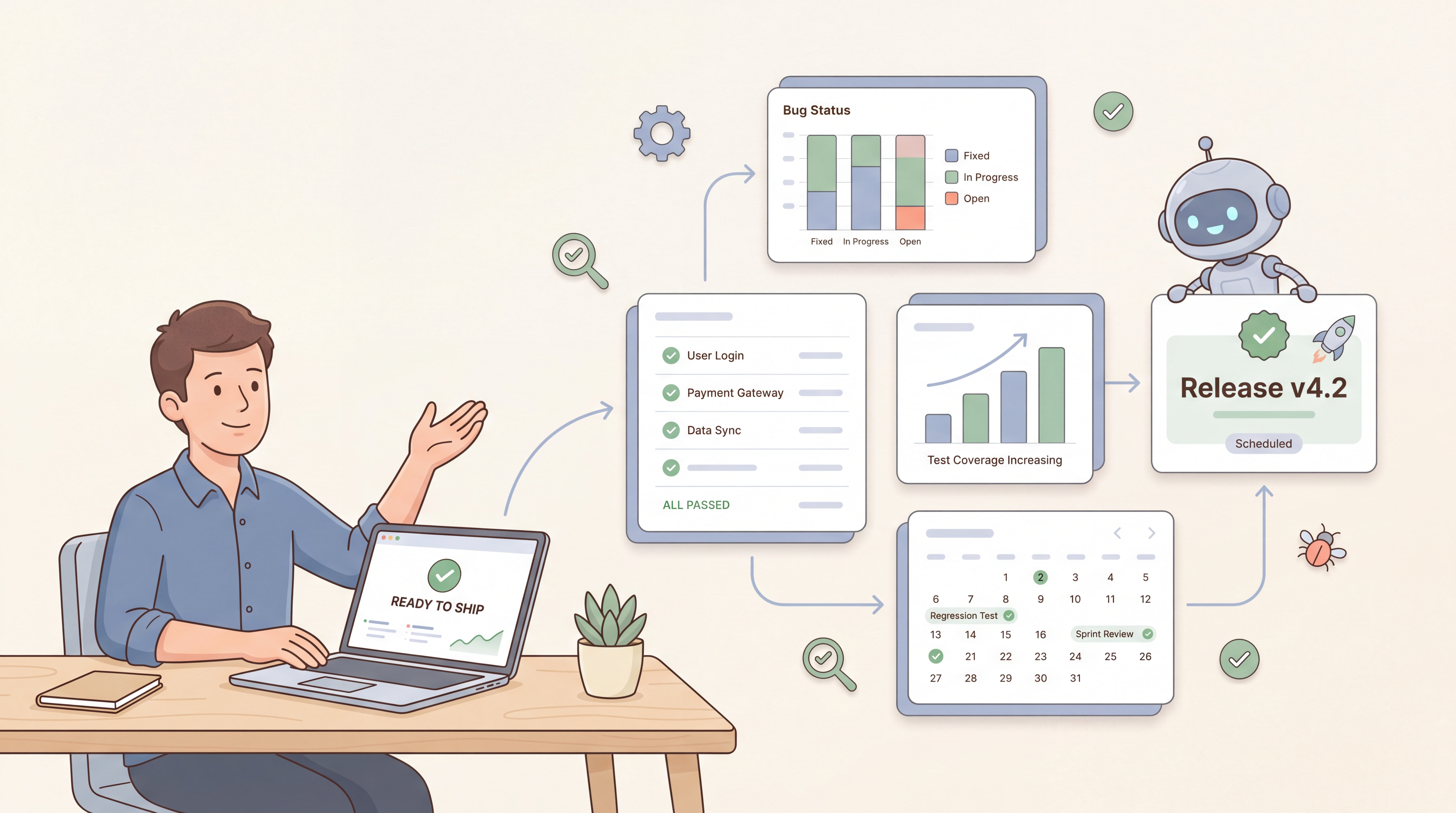
Every QA team has the same recurring meeting. Engineering Manager: "Are we ready to ship?" QA Lead: "Let me check." Then thirty minutes of scrolling through Jira filters, a spreadsheet exported from yesterday, and a Slack thread from last Tuesday - to arrive at "probably, mostly." It's not a tooling problem in the sense of "the test runner doesn't work." The test runner works fine. The problem is the team has a test runner where they need a QA management system - something that can answer release-readiness questions in real time, not assemble them by hand.
This post walks through what QA management software actually is in 2026, the four jobs it has to do, and what separates a useful system from a glorified pass/fail dashboard. The framing is shaped by our own customers' workflows and by the Custom Reports v2 and Release Readiness Dashboard capabilities we shipped this quarter - but the principles apply whichever tool you pick.
What is QA management software?
QA management software is the system of record for everything a QA team does: requirements coverage, test cases, test plans, execution results, defect tracking, and the reports that answer "what's our quality position right now?" Where test automation tools focus on running tests, and bug trackers focus on triaging defects, a QA management system connects requirements to test cases to executions to defects to releases - so any question about quality can be answered live, not assembled.
You'll see the same category called by several names:
- QA management software: the buyer's-guide framing
- QA management system: the architectural framing (and the abbreviation QMS, though QMS more often means quality management system in manufacturing/ISO contexts; in software, the meanings overlap)
- Test management software: the most common synonym, especially in CI/CD-heavy teams (compare the leading tools here)
- Quality assurance software: broader, sometimes encompasses governance and process tools
- QA software: informal shorthand for the same category
For this post we'll mostly say "QA management software" or "QA management system" - they refer to the same thing.
What is software quality assurance?
A quick definitional aside, because "what is software quality assurance" is one of the most-searched QA questions on the web and worth getting right.
Software quality assurance (SQA) is the discipline of ensuring software meets its requirements and quality standards across the entire development lifecycle. It's broader than testing: it covers the processes, standards, and metrics that make quality predictable, not the act of clicking through a test case. Testing is one activity inside SQA; reviews, audits, traceability, metrics, and continuous improvement are the others.
Three related distinctions QA leads should be precise about:
- Quality assurance vs. quality control. QA is process-oriented (prevent defects via better processes). Quality control (QC) is product-oriented (find defects in the built product). Testing is QC; SQA is the larger umbrella.
- Quality assurance in software development vs. quality assurance in software testing. The first focuses on the dev lifecycle (code reviews, branch strategy, CI). The second focuses on the test lifecycle (test design, execution, coverage). A mature QA management system spans both, with requirements traceability as the connective tissue.
- QA testers vs. QA engineers. A tester executes test plans; a QA engineer builds the systems (automation, environments, frameworks) that make testing scale. A QA management system serves both roles - testers as the daily UI, engineers as the API/integration surface.
If you want the longer treatment of QA's role in the development cycle, see our software testing strategies pillar. The rest of this post focuses on the system a QA team works inside, not the discipline.
Why teams outgrow the "glorified test runner"
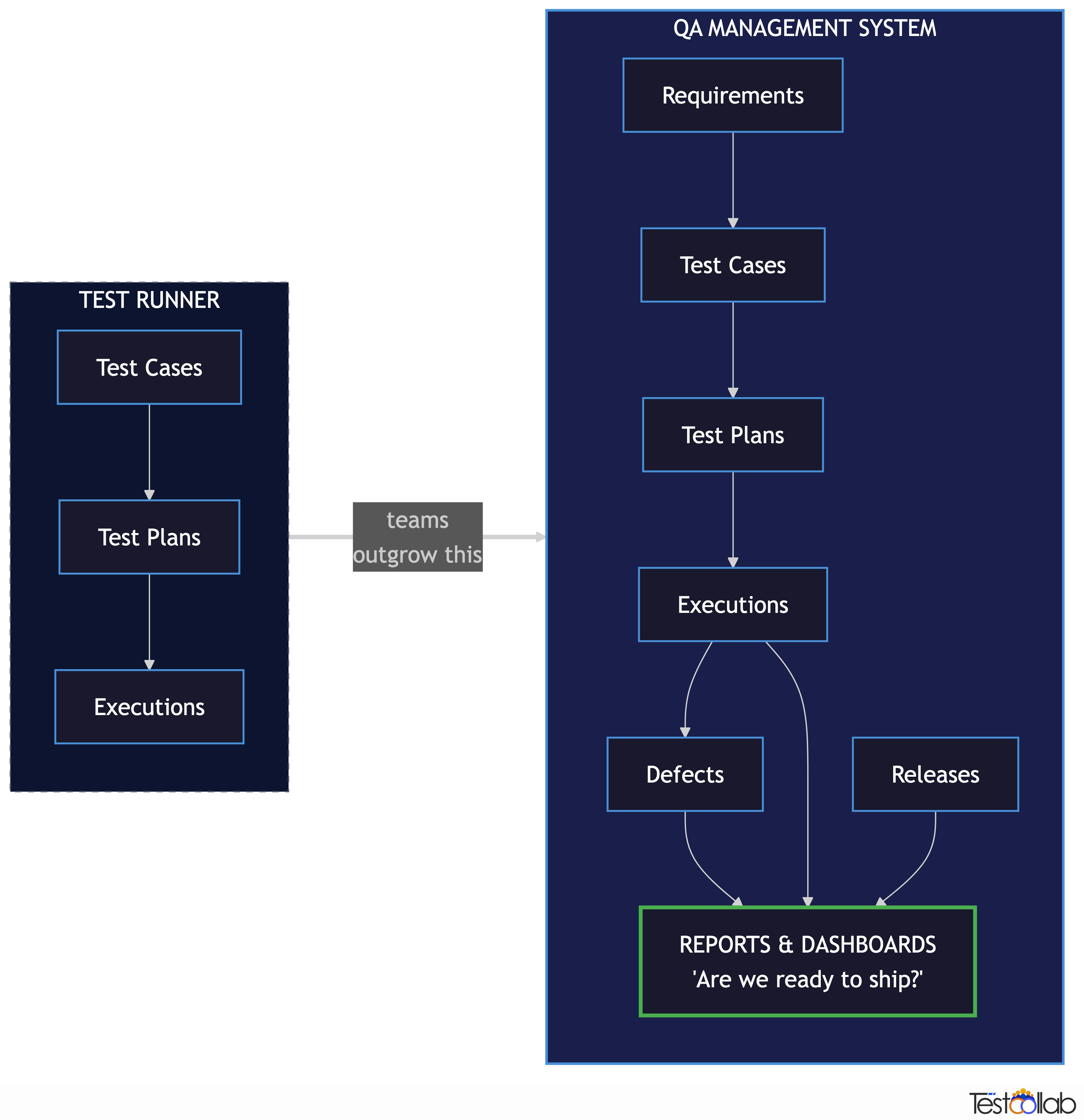
Most teams adopt their first QA tool to solve a specific pain - usually "we don't know which test cases ran last week" or "our spreadsheet has 14 tabs." So they pick a test runner with a UI, get the spreadsheet pain solved, and call it done.
The wall they hit a year later sounds like this:
- "How many test cases cover the new payments module?" - requires a coverage report joining requirements to test cases. The runner doesn't have requirements.
- "How many defects are open against the v4.2 release?" - requires defects linked to releases. The runner stores executions but not bugs.
- "Are we trending up or down on test execution speed?" - requires a time-series of executions across plans. The runner shows one plan at a time.
- "Which department is producing the most defects per executed test case?" - requires defect data joined to organisational metadata. The runner doesn't know about departments.
- "Are we ready to ship?" - requires all of the above, in one view, refreshed live.
The shift from "test runner" to "QA management system" is the shift from storing executions to modelling the QA workflow - and exposing it in queries and dashboards that don't need a human to assemble.
The four jobs of a QA management system
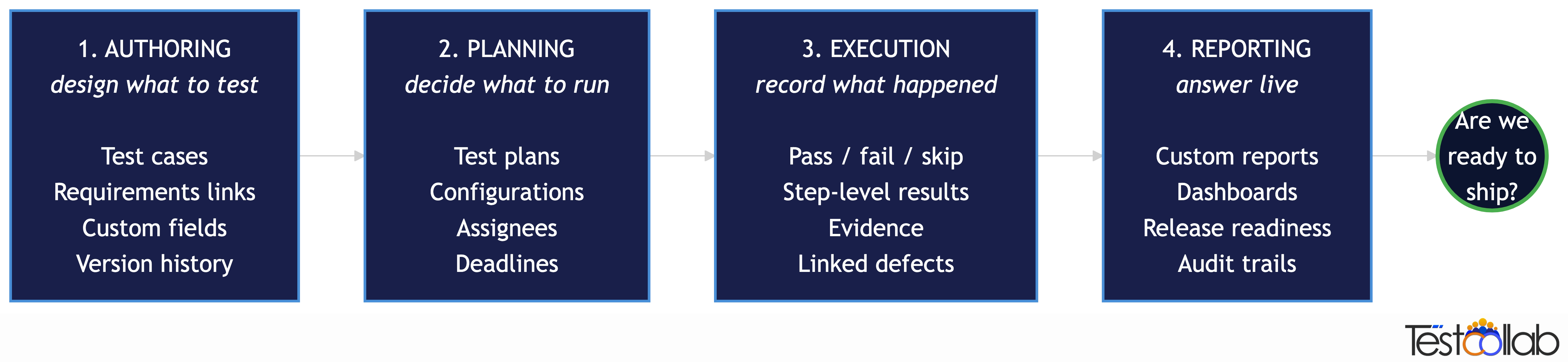
A useful way to evaluate any QA management software: ask whether it does all four of these well. Many tools do one or two; a system does all four.
1. Authoring: design what to test
The system holds test cases as first-class objects with steps, expected results, preconditions, tags, custom fields, and version history. It supports both manual case authoring and structured imports (CSV, Jira-synced requirements, screenshots, PDFs, even spreadsheets of acceptance criteria). It exposes AI test case generation for teams that want to start from a requirement or a URL and let the system propose draft cases.
If you can't audit who wrote which case when, against which requirement, with which prior version, the system is short on this job.
2. Planning: decide what to run
Authoring fills the library; planning decides which cases get exercised against which build, on which environment, by whom, by when. This means test plans with configurations (Browser × OS matrices), assignees, deadlines, scheduled re-runs, and the ability to exclude specific cases for specific configurations. Look for test plan management features that let you assemble a regression suite without copy-pasting case IDs.
A tool that lets you run cases but doesn't model the plan - what's intended to be run, by whom, by when - collapses planning into execution. That's the spreadsheet pattern most teams are trying to escape.
3. Execution: record what happened
Execution captures pass/fail/skip/blocked status, step-level results, evidence (screenshots, video, logs), and links to defects raised during the run. The agentic frontier we're now in extends this: rather than humans clicking, AI agents can drive a real browser through curated test plans and upload pass/fail results back via CLI. But the system's job is the same - be the source of truth for what ran and what happened.
4. Reporting: answer questions live
This is where most tools fail and where the "QA management software" label earns its keep. A real QA management system gives you a query layer over the four data shapes above (cases, plans, executions, defects) - so you can compose answers to questions you haven't asked yet, without exporting to a spreadsheet.
This is the part the rest of the post is mostly about.
"Are we ready to ship?": the question your dashboard should answer
Engineering leadership doesn't want a pass-rate percentage. They want a one-sentence answer to "are we ready to ship?" with the supporting evidence one click away. That sentence is the output of a release-readiness model with at least these inputs:
- Pass rate on the regression plan
- Coverage of the requirements in scope for this release
- Open defect count, weighted by severity
- Defect resolution rate (are we burning down or accumulating?)
- Time-on-test trends (slowing down? speeding up?)
- Test plan completion vs. deadline
We built TestCollab's Release Readiness Dashboard around exactly this model - a computed GO/NO-GO verdict per release, against configurable thresholds, with defect status synced live from your issue tracker. It's the "are we ready to ship?" answer made queryable.
But Release Readiness is the summary view. The reason you trust the summary is that the underlying data is also accessible - and shaped to whatever question you have next.
Composing a release-readiness dashboard (a real example)
In May 2026 we shipped a major overhaul of Custom Reports - configurable widget layouts, a new Issue dataset, stacked charts that auto-stack when you pick two dimensions, and date-grouped trends. The point of the overhaul wasn't more chart types. It was making the release-readiness model composable by anyone on the team, not just whoever owns the BI tool.
Here are three real dashboard widgets that QA leads should be able to build in a QA management system, with no SQL and no spreadsheet exports.
Widget 1: Defect velocity × department (stacked column chart)
The question: "Which engineering team is producing the most defects per sprint, and what's the severity mix?"
The composition:
- Dataset: Issues (or whatever your QA management software calls defects/bugs)
- X-axis: Created date, grouped by week
- Y-axis: Count
- Stacking dimension: Severity (or the custom field your team uses)
- Filter: Department = each in turn, or one chart per department
A stacked column chart auto-renders. The week-over-week view shows whether the velocity is rising or falling per team - much more actionable than a flat number.
Widget 2: Test execution trend by day (line chart)
The question: "Are we executing the regression plan fast enough to hit the release date?"
The composition:
- Dataset: Executions
- X-axis: Run-on date, grouped by day
- Y-axis: Count of executions
- Secondary line: Cumulative executions vs. total planned
When the primary dimension is a date, a line chart auto-selects and the X-axis sorts chronologically. The cumulative line gives the release manager a visual burndown without anyone exporting anything to Excel.
Widget 3: Coverage by suite (column chart, drillable)
The question: "Which feature areas are well-covered, and which are bare?"
The composition:
- Dataset: Test cases
- X-axis: Test suite (or feature module)
- Y-axis: Count of test cases
- Stacking dimension: Last execution status (Passed / Failed / Skipped / Unexecuted)
A bare suite (lots of grey "unexecuted" or zero cases) is a coverage gap. A red-heavy suite is a quality risk. The stacking turns a coverage report and a quality report into one chart.
Pinning to the dashboard
Each of the three widgets above gets pinned to the project dashboard. Widget layouts are configurable per widget - placement, size, and chart type - so the team can put "Defect velocity by department" full-width across the top, and the two smaller widgets side-by-side underneath. The next time someone asks "are we ready to ship?", the dashboard is the answer.
This is the difference between QA management software and a test runner: the reporting layer is composable, not pre-baked. You can answer questions you haven't asked yet.
Test evidence: the audit trail behind the dashboard
A release-readiness verdict is only as trustworthy as the evidence behind it. "Pass rate 94%" means nothing if you can't show what passed, who ran it, and what the screen looked like when it did. This is where a lot of QA management software falls down - they record outcomes but not artifacts. For any team that ships into a regulated industry, gets audited, or just needs to defend a release decision in a postmortem, evidence tracking is non-negotiable.
What a QA management system should capture, per execution:
- Step-level results: pass/fail/skip/blocked for each step, not just the case overall, so a partial failure tells you exactly where the case broke
- Screenshots and video: pasted inline, attached per step, or auto-captured by an automation framework on failure. Video is especially valuable for flaky failures where "looks fine in the rerun" needs proof
- Logs and console output: browser console, server logs, network traces - attached so the dev triaging the bug doesn't have to ask "can you send me the logs?"
- Free-text notes: the tester's own observation ("the modal flickered before opening") that no automation tool will ever capture
- Who, when, where: the tester, the timestamp, the environment, the build hash, the configuration matrix slot - recorded automatically so the audit trail builds itself
- Linked defects: the bugs raised from this execution, with a back-link from the bug to the failing case for full traceability
- Version pinning: which version of the test case the result corresponds to (since cases evolve), so a result from three months ago is interpretable against the case as it was then
This matters at three different time horizons:
- Today: the dev who has to fix the bug shouldn't have to ask the tester "what did you see?" The evidence answers them directly.
- This release: when leadership asks "what did we test?" the answer is a real evidence pack, not a verbal summary.
- Six months from now: auditors, customer-support tickets, regulatory reviews, and postmortems all reach back to old executions. If the evidence is gone, the test might as well not have happened.
Compliance frameworks codify this. SOC 2 wants demonstrable testing of access controls. ISO 27001 wants evidence of security testing. FDA 21 CFR Part 11 (for medical devices) wants a tamper-evident audit trail of every test action. GxP, HIPAA, GDPR - all of them ultimately want the same thing: show your work. A QA management system that doesn't store evidence forces you to keep it somewhere else, which is exactly the spreadsheet-and-Sharepoint pattern teams are trying to escape.
If you're using TestCollab, evidence attaches at three layers - per-step (rich text + image paste + file upload), per-execution (full screenshot/video capture from the automation framework via CLI upload), and per-defect (auto-linked from the failing execution). For broader treatment of how to design an evidence strategy that scales, see our test evidence strategy guide.
The QA process: from requirements to release
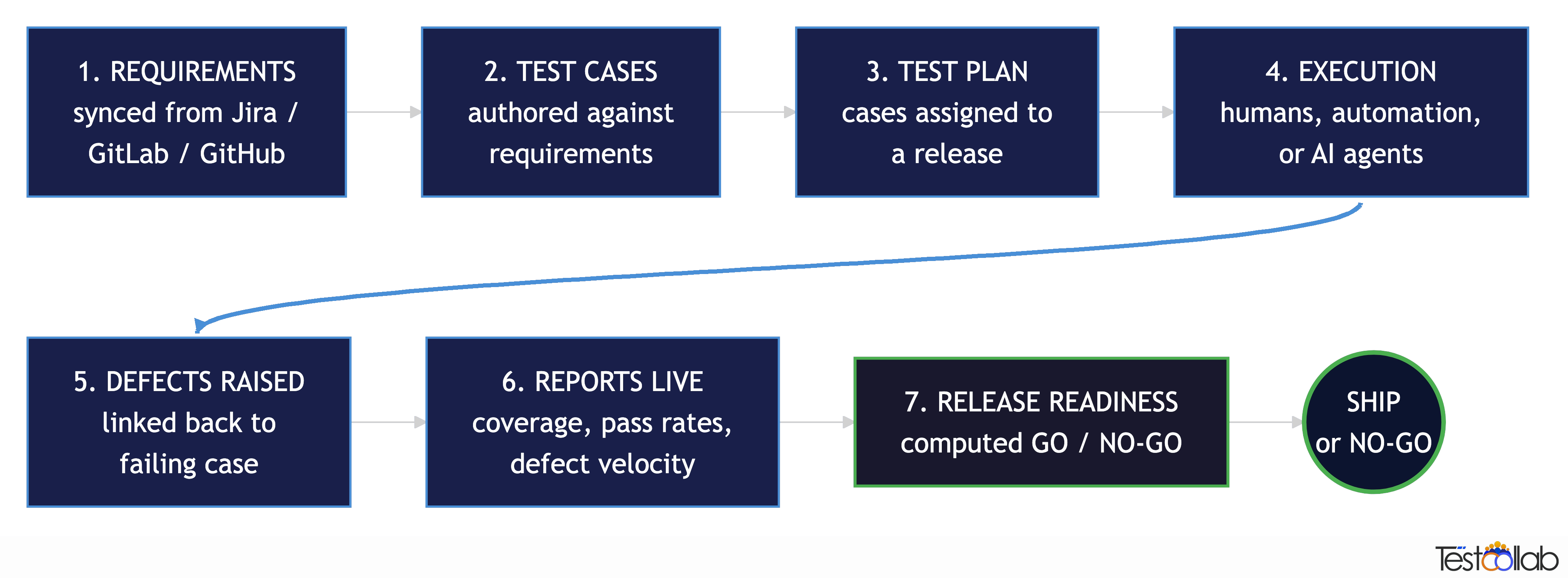
A QA management system models the QA process explicitly. The walk:
- Requirements come in: synced from Jira, GitLab, Azure DevOps, GitHub, or authored directly. The system stores them as first-class objects with status, owner, and acceptance criteria.
- Test cases get authored against requirements, automatically (via AI generation from requirements) or manually. Each case links back to its source requirement - this is the requirements traceability matrix.
- A test plan gets composed: a curated subset of cases assigned to a release/sprint/configuration matrix, with assignees and deadlines.
- Execution happens: humans, automation, or QA agents driving a browser - and results land back in the system with evidence attached.
- Defects get raised from failed executions, either to the inbuilt defect manager or to an external tracker via two-way sync.
- Reports update live: coverage, pass rates, defect velocity, release readiness - all derived from the data already in the system.
- A release ships when the release dashboard says GO, with the audit trail intact.
This is the QA process in software testing - the steps don't change much between teams, but the visibility of each step is what distinguishes a managed process from a tribal one.
QA process automation that actually saves time
The cliché is "AI will automate QA." The reality in 2026 is more interesting: AI doesn't replace QA judgement, it removes the rote work that surrounds it. The pieces a modern QA management system should automate:
- Test case authoring from requirements, screenshots, or spreadsheets - humans review and approve, AI drafts the boilerplate
- Test execution via AI agents that drive a real browser - humans curate the plan, agents do the clicking
- Defect linking from failed executions back to the test case and the originating requirement - no more "which test caught this bug?" archaeology
- Status sync from your issue tracker (Jira, GitHub, GitLab, ClickUp, Azure DevOps) into release-readiness calculations - when a defect closes, the verdict recomputes
- Coverage gap detection: surfacing test cases that have never been assigned to anyone, or requirements with zero linked cases
Every one of these used to be a 30-minute manual task. Together they were why "Are we ready to ship?" took half a day to answer. Automated, they collapse into the dashboard.
Test management as part of QA management
People sometimes ask whether they need test management software or QA management software. The honest answer: test management is a subset of QA management. A test management tool handles cases, plans, and executions - three of the four jobs. A QA management system adds requirements, defects, releases, and the reporting layer that ties them together.
If your team is small and you only need cases-and-plans, test management software is fine. As soon as you need to answer questions that span requirements → executions → defects → releases - which is most teams above ~5 engineers - you've outgrown pure test management.
Agile QA management
Agile teams have a particular flavour of this problem. Sprints are short, releases are frequent, regression suites need to run continuously, and the "are we ready to ship?" question gets asked every two weeks. An agile test management workflow in a QA management system looks like:
- Each sprint maps to a test plan (or a test plan folder)
- Sprint stories sync from Jira/GitLab as requirements
- Failed executions auto-raise issues into the same sprint
- Sprint-level coverage and pass-rate widgets pin to the team dashboard
- Release readiness is computed across whichever sprints feed the release
The tooling pattern is the same as waterfall; the cadence and the data model just have to keep up with two-week cycles.
Picking a QA management system: a 2026 checklist
If you're evaluating QA management software, here's a checklist that maps to the four jobs above and to the release-readiness model. Score candidates against these - most fail at least two.
Authoring
- [ ] Test cases support steps, expected results, custom fields, tags, version history
- [ ] AI-assisted authoring (from requirements, screenshots, spreadsheets, URLs) with human approval
- [ ] Bulk import from CSV / Excel / existing tool (TestRail, Zephyr, qTest, Testmo, etc.)
- [ ] Requirements as first-class objects, synced from your issue tracker
Planning
- [ ] Test plans with configurations (Browser × OS, environments)
- [ ] Assignees, deadlines, scheduled re-runs
- [ ] Per-case exclusion for specific configurations
- [ ] Reviewer workflows and audit trails
Execution
- [ ] Step-level pass/fail/skip/blocked recording
- [ ] Evidence attachment (screenshots, video, logs)
- [ ] CLI / CI integration (CI tools can upload results)
- [ ] AI agent execution (curated plans driven by agents end-to-end)
Reporting and release readiness
- [ ] Composable custom reports across cases, plans, executions, defects
- [ ] Configurable dashboard widgets (placement, size, chart type)
- [ ] Trend reports (date dimensions on the X-axis)
- [ ] Computed release readiness with configurable thresholds
- [ ] Defect status synced live from your issue tracker
Plumbing
- [ ] Two-way Jira / GitLab / Azure DevOps / GitHub / ClickUp integration
- [ ] REST API and / or MCP Server
- [ ] Public read-only dashboards (for stakeholders without a paid seat)
- [ ] RBAC, SSO, audit logs (for regulated industries)
- [ ] On-premise / private deployment option (for compliance)
Most legacy test management tools clear Authoring/Planning/Execution but stumble on Reporting and Plumbing. Most newer AI-first tools clear AI features but stumble on Planning and Reporting. The integrated QA management systems are the ones that clear all four.
TestCollab as a QA management system
TestCollab is built around exactly this model - and importantly, everything below works without ever turning on an AI feature. The platform is designed for QA teams that want to run a traditional, human-driven QA process well; the AI capabilities are an optional layer for teams that want them. If you'd rather your team writes every test case by hand, executes manually, and reviews every result with human eyes, the system is fully there for that. Quick map of what we do and where it lives:
Authoring (manual-first)
- Rich test case editor with steps, expected results, preconditions, and per-step attachments (screenshots, files, logs)
- Reusable shared test steps and step libraries so common flows aren't re-typed across cases
- Custom fields (text, dropdown, user, date) and tags for any taxonomy your team uses
- Full version history with diff tracking - see who changed what, revert to any prior version
- CSV / Excel import from TestRail, qTest, Zephyr, Testmo, or any spreadsheet
- Peer-review workflow with reviewer assignment, comments, and an approval audit trail
- Optional: AI test case generation via QA Copilot for teams that want AI-drafted starting points - every suggestion goes through human review before becoming a real case
Planning (manual-first)
- Test plans with assignment to specific testers, deadlines, and email reminders
- Browser × OS configuration matrices with per-case, per-configuration exclusion
- Test data parameters so one case runs against many input sets without duplication
- Test plan folders for organising regression suites, sprint plans, release plans
- Never-assigned test case detection so coverage gaps surface as a dashboard metric
- Calendar and Kanban views for human planners
Execution (manual-first)
- Run test cases manually with a clean step-by-step UI - pass/fail/skip/blocked per step, free-text notes, paste-in screenshots, attached logs and videos
- Filter the run grid by assignee, status, tag, or custom field so each tester sees their work
- Bug-file directly from a failed execution into your issue tracker (Jira, GitLab, GitHub, Azure DevOps, ClickUp) with the case context attached
- Time tracking per execution if your team bills hours or measures throughput
- Optional: CLI for CI-driven automated runs (any framework that emits JUnit XML or Mochawesome JSON) and AI agent execution for teams adopting agentic QA - neither is required
Reporting
- Custom Reports v2 across Test Cases, Test Plans, Executions, and the inbuilt Issue dataset
- Configurable per-widget dashboard layout - pin "Defect velocity by department", "Executions per day", "Coverage by suite" or any combination
- Stacked charts (auto-stack on two dimensions), line charts for date trends, drillable filters
- The Release Readiness Dashboard for live GO/NO-GO verdicts with configurable thresholds
- Public read-only dashboard links for stakeholders without a paid seat
Plumbing
- Two-way Jira test management integration (Forge app), GitLab, GitHub, Azure DevOps, ClickUp
- Requirements sync from issue trackers with full traceability back to test cases and executions
- REST API for everything in the UI, plus MCP Server for teams using AI assistants
- RBAC with granular per-action permissions, SSO/SAML on Enterprise
- Cloud-hosted or on-premise / private deployment for regulated industries
We've spent the last few releases pushing hard on the reporting layer specifically because that's where most QA management software falls down. The whole point of the system is that the report you need at 4pm on a Friday isn't an export-and-reformat job - whether your team got there by clicking through cases manually or by having an agent drive a browser.
FAQ
What's the difference between QA management software and test management software?
Test management software covers test cases, test plans, and executions - three of the four jobs of a QA system. QA management software adds requirements, defect tracking, release readiness, and the reporting layer that ties them all together. Most teams call them the same thing in conversation, but the gap matters when you're picking a tool: a pure test management tool will solve your "where are our test cases?" problem and leave your "are we ready to ship?" problem untouched.
What is QA management software used for?
Three things: (1) as the system of record for everything QA does - cases, plans, executions, defects, requirements; (2) as the process layer that connects requirements → tests → results → releases with traceability; (3) as the reporting layer that answers release-readiness questions in real time. The third is what distinguishes a system from a runner.
What is software quality assurance in plain terms?
Software quality assurance is the discipline of preventing defects through process - code reviews, traceability, standards, metrics, continuous improvement. Software testing is the activity of finding defects in the built product. Testing is one part of QA; QA is the broader umbrella that includes everything around the testing.
Why is a quality assurance tester needed on a software development team?
A QA tester brings two things developers can't easily provide for their own code: (1) independent judgement - they didn't write the feature, so they don't carry the developer's assumptions about how it should work; (2) systematic coverage - they exercise the negative paths, edge cases, and integration points that get skipped when "it works on my machine." On larger teams, dedicated QA also owns the test infrastructure, regression strategy, and release-readiness reporting - work that doesn't sit naturally inside any single dev squad.
What does QA in software development actually mean?
QA in software development means everything beyond just running tests: defining what "quality" means for your product, building the processes that prevent defects upstream (reviews, requirements clarity, CI checks), and measuring whether those processes are working. It's process and metrics, not just clicking through cases.
Is QA management software the same as a quality management system (QMS)?
Adjacent but distinct. A QMS in the manufacturing / ISO 9001 sense covers organisational quality processes across the whole business. QA management software in the software context is narrower - it covers software development quality specifically (requirements, tests, defects, releases). Some regulated software industries (medical devices, aerospace) need both, integrated.
What's the typical pricing model for QA management software?
Per-user, per-month, with tiers. As a benchmark in 2026: entry-level test management starts around $10–15/user/month, integrated QA management (with AI features) sits at $25–40/user/month, and enterprise editions with private deployment, SSO, and compliance certs are quoted per-deal. Watch out for vendors charging per-test-case or per-execution; those scale badly as your suite grows.
Can I move my test cases from another tool (TestRail, Zephyr, qTest)?
Yes - most modern QA management software supports importing from the major incumbents. TestCollab specifically has TestRail, qTest, Zephyr, and Testmo importers. The trickier part is migrating executions and defect history, not test cases - ask vendors specifically whether they import historical executions, not just current state.
The pattern across all the questions above: the value of QA management software is in what it lets you answer, not in the cases it stores. If you're picking one in 2026, run a release-readiness exercise against the candidates - give each one the same project, ask each one the same five questions a CTO would ask before a release, and time how long it takes to answer. The differences will be honest.
Try TestCollab free for 14 days - set up a project, pin a few release-readiness widgets, and see what your real "are we ready to ship?" dashboard would look like.