

Enterprise administration
Entra ID SSO, Okta SSO, and SCIM provisioning
Let people sign in to TestCollab with the account they already have in Microsoft Entra ID (formerly Azure AD), using your own tenant and app registration. Map your Entra groups to TestCollab roles and let SCIM provisioning add and remove users as your directory changes. Okta single sign-on is supported too.
Single sign-on and SCIM provisioning are Enterprise plan capabilities.
Trusted by QA teams at



Key advantages
What teams get with Single Sign-On & SCIM Provisioning
One identity provider, company-wide
People sign in through your identity provider instead of a TestCollab password. One provider is active per company at a time: Microsoft Entra ID or Okta, not both.
Roles follow your Entra groups
Map Entra security groups and app roles to TestCollab roles. Once you have mapped your groups, roles are recalculated from the token on every Entra sign-in.
Joiners and leavers handled
SCIM provisioning creates an account when you assign someone to the TestCollab app in Entra, and removes their company access when you unassign them.
Disabling SSO ends live sessions
Turn a provider off or unlink it and the sessions it issued stop working on the next request, not whenever the token would have expired.
Providers
Single sign-on with Microsoft Entra ID or Okta
Pick the identity provider your company already runs. Only one provider is active at a time, and TestCollab enforces that in the admin screen and in the API.
Connect your own Entra tenant
Enter the tenant ID and application (client) ID from your own Entra app registration. TestCollab checks both against Microsoft before saving, so a wrong value is caught during setup instead of at someone's first login.
Okta single sign-on
Okta single sign-on is supported as a login method and is enabled from the same settings page with an on/off switch, plus the option to make it mandatory. Connecting your own Okta org is not self-service today, so talk to us about your Okta setup. Group to role mapping and SCIM provisioning are Microsoft Entra ID capabilities.
Require SSO for everyone
Turn on mandatory sign-in and password logins are rejected by the API, not just hidden in the interface. There is no exemption for admins or for the account owner.
Group to role mapping
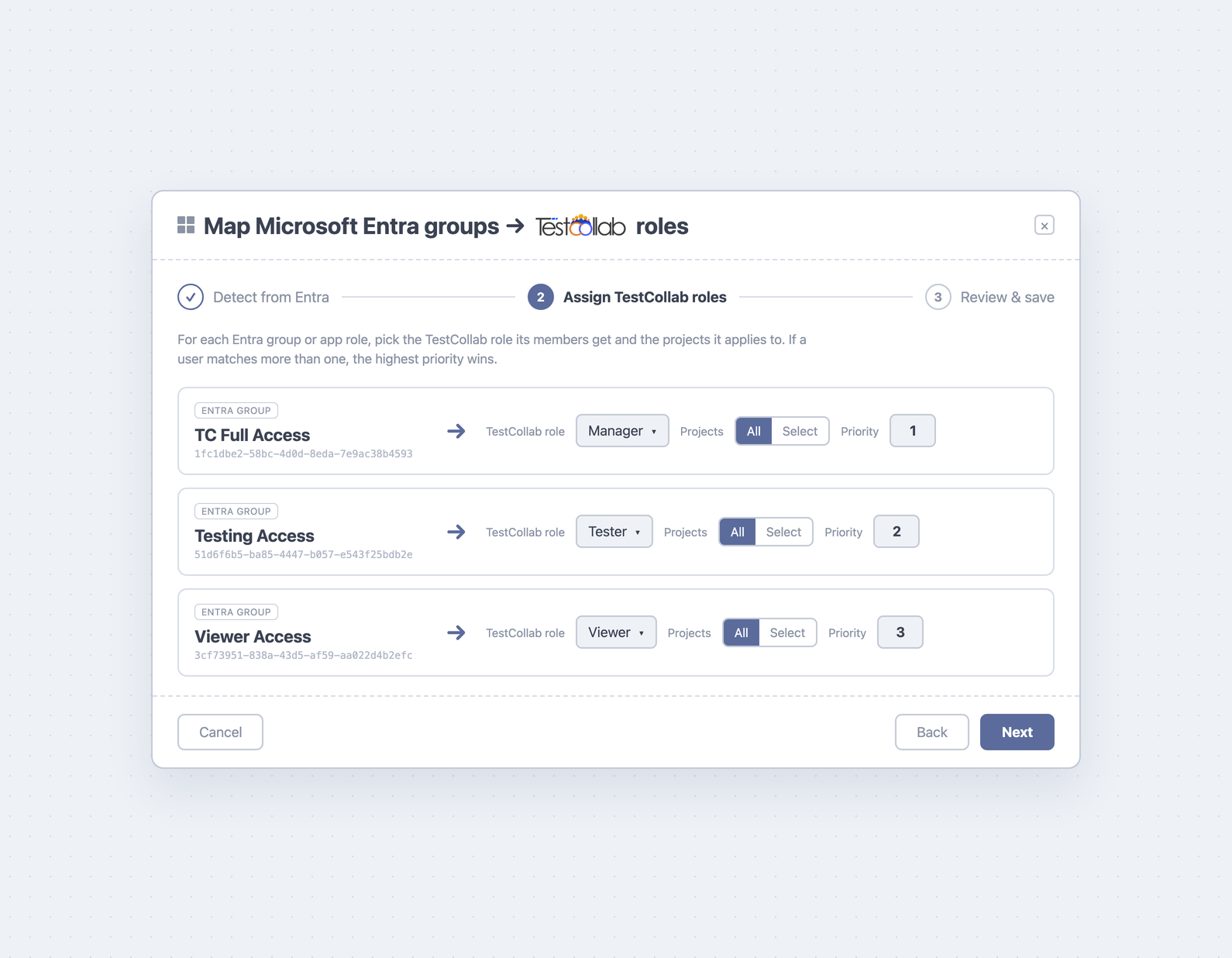
Map Entra groups and app roles to TestCollab roles
Group to role mapping is a Microsoft Entra ID capability. Set it up once and a user's project roles are recalculated from their Entra groups every time they sign in.
Pick groups by name
Sign in with Microsoft once and TestCollab reads your tenant's security groups and app roles from Microsoft Graph, so you map them by display name. This needs a one-time admin consent to the Group.Read.All and Application.Read.All permissions. The object ID stays visible under the name as a reference, and if your tenant does not grant that consent you can still map groups by pasting their object IDs.
Scope and priority on every rule
Each mapping applies to all projects or to the projects you select. When a user matches more than one rule, priority decides: 1 is the highest, 2 is next, and so on. Priority is resolved per project, so rules scoped to different projects never compete.
Defaults to No access
Choose what happens to someone who signs in through Entra but matches none of your mappings. A new configuration starts at No access, so adding your first mapping never quietly grants access on every project.
Leaving a group removes the role
Roles TestCollab granted from Entra are removed at the user's next sign-in once they leave the mapped group. If you would rather only ever add roles, turn that behavior off.
Roles TestCollab did not grant are left alone
Roles that TestCollab did not grant from Entra are never changed or removed by the sync. Roles it did grant are its own: if you edit one of those by hand, the next Entra sign-in resets it to the mapped value.
Guided setup with a review step
The mapping is built in a three-step wizard: sign in with Microsoft, map groups and app roles to TestCollab roles, then review the whole set before it is saved.
SCIM provisioning
SCIM provisioning from Microsoft Entra ID
SCIM user provisioning runs from Microsoft Entra ID, so Entra single sign-on has to be enabled for your company first. Assign a user to the TestCollab enterprise application in Entra and their account is created on the next provisioning cycle. Unassign them and their access to your company is removed.
Create and link, never duplicate
TestCollab creates the account and adds it to your company. If that email address already has a TestCollab account, it is linked instead of duplicated and the person's existing profile is left untouched.
Your own tenant URL and token
Generate a SCIM token in TestCollab, copy the tenant URL for your company, and paste both into Entra. The token is displayed exactly once and only its hash is stored. Rotate or disable it whenever you need to.
Leavers lose access here, not everywhere
Unassigning someone removes their membership and the project roles TestCollab granted them for your company. If the same account also belongs to another TestCollab organization, it keeps working there. If yours was their only TestCollab organization, the account is deactivated, and when the removal comes from an Entra assignment change the account record is deleted outright.
Or create accounts on first sign-in
If you would rather not run SCIM, turn on automatic account creation for the email domains you approve. A first-time user from an approved domain gets an account on their first Entra sign-in. It is off by default and the domain list is yours to set.
Re-adding a deactivated user restores them
Assign a deactivated user again and their membership comes back, the default role is re-applied, and the block from the earlier removal is cleared.
US or EU endpoint
The tenant URL you copy points at the API host for your region, so an EU workspace provisions against the EU endpoint.
Security
SSO security controls: sessions, tokens, and deprovisioning
What happens to sessions, tokens, and unassigned users.
Sessions end when SSO does
Sessions issued through a provider are re-checked on every request. Disable or unlink the provider and they stop working straight away rather than staying valid until the token would have expired.
App assignment is enforced at login
A user who is not assigned to the TestCollab enterprise application or to a mapped group is refused, with a message that says why. When Entra leaves group IDs out of the token because the user belongs to too many groups, TestCollab resolves membership through Microsoft Graph instead of failing the sign-in.
Tokens and secrets stay server side
The SCIM token is stored only as a SHA-256 hash, and the Entra application secret used for Graph lookups is stored encrypted and is never returned to the browser.
One provider per company
Only one identity provider can be active at a time. To switch, disable the current one first. The rule is enforced by the API, not only by the admin screen.
Seat limits are respected
Both first-sign-in and SCIM provisioning stop at your plan's user limit and return a clear error, which appears in Entra's provisioning logs instead of quietly over-provisioning.
Fails safe if Graph is unreachable
Before any access change, a SCIM update re-checks the user's current Entra app and group assignments through Microsoft Graph. If Graph cannot be reached, the request is refused and no TestCollab access changes are applied.
FAQ
Answers teams look for
What is SCIM provisioning?
SCIM (System for Cross-domain Identity Management) is a standard that lets your identity provider create, update, and remove user accounts in another application over an API, instead of someone doing it by hand. TestCollab implements SCIM 2.0, so when you assign a user to the TestCollab enterprise application in Microsoft Entra ID, their TestCollab account is created on the next provisioning cycle, and when you unassign them their access to your company is removed.
Does TestCollab support Microsoft Entra ID (formerly Azure AD) single sign-on?
Yes. You connect your own Entra tenant and app registration, and TestCollab validates the tenant ID and client ID against Microsoft before saving them. Entra ID SSO is an Enterprise plan capability and is switched on per workspace, so contact us and we will enable it for yours.
Does TestCollab work with Okta SSO?
Okta is supported as a login method and is enabled from the same admin settings page. It is an on/off switch rather than a self-service connection to your own Okta org, so contact us to discuss your Okta tenant. Mandatory sign-in and immediate session revocation apply to Okta as well. Group to role mapping and SCIM provisioning are Microsoft Entra ID capabilities.
Can we require everyone to sign in through SSO?
Yes. Turn on the mandatory setting for your provider and password logins are rejected by the API, even with the correct password. There is no exemption for admins or the account owner. The check runs at login, so it applies to the next sign-in rather than ending sessions that are already open.
Can we map Entra groups to TestCollab roles?
Yes. Map Entra security groups and app roles to TestCollab roles, with each mapping scoped either to all projects or to a set of projects you choose. When someone matches more than one mapping, priority decides which wins: 1 is the highest, 2 is next, and priority is resolved per project. Roles are recalculated from the token on every Entra sign-in. Roles that TestCollab did not grant from Entra are never changed or removed by the sync, and roles it did grant are reset to the mapped value at the next sign-in if you edit them by hand.
What happens when someone leaves the company?
Unassign them in Entra and SCIM removes their membership of your company along with the project roles TestCollab granted them. If the same account also belongs to another TestCollab organization, it keeps working there. If yours was their only organization, they lose the ability to sign in anywhere in TestCollab: the account is deactivated, and when the removal comes from an Entra assignment change the account record is deleted. Roles granted through group mapping are also removed at the next sign-in once someone leaves a mapped group.
Do we need a Microsoft Entra ID P1 or P2 license for SCIM provisioning?
Automatic provisioning is a Microsoft Entra ID capability rather than a TestCollab requirement, so check Microsoft's current licensing documentation for the plan your tenant needs. If the Provisioning blade is missing or greyed out in Entra, that is a licensing question on the Microsoft side. There is no extra license to buy from us: SCIM provisioning is included with Enterprise single sign-on.
Can we run Okta and Entra ID at the same time?
No. Only one identity provider can be active for a company at a time. To switch, open the provider that is currently enabled and disable it first, then enable the other one. TestCollab enforces this in the admin screen and in the API.
Do you support SAML?
No. Sign-in is OIDC based with Microsoft Entra ID and Okta. There is no SAML option today.
What happens to open sessions when we turn SSO off?
Sessions issued through a provider are re-checked on every request against your current settings. As soon as you disable or unlink that provider, those sessions stop working, rather than staying valid until the token expires.



