

The Build Filter
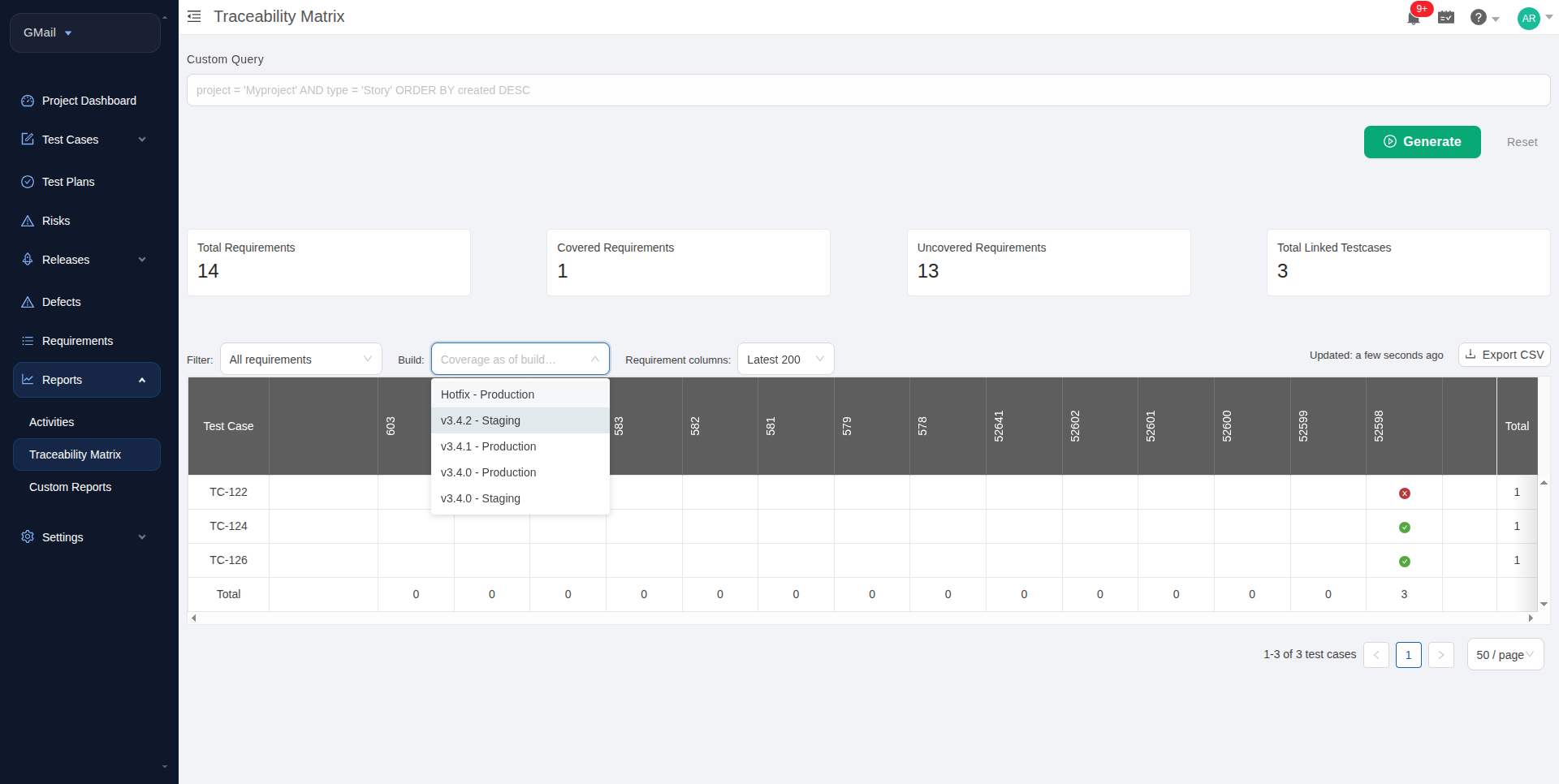
At the top of the Requirements Traceability Matrix page, you'll see a new dropdown labeled Build: (visible only when Builds are enabled).
Using the Filter
-
Click the Build dropdown to see all available builds in your project
-
Builds are shown with their version and environment, e.g., "v2.14.1 - Production"
Select a build to filter the matrix for that build
-
Leave it blank (or click the X to clear) to view the global view with no build filter
When you select a build, a blue chip appears showing "Coverage as of v2.14.1" (or whatever build you selected).
What Changes in the Matrix When a Build is Selected
Without a Build Filter (Global View)
The matrix shows the latest status of each requirement based on all test executions ever run against it, regardless of which build was being tested.
With a Build Filter (Build-Scoped View)
The matrix shows the status of each requirement based only on test executions that ran against the selected build.
Example
Requirement: "User can login with email"
Global view: Passed (because the most recent execution passed)
Build-scoped to v2.14.0: Passed (the plan linked to v2.14.0 ran and passed)
Build-scoped to v2.14.1: Not executed (the plan linked to v2.14.1 hasn't been run yet)
This is powerful for checking: "Did we test all our requirements against Release 2.14?"
Exporting Build-Scoped Coverage
When you export the Requirements Traceability Matrix as CSV (using the Export button), the exported file includes:
All the standard RTM columns (requirements, test cases, status)
-
An extra Build column showing which build the coverage is scoped to
-
A build-stamped filename, e.g.,
rtm-export-v2.14.1.csv
This provides an auditable artifact showing exactly which requirements were covered against a specific software version.
How to Export
Select a build using the Build filter
-
Click the Export button
-
The CSV file downloads with the build version in the filename and an extra Build column in the data
Example filename: rtm-export-v2.14.1.csv Example row:
Requirement: Login, Test Case: Test_Login, Status: Passed, Build: v2.14.1
Related Articles
-
Linking Test Plans to a Build - How to link test plans to builds (required to use the build filter)
-
Understanding Builds and Releases - Overview of builds and releases
-
The Build Detail Page - View all coverage and traceability metrics for a build
-
Creating and Managing Builds - How to create and manage builds



